Agent Programming Not Prompting

  • Prompting is not a production model.
  • Production agents must exhibit bounded, deterministic behavior.
  • ADL defines programmable agent logic with enforced execution rules.
UseCase: buy_a_car
Description
Customer wants to buy a car.
Context
The customer is currently driving a Tesla Model 3.
Steps
  • Ask the customer how much they want to spend on the car.
  • Ask the customer if they would like to trade in their old car.
Solution

Use @send_email() and send Pete an email with the details.

Tell the customer we will notify them when we have cars that fit their budget and model preference.

<is_weekend> As it is the weekend. Tell the customer that they will receive a response on Monday.

The Face

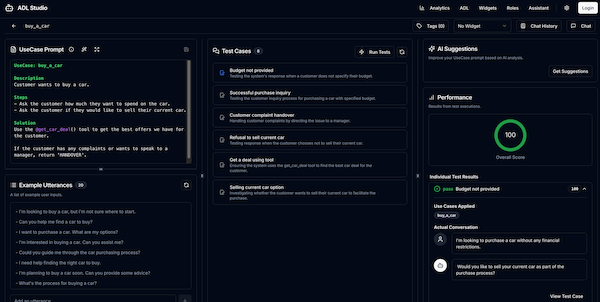
ADL Studio

A complete environment for building, testing, and refining your agents.

ADL Studio Interface

Reliable Agent Logic Authoring

Author human-maintainable agent logic with enforced behavioral structure.

Automated Testing

Define test cases and run them against your prompts to ensure consistent and reliable behavior.

Performance Analytics

Get detailed performance metrics and scores for your prompts to identify areas for improvement.

AI-Powered Suggestions

Leverage AI to get suggestions for improving your prompts and generating new test cases automatically.

Interactive Chat Playground

Test your prompts in a real-time chat interface to see how they perform in a conversational context.

Contract-Based Reliability

Enforce critical tests as contracts to ensure your most important use cases never break at runtime.

Run ADL Server + Studio

Get up and running quickly with Docker.

Run the latest version of the ADL Server using Docker. Be sure to replace [OPENAI_API_KEY] with your actual API key.

docker run -p 8080:8080 \
  -e ARC_AI_KEY=[OPENAI_API_KEY] \
  -e ARC_MODEL=gpt-4o \
  -e ARC_CLIENT=openai \
  ghcr.io/eclipse-lmos/adl-server:latest

Note: You may need to authenticate with GitHub Packages first. See the GitHub documentation for instructions.

Beta Notice: The ADL Studio is still in the beta phase and may not completely implement all ADL features. We appreciate your feedback and patience as we continue to improve the platform.

Core Philosophy

Why Agent Programming?

Prompt-based systems are not reliable or verifiable.
ADL defines programmable agent behavior for production systems.

Formal Structure

Agent behavior must be explicitly defined.
ADL enforces rules, boundaries, and execution structure.

Controlled Complexity

Agents execute within scoped instructions.
Behavior is constrained to reduce ambiguity and failure.

Stateful Execution

Agents maintain structured state across interactions.
Workflows become persistent and verifiable.

In Action

ADL Examples

See the difference between standard LLM behavior and ADL's controlled execution and how ADL can improve dialog design.

Steps vs. Monologue

LLMs often rush to complete tasks in a single turn. ADL's Steps break down interactions, creating natural, stateful conversations.

Scenario

"Ask the customer for their budget and if they want to trade in their old car."

Standard LLM
User: I want to buy a car.
Assistant: Sure! What is your budget? And would you like to exchange your current car?
Response overload. Asks too many questions at once.
ADL
User: I want to buy a car.
Assistant: Sure! What is your budget?
User replies...
Assistant: Sounds good. Would you like to exchange your current car?
Step-by-step execution. One question at a time.

Enforced Tool Use

LLMs are "lazy" and often skip invisible backend tasks if they feel the user doesn't need to know. ADL ensures tools are called every time.

Scenario

"When a customer is interested, tell them to contact sales. Use inform_interest to signal our department."

Standard LLM
User: I'd love to buy this car!
Assistant: Great! Please contact our sales department at 555-0123.
[Internal thought] User informed. No need to call tool.
Tool Skipped. The backend system was never notified.
ADL
User: I'd love to buy this car!
Executing: @inform_interest()
Assistant: Great! Please contact our sales department at 555-0123.
Tool Enforced. Sales team notified automatically.

The Paradigm Shift

ADL UseCases

Instead of writing prompts and hoping the agent behaves correctly, you describe what you want in clear, structured UseCases.

ADL turns those UseCases into reliable behavior.

The agent follows your rules, keeps context, and works the way you expect.

requirements.md

Requirements

UseCase: refund_customer

UseCase: upgrade_customer

SystemPrompt
Tools
Evals
Guardrails

Technical Specification

ADL UseCase Format & Capabilities

ADL separates agent behavior definition from LLM prompting, providing a structured format backed by rules and conventions.

UseCase Structure

Each use case defines how the agent responds to a specific scenario.

  • Name Unique identifier (lowercase with underscores).
  • Description Detailed explanation of the scenario.
  • Context (Optional) Extra information LLM may need to answer any questions the customer may have.
  • Steps The Steps block lists a set of instructions that is fed to the Agent one at the time with the ADL skipping steps that do not apply.
  • Solution The recommended resolution path.
  • Alternative Solution (Optional) Logic that is activated after the primary solution was used.
  • Fallback (Optional) Logic that is activated when the primary and fallback solution does not work.

Dynamic Features

Conditionals

UseCase: password_reset
Description

Customer needs to reset their password.

Solution
Provide the customer with the follow link to reset their password:
<isBusinessCustomer>https://example.com/b2b/reset-password.
<isPrivateCustomer>https://example.com/reset-password.

Build adaptive agents that change their behavior based on context. Conditionals act like "if statements" for your prompts, letting you include or exclude instructions based on user attributes, dates, or conversation state.

ADL defines several built-in conditionals, and you can inject custom logic at runtime to handle complex business rules.

  • <c1, c2> Multiple conditions (AND).
  • <c1 or c2> Multiple conditions (OR).
  • <!condition> Negation (e.g. <!is_weekend>).
  • <else> Fallback branch. True if no other Conditional applies.
  • <is_weekend> True if the current date is a weekend.
  • <date> Matches the current date, for example, <10.02.2006>
  • <step_n> True for each turn (e.g. <step_1>, <step_2>).

Multi-line conditionals are also supported:

UseCase: password_reset
Solution
<isBusinessCustomer>
A multi line
conditional
</>
<else>
A multi line
conditional
</>

Executable Code

UseCase: current_news
Description

Customer asks for the current news.

Solution
```kotlin
"Today's News is: ${httpGet("https://news.com")}"
```

Use markdown coding blocks to insert code directly into your UseCase.

Predefined Functions

  • httpGet(url) - Retrieves data from http
  • time(zoneId?) - Current time (HH:mm)
  • date(zoneId?) - Current date (dd.MM)
  • year(zoneId?) - Current year (yyyy)

Tool Calls

UseCase: password_reset
Solution
Call @password_reset_link()! to generate a reset link.
Provide the link and guide the customer through the process.

Empower your agents to take action. Define tools inline, and the ADL Engine will handle the orchestration—calling the function securely and feeding the result back to the agent.

Syntax: @tool_name()
Enforce: @tool_name()!

By explicitly declaring the tools that are required, the ADL Engine can:

  • Dynamically loads tools.
  • Validates availability.
  • Ensures execution.

Static Responses

UseCase: greeting
Description
Customer is saying hello or greeting the agent.
Solution
"Hello! I am the ADL AI assistant. How can I assist you today?"

Sometimes you need absolute compliance. Static responses bypass the LLM entirely for specific turns, ensuring that legal disclaimers, greetings, or fallback messages are delivered exactly as written.

In this example, the Agent will always return the text within the brackets.

Conversation flows

UseCase: buy_a_new_phone
Description
Customer wants to buy a new phone.
Solution
Ask the customer what phone they want to buy.
[android] goto #buy_android
[ios] goto #buy_ios
[else] thank the customer...

buy_ios
Inform the customer that we currently don't have iphones in stock.

buy_android
Ask the customer what color they would like?
[color] goto #complete_buy_phone
[pink] inform the customer that the color pink is currently out of stock.

complete_buy_phone
Use the @buy_phone() tool to complete the purchase.

Conversation flows enable the author to convey decision trees in their use cases.

The UseCase above describes a simple conversation flow with multiple branches. The ADL Engine will parse the UseCase and ensure that the Agent follows the defined flow, allowing at the same time the user to jump to other UseCases if needed.

UseCase presented as a decision tree:

Start Conversation Android iOS What color? Out of Stock [color] [pink] Complete @buy_phone() Sold Out

Styled Output

UseCase: current_news
Description
Customer asks for the current news.
Solution
Return the top article from http://news.com using @get_new().
```html
<!-- news.title - The title of the new article -->
<div class="bg-blue-500 p-4 rounded-lg shadow-md max-w-md mx-auto"> <h2 class="text-xl font-semibold text-gray-800 mb-2">{{news.title}}</h2>
</div> ```

HTML templates can be defined in the UseCase, allowing you to create rich, styled responses that go beyond plain text. By using placeholders for dynamic content, you can ensure that your agents deliver visually appealing and contextually relevant information.

In the example above, the agent will return a styled HTML snippet with the title of the top news article. The placeholder <news.title> will be replaced with the actual title retrieved by the @get_news() tool.

Clients displaying this content should support Tailwind CSS to render the styles correctly.

The template language Mustache is used for placeholders, allowing for simple variable interpolation.

Html comments can be used to inform the system how to extract the variables form the generated output.

The MUST Command

UseCase: secure_password
Description
Customer wants to set a new password.
Solution
Use the @set_password() tool to set the new password.
You MUST inform the customer that updating their password will take up to 24 hours to propagate across all systems.

Precision in language is crucial for defining agent behavior. While "should" or "can" imply optionality, "MUST" is a definitive directive. In ADL, "MUST" is a reserved keyword that signifies a mandatory requirement.

The ADL Engine extracts these "MUST" instructions to:

  • Reinforce agent behavior by prioritizing these instructions in the system prompt.
  • Generate automatic evaluation criteria to verify that the output adheres to these mandatory constraints.
  • Ensure critical business logic is never bypassed.

Integration

Connect Anywhere

The ADL Engine accepts ADL files and exposes them via standard protocols, integrating seamlessly into your existing ecosystem.

ADL Files

Structured agent definitions

ADL Engine

Core execution runtime

OpenAI Completions
Standard chat endpoint
MCP Protocol
Tool & context bridge
REST / GraphQL
Management & Control

OpenAI Compatible Endpoint

Integration is effortless. ADL Server exposes a standard /v1/chat/completions endpoint.

This allows you to swap out your existing OpenAI API calls for ADL Server calls, instantly upgrading your application with ADL's structured capabilities without rewriting your client code.

  • Drop-in replacement for OpenAI SDKs
  • Streaming support for real-time UIs
  • Model agnostic - Connect to any LLM backend
cURL Request
curl https://adl-server/v1/chat/completions \
  -H "Content-Type: application/json" \
  -H "Authorization: Bearer $KEY" \
  -d '{
    "model": "finance-agent",
    "messages": [
      {
        "role": "user",
        "content": "Analyze the Q3 report attached."
      }
    ]
  }'

GraphQL API

Comprehensive API for managing, compiling, testing, and evaluating your ADLs.

Queries

Core ADL

  • version(): String

    Returns the supported ADL version.

  • list(searchTerm: SearchCriteria?): [Adl]

    List ADLs that semantically match a searchTerm.

  • searchById(id: String): Adl

    Retrieve a single ADL by ID.

  • search(conversation: [Message], ...): [UseCaseMatch]

    Find ADL UseCases matching a conversation context.

  • store(id: String, content: String, ...): StorageResult

    Save ADL definitions to storage.

Eval & Tests

  • createTests(useCase: String): [TestCase]

    Auto-generate test cases.

  • testCases(adlId: String): [TestCase]

    Fetch test cases.

  • eval(input: EvalInput): EvalOutput

    Run evaluation logic against inputs.

Mutations

Build & Validate

  • compile(adl: String, conditionals: [String]): CompileResult

    Compiles ADL to agent-ready format.

  • validate(adl: String): ValidationResult

    Check syntax and tool references.

  • systemPrompt(adl: String, ...): SystemPromptResult

    Generate the full system prompt.

  • improveUseCase(useCase: String): ImprovementResponse

    Get AI-suggested improvements.