SW360 Frontend Architecture
Architecture documentation for the SW360 React Frontend (Next.js).
SW360 Frontend Architecture Documentation
Version: 1.0
Date: May 2026
Classification: Public
Repository: eclipse-sw360/sw360-frontend
| Attribute | Value |
|---|
| Document Title | SW360 Frontend Architecture Documentation |
| Version | 1.0 |
| Status | Released |
| Last Updated | May 2026 |
| License | EPL-2.0 |
Table of Contents
- Introduction and Goals
- Technology Stack
- Architecture Constraints
- System Context
- Building Block View
- Runtime View
- Deployment View
- Cross-cutting Concepts
- Quality Requirements
- Risks and Technical Debt
1. Introduction and Goals
1.1 Purpose
The SW360 Frontend is a modern web application that replaces the legacy Liferay Portal UI. Built with Next.js and React, it provides a responsive, internationalized user interface for managing software components, licenses, projects, and compliance workflows.
1.2 Goals
- Modern UX: Responsive, accessible interface using React Bootstrap
- Performance: Server-side rendering (SSR) and Turbopack for fast builds
- Internationalization: 10 language support out of the box
- Security: OAuth2/OIDC authentication, CSP headers, RBAC middleware
- Separation of Concerns: Standalone frontend communicating exclusively via REST API
- Developer Experience: TypeScript, Biome linting, Playwright E2E testing
1.3 Stakeholders
| Role | Concerns |
|---|
| Frontend Developers | Component structure, TypeScript types, build tooling |
| UX Designers | Design system consistency, accessibility, responsive layout |
| Backend Developers | REST API contract, HAL+JSON parsing, auth token flow |
| System Administrators | Container deployment, environment configuration |
| Translators | i18n message files, locale coverage |
2. Technology Stack
| Layer | Technology | Version |
|---|
| Framework | Next.js | 16.x |
| UI Library | React | 19.x |
| Language | TypeScript | 6.x |
| Styling | Bootstrap 5 + React Bootstrap | 5.3.x / 2.10.x |
| Authentication | NextAuth.js | 4.x |
| Internationalization | next-intl | 4.x |
| Data Tables | @tanstack/react-table | 8.x |
| Reactive Streams | RxJS | 7.x |
| Linting/Formatting | Biome | 2.x |
| E2E Testing | Playwright | Latest |
| Package Manager | pnpm | 11.x |
| Runtime | Node.js | 24.x (slim) |
| Bundler | Turbopack (Next.js native) | Built-in |
| Git Hooks | Husky + lint-staged + commitlint | Latest |
3. Architecture Constraints
3.1 Technical Constraints
| Constraint | Description | Rationale |
|---|
| REST API only | Frontend communicates exclusively via SW360 REST API (HAL+JSON) | Clean separation, independent deployment |
| No direct DB access | All data flows through backend REST endpoints | Security, single source of truth |
| Next.js App Router | Uses src/app/ directory with [locale] dynamic segments | Next.js 16 convention, built-in i18n routing |
| Standalone output | output: 'standalone' in next.config.ts | Optimized Docker images, no node_modules in production |
| CSP enforced | Content Security Policy headers on all routes | XSS prevention, security compliance |
3.2 Organizational Constraints
| Constraint | Impact |
|---|
| Eclipse Foundation | EPL-2.0 license, DCO sign-off required |
| Conventional Commits | Enforced via commitlint (@commitlint/config-conventional) |
| Biome | Replaces ESLint + Prettier for unified linting/formatting |
| pnpm only | preinstall script enforces pnpm (only-allow pnpm) |
4. System Context
4.1 Context Diagram
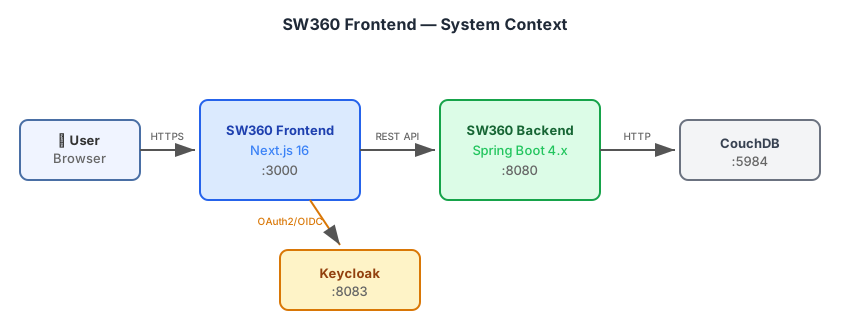
4.2 External Interfaces
| Interface | Protocol | Direction | Description |
|---|
| SW360 REST API | HTTPS (HAL+JSON) | Frontend → Backend | All CRUD operations |
| Keycloak | OAuth2/OIDC | Frontend ↔ Keycloak | User login, token refresh |
| NextAuth API Routes | Internal HTTP | Browser → Next.js server | Session management (/api/auth/*) |
| Gravatar | HTTPS | Frontend → External | User avatar images |
4.3 Authentication Providers
The frontend supports three authentication modes configured via NEXT_PUBLIC_SW360_AUTH_PROVIDER:
| Provider | Value | Use Case |
|---|
| Keycloak | keycloak | Production (OAuth2/OIDC SSO via Keycloak) |
| SW360 OAuth | sw360oauth | Production (OAuth2 via SW360 backend directly) |
| SW360 Basic | sw360basic | Development/testing (username + password) |
5. Building Block View
5.1 Project Structure
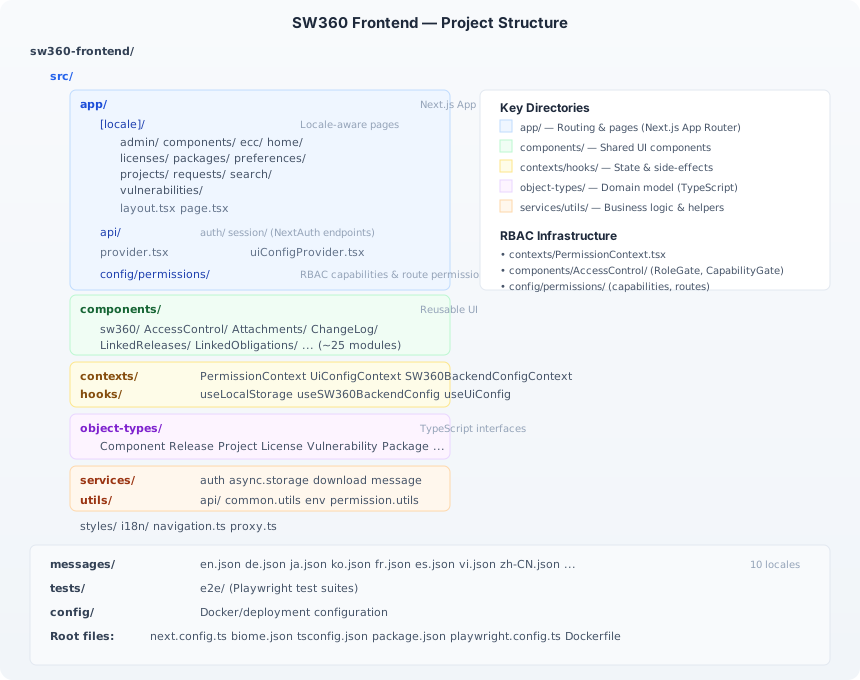
5.2 Layer Architecture
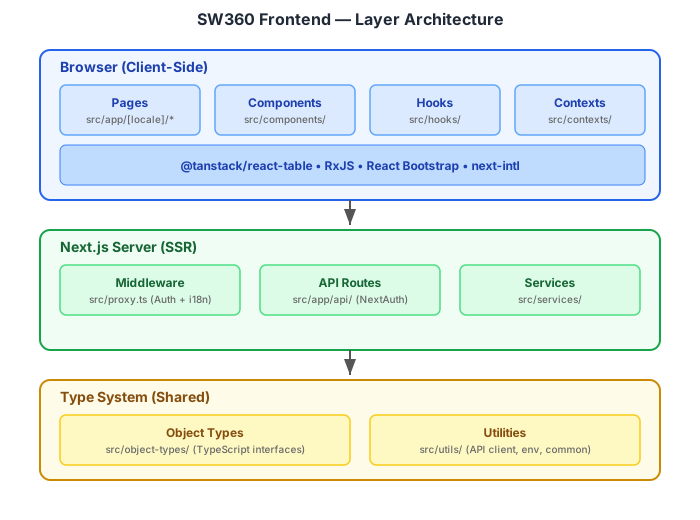
5.3 Key Modules
5.3.1 Pages (src/app/[locale]/)
Pages follow the SW360 domain model. Each page directory maps to a backend resource:
| Page Route | Backend Resource | Key Functionality |
|---|
/home | Dashboard | My components, my projects, recent activity |
/components | ComponentController | List, create, edit, detail components |
/components/[id]/releases | ReleaseController | Release management within components |
/projects | ProjectController | Project lifecycle, linked releases |
/licenses | LicenseController | License database, obligations |
/packages | PackageController | Package (pURL) management |
/vulnerabilities | VulnerabilityController | CVE tracking, risk assessment |
/requests | ModerationService | Moderation + clearing requests |
/ecc | ECC endpoints | Export Control Classification |
/admin | Admin endpoints | System administration (ADMIN only) |
/search | Search endpoints | Global cross-entity search |
/preferences | User endpoints | User preferences, API tokens |
5.3.2 Components (src/components/)
Shared UI components organized by domain concern:
| Component Module | Description |
|---|
sw360/ | Core SW360 widgets (tables, modals, nav sidebar) |
AccessControl/ | Role-based UI visibility guards |
Attachments/ | File upload, attachment listing, type management |
ChangeLog/ | Diff view for audit trail records |
LinkedReleases/ | Release linking with version selection |
LinkedObligations/ | Obligation display and management |
ComponentVulnerabilities/ | CVE display per component/release |
ProjectAddSummary/ | Project creation wizard |
ReleaseSummary/ | Release detail summary card |
ExternalIds/ | External ID management (SWID, CPE, etc.) |
5.3.3 Object Types (src/object-types/)
TypeScript interfaces mirroring the backend Thrift/REST data model:
| Type File | Backend Entity |
|---|
Component.ts | Component |
Release.ts, ReleaseDetail.ts | Release |
Project.ts, ProjectPayload.ts | Project |
LicenseDetail.ts, LicensePayload.ts | License |
Vulnerability.ts, LinkedVulnerability.ts | Vulnerability |
Package.ts, LinkedPackage.ts | Package |
Obligation.ts | Obligation |
User.ts | User |
Attachment.ts | Attachment |
ClearingRequest.ts | ClearingRequest |
ModerationRequest.ts | ModerationRequest |
Embedded.ts, Links.ts, Pageable.ts | HAL+JSON response envelope |
5.3.4 Services (src/services/)
| Service | Responsibility |
|---|
auth.service.ts | Token extraction, session helpers |
async.storage.service.ts | Async key-value storage abstraction |
download.service.ts | File download with auth headers |
message.service.ts | Toast notification via RxJS Observable |
5.3.5 Custom Hooks (src/hooks/)
| Hook | Purpose |
|---|
useLocalStorage | Typed localStorage read/write with SSR safety |
useSW360BackendConfig | Fetch and cache backend configuration |
useUiConfig | UI configuration (feature flags, display settings) |
6. Runtime View
6.1 Authentication Flow
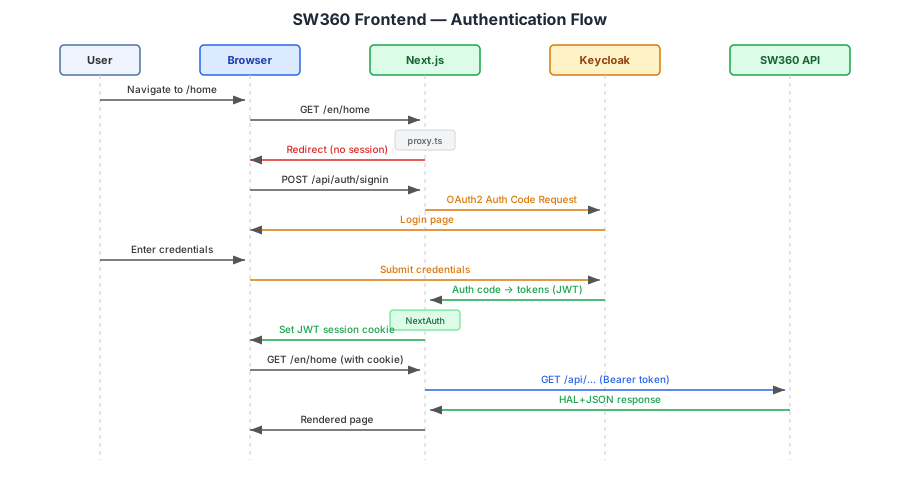
6.2 Middleware Pipeline
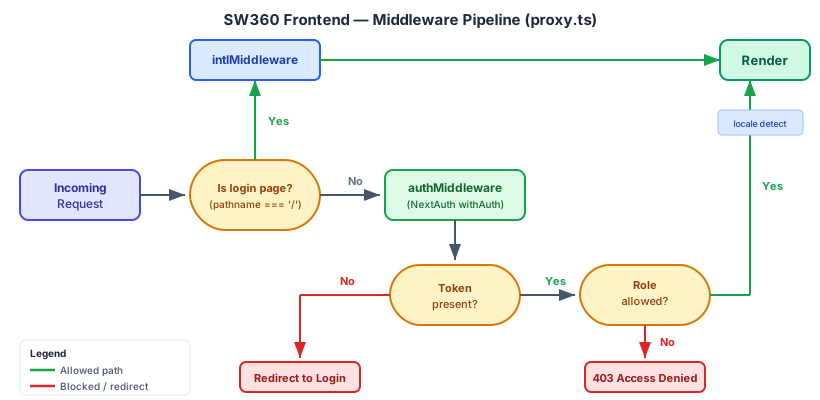
Route Protection Configuration:
| Route Prefix | Auth Required | Roles |
|---|
/admin | ✅ | ADMIN, SW360_ADMIN only |
/home, /projects, /components, etc. | ✅ | Any authenticated user |
/ (login) | ❌ | Public |
6.3 API Communication Pattern
The frontend uses a consistent pattern for data fetching:
- Page renders and calls a custom hook
- Hook invokes API utility with auth headers from session
- API Utils makes fetch request to SW360 REST API
- Response returns HAL+JSON with
_embedded, _links, and page metadata - Data is rendered using
@tanstack/react-table for list views
6.4 Notification Flow (RxJS)
Toast notifications use an RxJS Subject-based pattern:
- Action triggers
message.service.ts which emits on an RxJS Subject - Toast Component subscribes to the Observable stream and displays notifications
- This decouples business logic from UI rendering of notifications
7. Deployment View
7.1 Docker Architecture
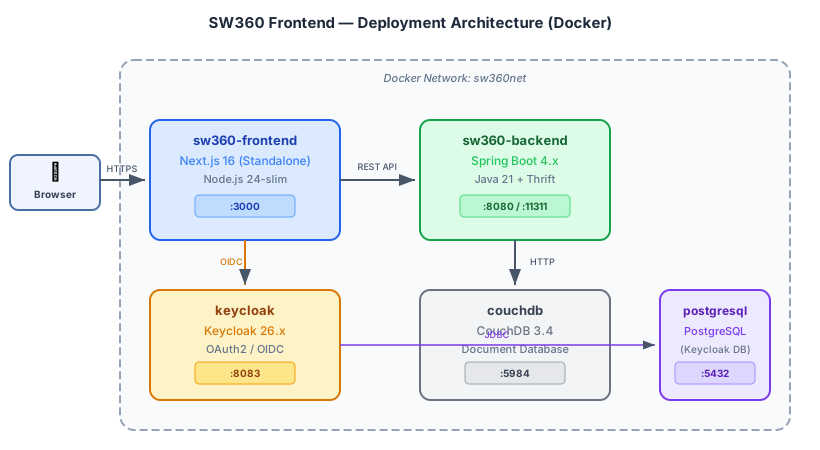
7.2 Dockerfile (Multi-stage Build)
| Stage | Base Image | Purpose |
|---|
| build | node:24-slim | Install pnpm, build Next.js with Turbopack |
| runtime | node:24-slim | Copy standalone output, run node server.js |
Build-time Environment Variables:
| Variable | Description | Default |
|---|
NEXT_PUBLIC_SW360_API_URL | SW360 REST API base URL | — |
NEXT_PUBLIC_SW360_AUTH_PROVIDER | keycloak, sw360oauth, or sw360basic | sw360basic |
Runtime Environment Variables:
| Variable | Description |
|---|
SW360_REST_CLIENT_ID | OAuth2 client ID for REST API |
SW360_REST_CLIENT_SECRET | OAuth2 client secret |
SW360_KEYCLOAK_CLIENT_ID | Keycloak client ID |
SW360_KEYCLOAK_CLIENT_SECRET | Keycloak client secret |
AUTH_ISSUER | Keycloak issuer URL |
AUTH_SECRET | NextAuth.js session encryption secret |
7.3 Docker Compose
services:
  sw360-frontend:
    build:
      context: .
      args:
        - NEXT_PUBLIC_SW360_API_URL=http://sw360:8080
        - NEXT_PUBLIC_SW360_AUTH_PROVIDER=keycloak
    ports:
      - "3000:3000"
    environment:
      - SW360_KEYCLOAK_CLIENT_ID=sw360-frontend
      - SW360_KEYCLOAK_CLIENT_SECRET=${KC_SECRET}
      - AUTH_ISSUER=http://keycloak:8083/realms/sw360
      - AUTH_SECRET=${AUTH_SECRET}
    depends_on:
      - sw360
      - keycloak
7.4 Production Considerations
| Concern | Approach |
|---|
| Reverse Proxy | nginx/Traefik in front of Next.js for TLS termination |
| Scaling | Horizontal (stateless — session in JWT cookie) |
| CDN | Static assets served from /_next/static/ — CDN-friendly |
| Health Check | Next.js built-in health endpoint |
| Source Maps | productionBrowserSourceMaps: true for debugging |
8. Cross-cutting Concepts
8.1 Internationalization (i18n)
SW360 Frontend supports 10 locales using next-intl:
| Locale | Language |
|---|
en | English |
de | German |
fr | French |
es | Spanish |
ja | Japanese |
ko | Korean |
vi | Vietnamese |
pt-BR | Brazilian Portuguese |
zh-CN | Simplified Chinese |
zh-TW | Traditional Chinese |
Architecture:
- URL-based locale:
/{locale}/components (e.g., /en/components, /de/components) - Message files:
messages/{locale}.json - Middleware detects locale from URL, cookie, or
Accept-Language header - All UI strings externalized — no hardcoded text in components
8.2 Security
8.2.1 Content Security Policy
The next.config.ts enforces strict CSP headers:
default-src 'self';
script-src 'self' 'unsafe-inline';
style-src 'self' 'unsafe-inline';
img-src 'self' data: https://secure.gravatar.com;
connect-src 'self';
object-src 'none';
frame-ancestors 'self';
require-trusted-types-for 'script';
| Header | Value |
|---|
Strict-Transport-Security | max-age=31536000; includeSubDomains; preload |
X-Content-Type-Options | nosniff |
X-XSS-Protection | 0 (modern browsers handle XSS internally) |
Referrer-Policy | strict-origin-when-cross-origin |
X-Frame-Options | SAMEORIGIN |
Permissions-Policy | camera=(), microphone=(), geolocation=() |
8.2.3 Role-Based Access Control (Three-Layer Defense)
SW360 Frontend implements a comprehensive RBAC system with three layers of defense:
| Layer | Mechanism | Scope | Implementation |
|---|
| Layer 1: Route Blocking | proxy.ts middleware | Server-side redirect | Blocks entire routes for restricted roles |
| Layer 2: Page Access | AccessControl HOC | Page-level blocking | Renders “Access Denied” for unauthorized pages |
| Layer 3: Element UI | ViewerGate / CapabilityGate | Button/field hiding | Hides specific UI elements per role |
Blacklist-Based Route Protection
The middleware uses a blockedRoles configuration with longest-prefix matching:
const roleBasedAccessControl = {
    '/admin': { roles: [ADMIN, SW360_ADMIN], authRequired: true },
    '/projects/add': { blockedRoles: [UserGroupType.VIEWER], authRequired: true },
    '/components/add': { blockedRoles: [UserGroupType.VIEWER], authRequired: true },
    '/vulnerabilities': { blockedRoles: [UserGroupType.VIEWER], authRequired: true },
    '/ecc': { blockedRoles: [UserGroupType.VIEWER], authRequired: true },
    // ... all authenticated routes
}
Capability-Based Permission System
Beyond role-based blocking, granular capabilities provide fine-grained UI control:
| Capability | Affected UI | Restricted For |
|---|
canEditClearingRequestDetails | Priority, Clearing Type, Requesting User fields | USER role |
canCreateVulnerabilities | “Add Vulnerability” button | SECURITY_USER role |
canExportSpreadsheet | Export Spreadsheet buttons | VIEWER role |
canTriggerFossology | FOSSology process icons | VIEWER role |
Component Patterns
// Layer 2: Page-level blocking via HOC
export default AccessControl(MyPage, [UserGroupType.VIEWER])

// Layer 3a: Element hiding for VIEWER
<ViewerGate>
  <Button>Edit</Button>  {/* Hidden for VIEWER */}
</ViewerGate>

// Layer 3b: Capability-based control
const { hasCapability } = usePermissionContext()
const canEdit = hasCapability('canEditClearingRequestDetails')
<input disabled={!canEdit} />
Key Infrastructure Files
| File | Purpose |
|---|
src/contexts/PermissionContext.tsx | React context providing isViewer, isAdmin, hasCapability() |
src/components/AccessControl/RoleGate.tsx | ViewerGate component for element-level hiding |
src/components/AccessControl/CapabilityGate.tsx | Capability-based conditional rendering |
src/config/permissions/capabilities.config.ts | Role-to-capability mapping matrix |
src/utils/permission.utils.ts | Utility functions mirroring backend permission logic |
src/proxy.ts | Server-side route blocking with longest-prefix matching |
8.3 State Management
SW360 Frontend uses no global state library (no Redux, Zustand, etc.). Instead:
| Pattern | Usage |
|---|
| React Context | UiConfigContext, SW360BackendConfigContext, PermissionContext — app-wide config & RBAC |
| Custom Hooks | useSW360BackendConfig, useUiConfig, useLocalStorage |
| NextAuth Session | User identity, tokens, roles (JWT cookie) |
| RxJS Subjects | Cross-component notifications (toast messages) |
| URL State | Pagination, filters via query parameters |
| Local Component State | Form state, UI toggles via useState |
8.4 Data Table Pattern
All list pages use @tanstack/react-table with:
- Server-side pagination (via HAL
page metadata) - Column sorting
- Row selection
- Custom cell renderers for links, badges, status icons
8.5 Error Handling
| Level | Mechanism |
|---|
| Page-level | error.tsx boundary in src/app/[locale]/ |
| API errors | HTTP status codes → toast notifications via message.service.ts |
| Auth errors | NextAuth error handling → redirect to login |
| Type safety | TypeScript strict mode catches errors at compile time |
8.6 Code Quality
| Tool | Purpose | Configuration |
|---|
| Biome | Lint + format (replaces ESLint + Prettier) | biome.json |
| TypeScript | Type checking (strict: true) | tsconfig.json |
| Husky | Pre-commit hooks | .husky/ |
| lint-staged | Run Biome on staged files only | package.json |
| commitlint | Enforce conventional commits | package.json |
| Playwright | E2E testing | playwright.config.ts |
9. Quality Requirements
| Scenario | Target |
|---|
| First Contentful Paint | < 1.5s |
| Page navigation (client-side) | < 500ms |
| Component list load (100 items) | < 1s |
| Build time (production) | < 3 min |
Optimization strategies:
- Next.js SSR for initial load
- Turbopack for fast development builds
- Standalone output (minimal production footprint)
react: 19.x with concurrent features
9.2 Accessibility
| Requirement | Approach |
|---|
| Keyboard navigation | React Bootstrap components are keyboard-accessible |
| Screen readers | Semantic HTML, ARIA attributes |
| Color contrast | Bootstrap 5 default theme meets WCAG AA |
| Focus management | Managed by React Bootstrap modals/dialogs |
9.3 Browser Support
| Browser | Version |
|---|
| Chrome | Latest 2 versions |
| Firefox | Latest 2 versions |
| Edge | Latest 2 versions |
| Safari | Latest 2 versions |
10. Risks and Technical Debt
10.1 Risks
| ID | Risk | Mitigation |
|---|
| R1 | NextAuth.js v4 → v5 migration | NextAuth v5 (Auth.js) has breaking changes; plan migration path |
| R2 | Preact aliasing | preact in dependencies — may cause React compatibility issues; monitor |
| R3 | Large i18n files | 100KB+ per locale; consider lazy-loading or splitting |
| R4 | No unit test framework | Only Playwright E2E; add Vitest for component unit tests |
10.2 Technical Debt
| ID | Description | Impact | Proposed Solution |
|---|
| D1 | No component unit tests | Regression risk | Add Vitest + React Testing Library |
| D2 | Mixed service patterns | Some API calls in components, some in services | Consolidate all API calls into service layer |
| D3 | TypeScript any usage | Reduced type safety | Strict noImplicitAny enforcement |
| D4 | No Storybook | No component catalog | Add Storybook for design system documentation |
Appendix A: Revision History
| Version | Date | Author | Changes |
|---|
| 1.0 | May 2026 | SW360 Architecture Team | Initial document |
Appendix B: References
- SW360 Frontend Repository: https://github.com/eclipse-sw360/sw360-frontend
- Next.js Documentation: https://nextjs.org/docs
- NextAuth.js: https://next-auth.js.org/
- React Bootstrap: https://react-bootstrap.github.io/
- next-intl: https://next-intl.dev/
- TanStack Table: https://tanstack.com/table
- Biome: https://biomejs.dev/
- Playwright: https://playwright.dev/
This program and the accompanying materials are made available under the terms of the Eclipse Public License 2.0 which is available at https://www.eclipse.org/legal/epl-2.0/