SW360 Rest API
The sw360 REST API provides access to sw360 resources for external clients. It consists currently of three Maven modules aggregated in one parent module rest in the sw360 distribution.
For access setup and request examples, see API Access. Legacy workflows are kept in Legacy REST API Guides.
Resource Server Authentication and Authorization Flow
This section describes how resource-server identifies the principal and
evaluates effective permissions.
Security Pipeline (High-Level)
flowchart TD
    A[Incoming HTTP request] --> B{Authorization header}
    B -->|Basic ...| C[Basic Authentication Provider]
    B -->|Token ...| D[API Token Filter + Provider]
    B -->|Bearer ...| E[JWT Authentication Provider + JWT Converter]
    C --> F[Authenticated principal + authorities]
    D --> F
    E --> F
    F --> G[Resolve SW360 user in RestControllerHelper]
    G --> H[Endpoint + method authorization checks]
How principal identity is resolved
RestControllerHelper.getSw360UserFromAuthentication() resolves the SW360 user
from authentication context using this order:
- Cached
Userin authentication details (fast path). - JWT claims (
email, fallbackmapped_user_email,user_name) depending on token style. - Basic-auth principal (
Sw360UserDetailsor username string).
If the user cannot be resolved, the request fails with authentication error.
How roles and scopes become authorities
The resource server merges:
- User group authorities (for example
READ,WRITE,ADMIN) based on the SW360 user group configuration. - Token capability authorities (
TOKEN_READ,TOKEN_WRITE) based on token scope/capability metadata.
Scope mapping behavior:
READ(orSCOPE_READ) =>TOKEN_READWRITE(orSCOPE_WRITE) =>TOKEN_READ+TOKEN_WRITE- Missing/unknown scope defaults to read/write capabilities for compatibility.
Endpoint capability checks
HTTP method checks apply to /api/**:
GETrequiresTOKEN_READPOST,PUT,PATCH,DELETErequireTOKEN_WRITE
These checks are evaluated in addition to controller/service-level security.
Module Structure
The rest module provides a REST API infrastructure for sw360 including:
- Module
authorization-server- OAuth2/OIDC authorization server that authenticates SW360 users and issues JWT access tokens. - Module
resource-server- REST API gateway that validates credentials/tokens and exposes SW360 resources. - Module
rest-common- shared support library code used by both REST applications.
The REST API implementation uses:
- Module
authorization-serverstores OAuth client registrations in CouchDB databasesw360oauthclientsand authenticates users against SW360 user data fromsw360usersthrough the backend user service. - Module
resource-serveruses Thrift clients to reach the respective SW360 backend services and serialize the resulting data as REST/HAL responses.
Request Flow from Client to Backend Service
flowchart LR
    C[Client / Script / Frontend] --> RS[REST resource-server]
    RS --> TC[ThriftClients]
    TC --> TS[Thrift Server]
    TS --> BS[SW360 Backend Service Module]
    BS --> DB[(CouchDB)]
API Principles
Security Principles
The resource-server supports multiple authentication mechanisms and uses a
single capability model (TOKEN_READ / TOKEN_WRITE) for endpoint protection.
Tokens are validated, converted to authorities, merged with user-group
authorities, and then evaluated against endpoint and method-level rules.
For user-facing setup details of each mechanism, see API Access.
Data Principles
The REST API provides Hypermedia using HAL (Hypertext Application Language). The following abbreviated example shows the root HAL response shape:
curl -u '<sw360-user>:<password>' 'https://<my_sw360_server>/resource/api'
{
  "_links": {
    "sw360:attachmentCleanUp": {
      "href": "http://localhost:8080/resource/api/attachmentCleanUp"
    },
    "sw360:fossology": {
      "href": "http://localhost:8080/resource/api/fossology"
    },
    "sw360:attachments": {
      "href": "http://localhost:8080/resource/api/attachments{?sha1}",
      "templated": true
    },
    "sw360:cacheAdmin": {
      "href": "http://localhost:8080/resource/api/admin/cache"
    },
    "sw360:changeLogs": {
      "href": "http://localhost:8080/resource/api/changelog/document/{id}",
      "templated": true
    },
    "sw360:clearingRequests": {
      "href": "http://localhost:8080/resource/api/clearingrequest"
    },
    "sw360:components": {
      "href": "http://localhost:8080/resource/api/components"
    },
    "sw360:configurations": {
      "href": "http://localhost:8080/resource/api/configurations"
    },
    "sw360:databaseSanitation": {
      "href": "http://localhost:8080/resource/api/databaseSanitation"
    },
    "sw360:department": {
      "href": "http://localhost:8080/resource/api/departments"
    },
    "sw360:ecc": {
      "href": "http://localhost:8080/resource/api/ecc"
    },
    "sw360:importExport": {
      "href": "http://localhost:8080/resource/api/importExport"
    },
    "sw360:licenses": {
      "href": "http://localhost:8080/resource/api/licenses"
    },
    "sw360:licenseinfo": {
      "href": "http://localhost:8080/resource/api/licenseinfo"
    },
    "sw360:moderationRequests": {
      "href": "http://localhost:8080/resource/api/moderationrequest"
    },
    "sw360:obligations": {
      "href": "http://localhost:8080/resource/api/obligations"
    },
    "sw360:packages": {
      "href": "http://localhost:8080/resource/api/packages"
    },
    "sw360:projects": {
      "href": "http://localhost:8080/resource/api/projects"
    },
    "sw360:releases": {
      "href": "http://localhost:8080/resource/api/releases"
    },
    "sw360:reports": {
      "href": "http://localhost:8080/resource/api/reports"
    },
    "sw360:schedule": {
      "href": "http://localhost:8080/resource/api/schedule"
    },
    "sw360:searches": {
      "href": "http://localhost:8080/resource/api/search"
    },
    "sw360:users": {
      "href": "http://localhost:8080/resource/api/users"
    },
    "sw360:vendors": {
      "href": "http://localhost:8080/resource/api/vendors"
    },
    "sw360:vulnerabilities": {
      "href": "http://localhost:8080/resource/api/vulnerabilities"
    },
    "profile": {
      "href": "http://localhost:8080/resource/api/profile"
    },
    "curies": [
      {
        "href": "http://localhost:8080/resource/docs/{rel}.html",
        "name": "sw360",
        "templated": true
      }
    ]
  }
}
API Installation
Both, the authorization-server and the resource-server can be build using Maven like the rest of the project. Each is generating a Spring Boot server that can be deployed in an application container, e.g. Tomcat.
API Configuration
Since the authorization-server and the resource-server are Spring Boot servers, they are configured as usual via /src/main/resources/application.yml. In addition some configuration comes historically from sw360.properties. Please note that all configurations could be provided centrally in the /etc/sw360/ directory. As such, the sw360.properties sits directly in /etc/sw360/. For rest-specific configurations the application considers the location /etc/sw360/rest.
Authorization Server Configuration
The authorization server is responsible for:
- authenticating SW360 users against the SW360 user data set (
sw360users) - storing OAuth client registrations in CouchDB database
sw360oauthclients - issuing JWT access tokens and refresh tokens
- exposing OIDC/JWKS metadata used by clients and the resource server
Authorization Server application.yml
| Property | Description | Example / Default |
|---|---|---|
couchdb.url | CouchDB base URL used for OAuth client storage | http://localhost:5984 |
couchdb.database | OAuth client database | sw360oauthclients |
couchdb.username | CouchDB username for OAuth client database | sw360 |
couchdb.password | CouchDB password for OAuth client database | sw360fossie |
sw360.cors.allowed-origin | Allowed CORS origin | environment-specific |
security.oauth2.resource.id | Resource identifier embedded into issued tokens | sw360-REST-API |
security.accesstoken.validity | Access token validity | 30 |
Authorization Server shared sw360.properties
| Property | Description | Default |
|---|---|---|
rest.write.access.usergroup | Minimum SW360 user group that gets write authority | SW360_ADMIN |
rest.admin.access.usergroup | Minimum SW360 user group that gets admin authority for client management | SW360_ADMIN |
General Configuration
Shared properties commonly used by the REST applications:
| Property | Description | Default |
|---|---|---|
backend.url | URL where backend/thrift services can be reached | http://127.0.0.1:8080 |
rest.write.access.usergroup | Minimum user group that should receive write authority | SW360_ADMIN |
rest.admin.access.usergroup | Minimum user group that should receive admin authority | SW360_ADMIN |
After this configuration is done the normal REST service for client management should be usable. This one is only accessible for authenticated users that get the ADMIN authority (remember, the therefore necessary sw360 usergroup has just been configured). So the clients can be configured now.
Client Management
In the scenarios of this page, the shipped authorization server is used. So the next step is to configure a valid OAuth2 client in this authorization server. There should be one OAuth2 client per external REST API client (which in turn can have many different users). Therefore the authorization server offers a REST API for basic CRUD operations for configuring the clients that are stored in the just configured CouchDB. Since sw360-ADMIN privileges are needed for client management, an authentication is needed to work with this API.
Client Management via Curl
The client-management API can be used directly via curl:
SW360_USER=[admin sw360 user]
SW360_PW=[corresponding sw360 admin user password]
curl -s -S \
     --user "${SW360_USER}:${SW360_PW}" \
     --header "Content-Type: application/json" \
     --header "Accept: application/json" \
     -X POST https://[hostname]:[port]/authorization/client-management \
     -d @- <<EOF
{
    "description" : "my first test client",
    "authorities" : [ "BASIC" ],
    "scope" : [ "READ" ],
    "access_token_validity" : 3600,
    "refresh_token_validity" : 3600
}
EOF
Live response format from local server (POST /authorization/client-management):
{
  "access_token_validity": 3600,
  "authorities": [
    "BASIC"
  ],
  "client_id": "<generated-client-id>",
  "client_secret": "<hashed-client-secret>",
  "description": "my first test client",
  "refresh_token_validity": 3600,
  "scope": [
    "READ"
  ]
}
OAuth2 Access Token
With a configured OAuth client it is possible to retrieve an access token for the REST API from the authorization server.
Current token endpoint metadata can be discovered from:
curl -sS 'https://<my_sw360_server>/authorization/.well-known/oauth-authorization-server'
Live local discovery response includes:
{
  "issuer": "http://localhost:8080/authorization",
  "token_endpoint": "http://localhost:8080/authorization/oauth2/token",
  "jwks_uri": "http://localhost:8080/authorization/oauth2/jwks",
  "grant_types_supported": [
    "authorization_code",
    "client_credentials",
    "refresh_token",
    "urn:ietf:params:oauth:grant-type:token-exchange"
  ]
}
Example token request (client credentials):
curl -X POST \
  --user '[clientid]:[clientsecret]' \
  -d 'grant_type=client_credentials&scope=READ' \
  'https://<my_sw360_server>/authorization/oauth2/token'
Live response format from local server:
{
  "access_token": "<jwt-access-token>",
  "scope": "READ",
  "token_type": "Bearer",
  "expires_in": 299
}
The access_token is then sent to resource-server as Authorization: Bearer <token>.
Keycloak Access Token (Client Credentials)
Keycloak OIDC metadata can be discovered with:
curl -sS 'https://<keycloak-host>/realms/<realm>/.well-known/openid-configuration'
Live local discovery response includes:
{
  "issuer": "http://localhost:8083/realms/sw360",
  "token_endpoint": "http://localhost:8083/realms/sw360/protocol/openid-connect/token",
  "jwks_uri": "http://localhost:8083/realms/sw360/protocol/openid-connect/certs"
}
Token request template:
curl -X POST 'https://<keycloak-host>/realms/<realm>/protocol/openid-connect/token' \
  -H 'Content-Type: application/x-www-form-urlencoded' \
  --data 'grant_type=client_credentials&client_id=<client-id>&client_secret=<client-secret>&scope=openid email READ WRITE'
Live success response format (local Keycloak):
{
  "access_token": "<jwt-access-token>",
  "expires_in": 3600,
  "refresh_expires_in": 0,
  "token_type": "Bearer",
  "not-before-policy": 0,
  "scope": "email READ WRITE profile"
}
More Links:
- OAuth2 more information: https://oauth.net/2/
- Decode Bearer tokens at: https://jwt.io/
OAuth2 Refresh Token
The authorization server supports so called refresh tokens to generate new access tokens after they have been expired. New access tokens can be generated with the use of the refresh_token without further re-authorization of the user. The following url must be used:
https://<my_sw360_server>/authorization/oauth2/token?grant_type=refresh_token&refresh_token=<REFRESH_TOKEN>
The client must pass its credentials via basic authentication. Though a user authentication is not necessary.
Resource Server Configuration
Now that access tokens can be generated, the resource server has to be configured.
Resource Server application.yml
| Property | Description | Example / Default |
|---|---|---|
sw360.security.jwt.issuers[*].issuer-uri | Trusted JWT issuer URL. Validated against the iss claim of incoming tokens. | https://<keycloak-host>/realms/sw360 |
sw360.security.jwt.issuers[*].jwk-set-uri | (Optional) Direct JWKS endpoint for the issuer above. When set, OpenID Connect discovery is skipped and JWKS is fetched from this URL. Useful when the identity provider sits behind a reverse proxy with a self-signed certificate. | http://localhost:8083/realms/sw360/protocol/openid-connect/certs |
spring.security.oauth2.resourceserver.jwt.issuer-uri | Single issuer fallback used only when sw360.security.jwt.issuers is not configured. | https://<my_sw360_server>/authorization |
jwt.auth.converter.principle-attribute | JWT claim used as principal name | email |
sw360.thrift-server-url | Backend/thrift server URL | https://<my_sw360_server> |
sw360.base-url | Base URL used for generated HAL links (SW360_BASE_URL env var) | https://<my_sw360_server> |
sw360.couchdb-url | CouchDB URL used for attachments and related services | https://<couchdb-host>:5984 |
sw360.cors.allowed-origin | Allowed CORS origin | environment-specific |
Resource Server sw360.properties
| Property | Description | Default |
|---|---|---|
rest.apitoken.write.generator.enable | Enables write-token generation | true |
rest.apitoken.read.validity.days | Default/maximum read-token validity | 90 |
rest.apitoken.write.validity.days | Default/maximum write-token validity | 30 |
rest.apitoken.hash.salt | BCrypt salt used for API token hashing (OpenBSD format, e.g. $2a$04$...) | $2a$04$Software360RestApiSalt |
The REST API is now completely usable via an own client or testwise with integrated tools.
When this property is configured through shell-sourced secrets files, keep it quoted,
for example REST_APITOKEN_HASH_SALT='$2a$04$Software360RestApiSalt'. To generate a
new value:
REST_APITOKEN_HASH_SALT='$2a$04$'$(openssl rand -hex 16 | head -c 22)
Keep the value stable after deployment; changing it invalidates existing API tokens.
Tools
Swagger UI is available on deployed instances for interactive API exploration. The typical URL is:
https://<my_sw360_server>/resource/swagger-ui/index.html
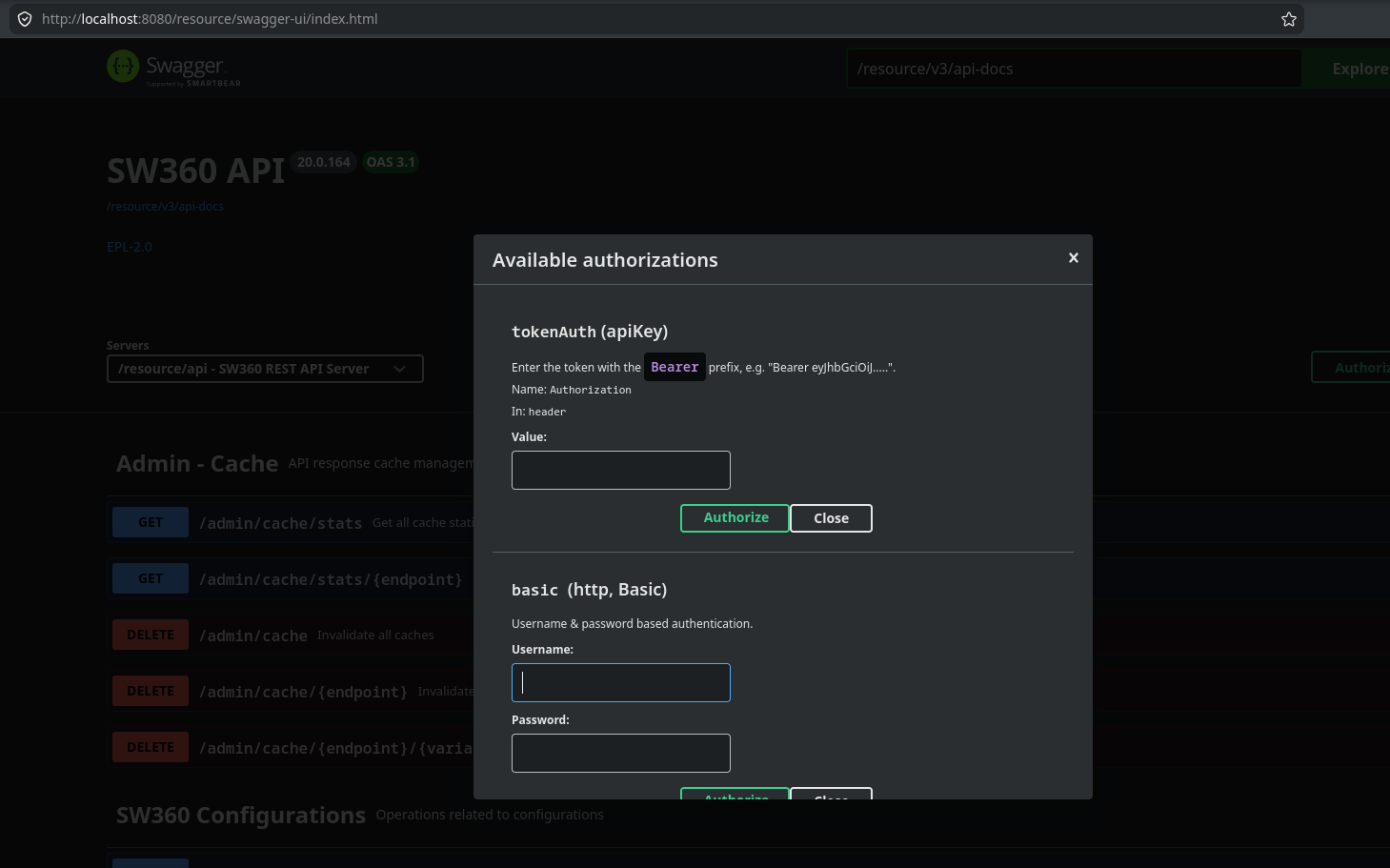
When using other tools, set the Authorization header according to the chosen
mechanism:
Authorization: Basic <base64(user:password)>Authorization: Token <api-token>Authorization: Bearer <access-token>
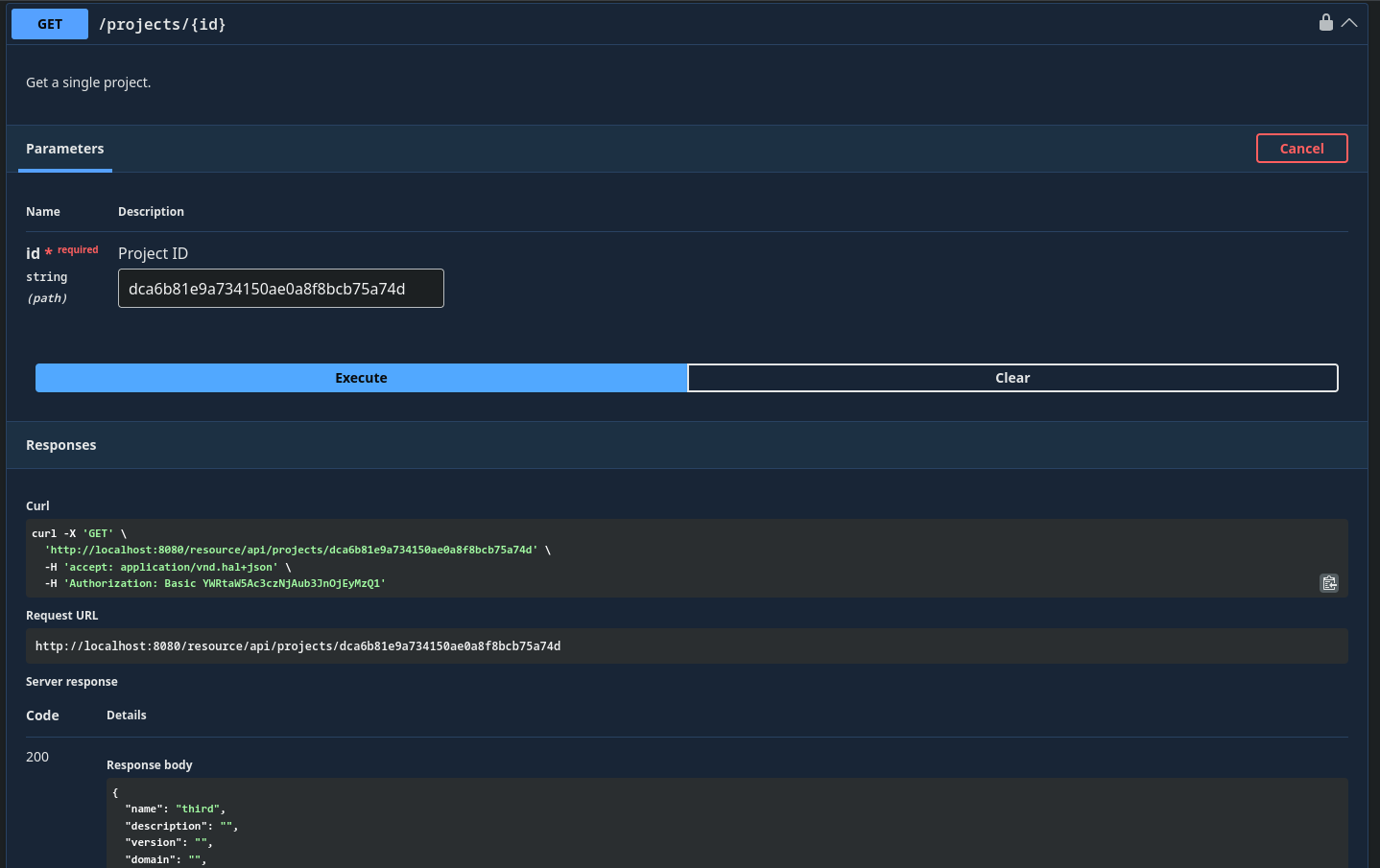
Example - Get a project
Here is an example how to query for a project as HTTP GET Request. As for the resource endpoint, the request:
https://sw360.org/resource/api/projects/{id} (or /resource/api/projects/{id})
will return the following response:
API Documentation
sw360 deploys a REST API documentation at every instance. There are the following URLs offered at each instance
| URL | Description |
|---|---|
| https://[hostname]:[port]/resource/docs/index.html | Small overview page |
| https://[hostname]:[port]/resource/docs/api-guide.html | The API description for the currently running server |
| https://[hostname]:[port]/resource/swagger-ui/index.html | Swagger UI for interactive API usage |
Generated Link Base URL
Original issue (why this needed a fix)
In reverse-proxy deployments, clients often access SW360 via HTTPS while the application container runs with local HTTP defaults. In that situation, HAL responses could expose internal/non-canonical links.
Example of the mismatch:
Request URL seen by client:
https://sw360.example.com/resource/api/projects

HAL link returned by server:
"href": "http://localhost:8080/resource/api/projects/065f3aa45c2683297fd1bb39296f519d"
This is problematic for clients because links are generated with the wrong scheme/host, and they do not match the public API origin.
Previous workaround and why it was changed
Historically, this was often mitigated with reverse-proxy X-Forward-* headers
so the app could infer external scheme/port. That approach is operationally
fragile and security-sensitive because it depends on trusted header handling
across proxy boundaries. If a malicious actor injected header values, it could
generate emails with links to arbitrary hosts and was detected as a security
vulnerability in the past and fixed via PR
#3726.
Current solution
Configure the canonical SW360 base URL in resource-server application.yml
via sw360.base-url.
sw360.base-url reads the environment variable SW360_BASE_URL:
sw360:
  base-url: ${SW360_BASE_URL:http://localhost:8080}
For HTTPS deployments, set SW360_BASE_URL to the externally reachable HTTPS
origin (for example https://<my_sw360_server>). Generated HAL links then use
the configured base URL consistently.