| |
|
| Overview |
| |
There are cases when web files cannot or do not have to
specify certain properties within the content of the file. For
example, before XHTML, it was not necessarily required to specify the
DOCTYPE within an html file. Or in JSP Fragments, page directives and
such are not in the fragments themselves. Without this information,
however, some features such as content assist and source validation
cannot work to the best of their knowledge. So there needs to be a
way to associate the invisible information. File properties can be
used to associate additional information with file. The file
properties work like per-file/per-project preferences, and they are
visible via the Properties Dialog.
The Structured Source Editing component currently contributes
3 property pages:
- jst.jsp
JSP Fragment Content Settings
- wst.html
Web Content Settings
- wst.css
(CSS) Web Content Settings
Note: Currently changes to the file properties do not take effect
immediately in a file that is already open in an editor. Users must
close and reopen the file for the new settings to take effect.
|
| JSP Fragment |
| |
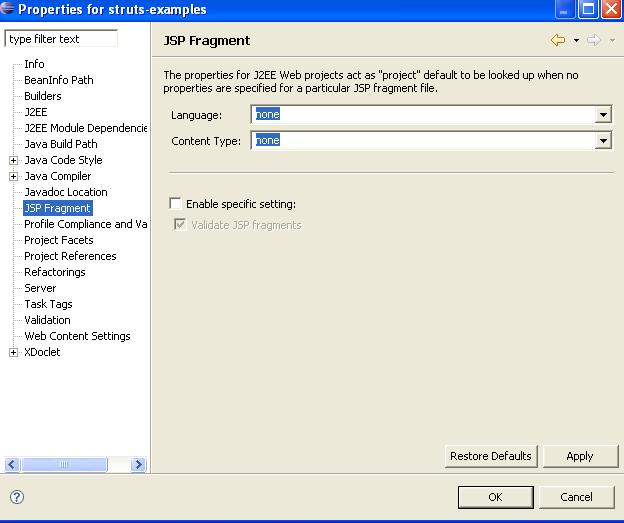
Users can use the JSP Fragment property page to specify the
scripting language and content type that should be associated with
the JSP fragment. Users can also specify if they want the fragment
validated or not (the fragment will be validated like a JSP).
|
| Web Content Settings |
| |
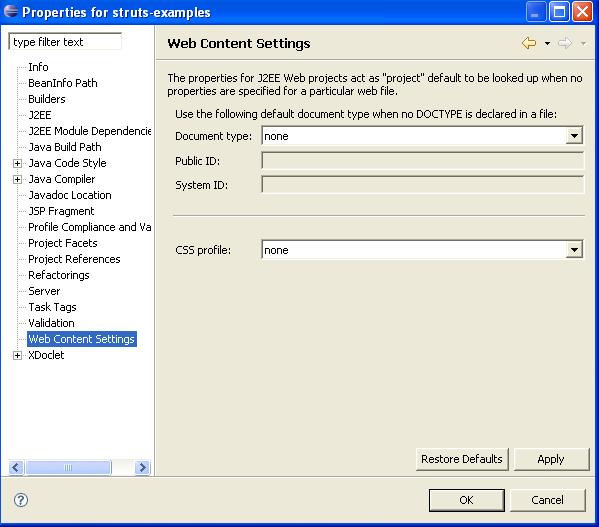
Users can use the Web Content Settings property page to
specify the default document type to be used if none is specified in
the file. They can also specify the type of CSS they plan on using.
|
| (CSS) Web Content
Settings |
| |
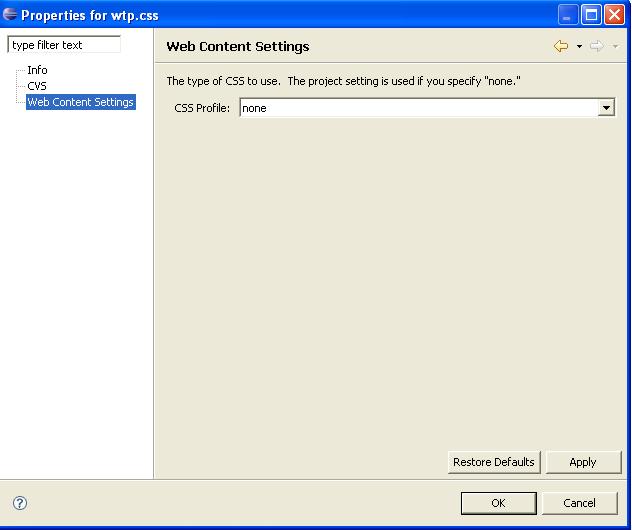
Users can use the (CSS) Web Content Settings property page to
specify the type of CSS they plan on using.
|
| Storage of Properties |
| |
The properties are currently stored with the project they are
associated with. This way, the properties travel along with the
project, so when projects are shared amongst a team, so are the
properties. The properties are stored as project preferences. Project
preferences are stored in a .settings folder under the project root.
|
| Code Usage |
| |
Clients should already have the properties specified and
accessible via an existing mechanism, like the PageDirectiveAdapter
or HTMLDocumentTypeAdapter. It is then up to the PageDirectiveAdapter
and HTMLDocumentTypeAdapter to call the appropriate code below to get
the information desired.
For the curious, PageDirectiveAdapter ahd HTMLDocumentAdapter will
then in turn call a get or set Property method call in the desired
xxxContentProperties class to get the information they need.
/**
 * Returns the value for the given key in the given context.
 *
 * @param key
 *            The property key
 * @param resource
 *            The current context or null if no context is
 *            available and the workspace setting should be taken. Note
 *            that passing null should be avoided.
 * @param recurse
 *            whether the parent should be queried till property is found
 * @return Returns the current value for the key.
 * @since 1.1
 */
public static String getProperty(String key, IResource resource, boolean recurse)


/**
 * Sets the value for the given key in the given context.
 *
 * @param key
 *            The property key
 * @param resource
 *            The current context. Note context cannot be
 *            null.
 * @param value
 *            The value to set for the key. If value is null
 *            the key is removed from properties.
 * @since 1.1
 */
public static void setProperty(String key, IResource resource, String value) throws CoreException
- JSP Fragment properties
(org.eclipse.jst.jsp.core.internal.contentproperties.JSPFContentProperties)
JSPCONTENTTYPE - default content type for JSP Fragments
JSPLANGUAGE - default language for JSP Fragments
VALIDATE_FRAGMENTS - whether or not to validate JSP Fragment
- HTML properties
(org.eclipse.wst.html.core.internal.contentproperties.HTMLContentProperties)
DOCUMENT_TYPE - default content type for HTML when DOCTYPE is not
specified
- CSS
properties(org.eclipse.wst.css.core.internal.contentproperties.CSSContentProperties)
CSS_PROFILE - css profile to use
|