Feature Overview
DPM (Data Point Model) Operations is a specialized module within Eclipse Free BIRD Tools that provides a streamlined 3-step workflow for processing regulatory data according to European Banking Authority (EBA) standards. This feature transforms raw financial data into compliant regulatory reports through a systematic preparation, import, and output generation process.
Purpose
DPM Operations addresses the critical need for standardized regulatory reporting in the financial sector. This feature enables:
- Import of uptodate EBA Information Technical Standards (ITS): By using simple mappings, the application is able to translate the EBA ITS standards into SMCube methodology.
- Generation of Output Layers: After importing the rendering package of the EBA ITS into our knowledge graph, we can then generate the structure used for the mapping and the generation of linking entities.
Financial institutions use DPM Operations to streamline their regulatory reporting obligations, and maintain compliance with evolving European banking regulations.
Getting Started
Prerequisites
Before using DPM Operations, ensure:
- You ran the first two steps of the workflow.
- You have an internet connection.
- You understand the 3-step sequential process
Accessing DPM Operations
To access DPM Operations, launch the FreeBIRD Application, navigate to the Home page, and click on "DPM Data Operations". You will then follow a 3-step sequential process.

Step-by-Step Guide
Overview of the 3-Step DPM Workflow
The DPM workflow consists of three sequential steps that must be executed in order: Prepare, Import, and Create Output Layers.
Step 1: Prepare DPM Data
Click the "Prepare DPM Data" card to import and preprocess the data from the EBA website. This step ensures the ontology represented in the EBA ITS to the import phase. The system will validate your source data and confirm it is ready for import.
Step 2: Import DPM Data
Click the "Import DPM Data" card to process the EBA ITS ontology and apply the necessary mapping to the SMCube methodology. During this step, the system imports your data into DPM structures while performing validation checks. Once complete, your EBA ITS ontology will be properly structured according to SMCube specifications.
Step 3: Create Output Layers
Click the "Create Output Layers" card to generate your final regulatory reporting outputs. This step produces all required regulatory reports that are ready for submission to authorities.
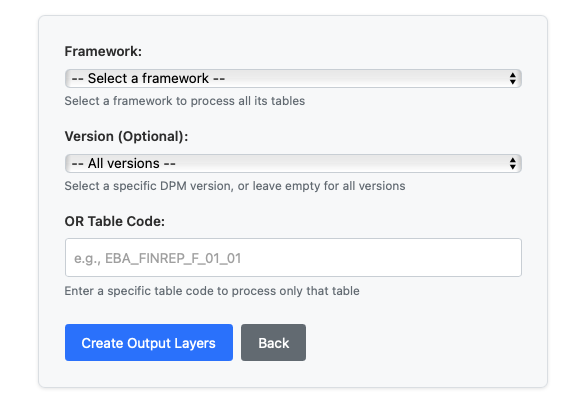
When creating output layers, you need to select your regulatory framework such as COREP, FINREP, or LCR. Then choose the specific version of your selected framework. You can also pick specific table codes if you want targeted output generation. After making your selections, the system will generate regulatory reports in the required smcube format, and your selected outputs will be ready for integration.
Best Practices
Always execute the three steps in sequential order: Prepare, then Import, then Create Output Layers. Complete each step fully before proceeding to the next one.
Conclusion
DPM Operations simplifies the complex task of importing regulatory reporting standard by providing a structured, validated approach to ontology processing. The 3-step workflow ensures that your favourite financial ontology is properly prepared, imported, and transformed into compliant regulatory reports ready for submission to authorities.
Next Steps
- Review the Workflow Dashboard Guide for comprehensive workflow management
- Explore Execute Datapoint Guide for detailed execution options
- Learn about Pull Request Creation to submit your reports
For regulatory framework updates or technical support, reach out through Eclipse Chat or contact us at efbt-dev@eclipse.org.