NatTable 2.7.0 - New & Noteworthy
The NatTable 2.7.0 release was made possible by several companies that provided and sponsored ideas, bug reports, discussions and new features you can find in the following sections. We would like to thank everyone involved for their commitment and support on developing the 2.7.0 release.
Almost every change in code is tracked via GitHub Issues, so if you are curious about the details and all the bugs that are fixed and enhancements that were added with the 2.7.0 release, have a look there.
There are no modifications in the NatTable RAP fragment for this release. The NatTable RAP fragment 2.6.0 works without modifications with the NatTable 2.7.0 release.
API changes
The following modifications to the API were made. Several new classes and interfaces were introduced to support new features. The details can be found in the Enhancements and new features section.
Below is the list of new classes and interfaces
org.eclipse.nebula.widgets.nattable.filterrow.combobox.FilterRowCategoryValueMapperorg.eclipse.nebula.widgets.nattable.layer.DefaultZoomDpiConverter
Below is the list of new constants
CellConfigAttributes#BLEND_SELECTION_BACKGROUNDComboBoxFilterUtils#DEFAULT_LIST_VALUE_MAP_FUNCTIONICellEditDialog#DIALOG_COMMIT_EDITOR_ON_EDITFilterRowConfigAttributes#CATEGORY_VALUE_MAPPERFilterRowConfigAttributes#FLATTEN_COLLECTION_VALUESFilterRowConfigAttributes#LIST_VALUE_MAP_FUNCTIONFilterRowConfigAttributes#USE_CATEGORIES_ONLY
Below is the list of new fields
FilterRowComboBoxDataProvider#customMapper(private)FilterRowComboBoxDataProvider#categoriesOnly(private)FilterRowComboBoxDataProvider#categoryValueMapper(private)FilterRowComboBoxDataProvider#flattenCollectionValues(private)
Below is the list of new methods
BackgroundPainter#getBlendedBackgroundColour(ILayerCell, IConfigRegistry)ComboBoxGlazedListsFilterStrategy#getFlattenedCollectionPatternPrefix()ComboBoxGlazedListsFilterStrategy#getFlattenedCollectionPatternSuffix()GUIHelper#getAutoScaleProperty(Display)GUIHelper#getAutoScaleZoom(Composite parent, int zoom)GUIHelper#getPrimaryMonitorDpi()GUIHelper#getScaledFont(Font)GUIHelper#isRescalingAtRuntime(Display)GUIHelper#isSvgSupported()FilterRowComboBoxDataProvider#configureConfigRegistryAccess(ILayer, IConfigRegistry)FilterRowComboBoxDataProvider#getCategoryValueMapper(int)FilterRowComboBoxDataProvider#getContentFilter()FilterRowComboBoxDataProvider#getCustomMapper(int)FilterRowComboBoxDataProvider#handleCategoriesCollection(List, int)FilterRowComboBoxDataProvider#isCategoriesOnly(int)FilterRowComboBoxDataProvider#isFlattenCollectionValues(int)FilterRowComboBoxDataProvider#setCategoriesOnly(int, boolean)FilterRowComboBoxDataProvider#setCategoryValueMapper(int, FilterRowCategoryValueMapper<?>)FilterRowComboBoxDataProvider#setCustomMapper(int, Function<? super Object, ? extends Object>)FilterRowComboBoxDataProvider#setFlattenCollectionValues(int, boolean)FilterRowComboBoxDataProvider#sortCollection(List, int)NatTable#configureScaling(IDpiConverter)
Dependency Updates
We updated the dependencies to Eclipse Platform 2026-03 (4.39). The minimum required Java version of the SWT version in the Eclipse Platform 2026-03 is 21. This update is required to support monitor-specific-scaling with the new Shell#getZoom() API as described in Platform and Equinox API - 4.39. This API is not available in RAP, therefore NatTable internally tries to access that API in a way that it falls back to a default in case the API is not available. Therefore NatTable Core has a minimum required Java version of Java 17, so generally the usage with an older SWT and Java version should be possible. But the recommendation is to use a current SWT version with at least Java 21.
NatTable also updated the target platform to consume the versions of third-party-libraries provided by Eclipse Orbit Aggregation 4.39.0. Additionally we updated to Nebula Release 3.4.0. The dependency update influences the NatTable E4 Extension and the NatTable Nebula Extension, which now require Java 21 because of the transitive dependencies. NatTable Core, the NatTable GlazedLists Extension and the NatTable POI Extension still only require only Java 17 and should generally still work with older Eclipse releases.
Enhancements and new features
-
Monitor-Specific Scaling
NatTable now supports monitor-specific scaling according to the API and contracts added in Eclipse Platform 2026-03 (4.39). For this the
DefaultZoomDpiConverteris introduced that uses theShell#getZoom()method. If that method does not exist (either when using it in RAP or using an older SWT version) a default zoom factor of 100 is used.The
GUIHelpergot some new methods to be able to handle the system propertiesswt.autoScaleandswt.autoScale.updateOnRuntimeaccordingly. With the default configuration and the usage of theDefaultZoomDpiConverter, NatTable should automatically scale when moving the application from one monitor to another, similar to the behavior of other SWT controls. In that turn theDefaultHorizontalDpiConverterand theDefaultVerticalDpiConverterare deprecated as they use theDisplay#getDPI()method, which is part of discussions for quite a while. We also added the single parameterNatTable#configureScaling(IDpiConverter)method, to make it easier to change theIDpiConverterthat is used for scaling. While technically possible, there are actually no real use cases that scale differently horizontally and vertically. -
Excel-like filter row - handling of collection values
The implementation of the Excel-like filter row simply collects all values in a column to propagate the available values to the dropdown. In case of collection values, this results in one entry per collection value. The options in the dropdown are not squashed to single collection values by default. This behavior can now be changed.
To configure the collection handling via
ConfigRegistry, theFilterRowComboBoxDataProviderneeds to be prepared to be able to access it. This can be done viaFilterRowComboBoxDataProvider#configureConfigRegistryAccess(columnHeaderDataLayer, configRegistry);. With the access to the columnheaderDataLayerand theConfigRegistrythe configuration attributesFilterRowConfigAttributes#LIST_VALUE_MAP_FUNCTIONto specify the mapping function andFilterRowConfigAttributes#FLATTEN_COLLECTION_VALUESto enable the flattening can be used inside theFilterRowComboBoxDataProvider.// register a map function to convert the description values to to a // list configRegistry.registerConfigAttribute( FilterRowConfigAttributes.LIST_VALUE_MAP_FUNCTION, ComboBoxFilterUtils.DEFAULT_LIST_VALUE_MAP_FUNCTION, DisplayMode.NORMAL, LIST_VALUES); // register the flag to flatten the collection values in the // resulting filter combobox configRegistry.registerConfigAttribute( FilterRowConfigAttributes.FLATTEN_COLLECTION_VALUES, Boolean.TRUE, DisplayMode.NORMAL, LIST_VALUES);There is a default implementation of a list-value-mapping function
ComboBoxFilterUtils#DEFAULT_LIST_VALUE_MAP_FUNCTIONthat maps a comma-separated String to a list of Strings.The
_6037_MixedFilterRowExamplewas updated to show the usage and behavior of this configuration pattern in the last column Description.Alternatively the collection handling can be configured via
FilterRowComboBoxDataProviderAPI. ViaFilterRowComboBoxDataProvider#setCustomMapper(int, Function<? super Object, ? extends Object>)the list-value-mapping function can be configured for a specific column, viaFilterRowComboBoxDataProvider#setFlattenCollectionValues(int, boolean)the collection value flattening can be enabled or disabled.filterRowHeaderLayer.getComboBoxDataProvider().setCustomMapper(2, ComboBoxFilterUtils.DEFAULT_LIST_VALUE_MAP_FUNCTION); filterRowHeaderLayer.getComboBoxDataProvider().setFlattenCollectionValues(2, true);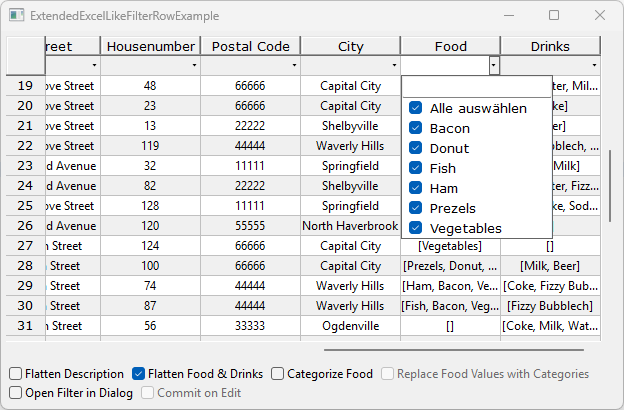
Additionally it is possible to configure value categories, for example categorize multiple single values in the collection values to a category. This makes the filter even more comfortable if a filter for a category automatically filters for multiple values. If value categories are used, it is even possible to configure whether the categories are added on top of the dropdown options, or if the categories should replace the single values.
Similar to the flattening it is possible to configure the categories either via
ConfigRegistryor viaFilterRowComboBoxDataProviderAPI. To configure whether categories for flattened collection values should be used, configure aFilterRowCategoryValueMappereither viaFilterRowConfigAttributes#CATEGORY_VALUE_MAPPERconfiguration attribute or viaFilterRowComboBoxDataProvider#setCategoryValueMapper(int, FilterRowCategoryValueMapper<?>)API. To configure if the categories should be added to the single values or if they should be used instead of the single values use either the configuration attributeFilterRowConfigAttributes#USE_CATEGORIES_ONLYor theFilterRowComboBoxDataProvider#setCategoriesOnly(int, boolean)API.private FilterRowCategoryValueMapper<String> foodCategoryMapper = new FilterRowCategoryValueMapper<String>() { @Override public List<String> valuesToCategories(List<String> values) { if (values == null || values.size() == 0 || !(values.get(0) instanceof String)) { return Collections.emptyList(); } return values.stream().map(value -> { switch (value) { case "Vegetables", "Prezels", "Donut" -> { return "Vegetarian Dish"; } case "Bacon", "Ham" -> { return "Meat Dish"; } case "Fish" -> { return "Fish Dish"; } } return null; }).distinct().collect(Collectors.toList()); } @Override public Collection<String> resolveCategories(Collection<String> valuesWithCategories) { return valuesWithCategories.stream().map(category -> { switch (category) { case "Vegetarian Dish" -> { return Arrays.asList("Vegetables", "Prezels", "Donut"); } case "Meat Dish" -> { return Arrays.asList("Bacon", "Ham"); } case "Fish Dish" -> { return Arrays.asList("Fish"); } } return Arrays.asList(category); }).flatMap(List::stream).distinct().collect(Collectors.toList()); } };filterRowHeaderLayer.getComboBoxDataProvider().setCategoryValueMapper(10, this.foodCategoryMapper); filterRowHeaderLayer.getComboBoxDataProvider().setCategoriesOnly(10, true);The
_6038_ExtendedExcelLikeFilterRowExamplewas added to show the programmatic configuration, usage and behavior of the above configuration options.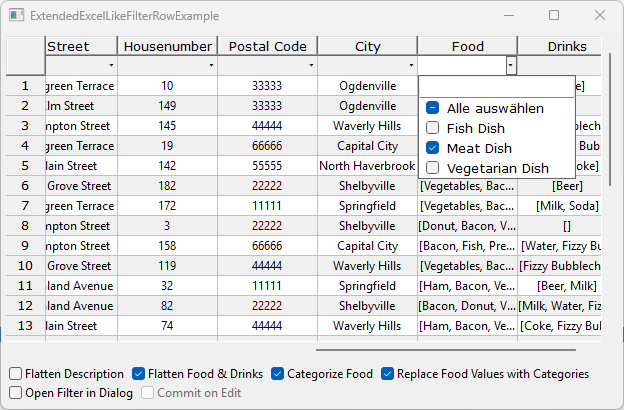
-
Open the filter row cell editor in a dialog
If the Excel-like filter row is used and a column contains a lot of different values, it might be useful to open the filter in a subdialog rather than in a dropdown inside the NatTable.
To configure that a filter editor should be opened in a dialog, the already existing
EditConfigAttributes#OPEN_IN_DIALOGconfiguration attribute needs to be set totrue.configRegistry.registerConfigAttribute( EditConfigAttributes.OPEN_IN_DIALOG, Boolean.TRUE, DisplayMode.EDIT, GridRegion.FILTER_ROW);Whether the filter should be updated directly on editing or on confirm via OK button can be configured via the newly introduced parameter
ICellEditDialog#DIALOG_COMMIT_EDITOR_ON_EDITin the edit dialog settings.Map<String, Object> editDialogSettings = new HashMap<>(); editDialogSettings.put(ICellEditDialog.DIALOG_SHELL_TITLE, "Column Filter"); editDialogSettings.put(ICellEditDialog.DIALOG_SHELL_RESIZABLE, Boolean.TRUE); // add custum message editDialogSettings.put(ICellEditDialog.DIALOG_MESSAGE, "Select the filter values to apply:"); // commit on edit editDialogSettings.put(ICellEditDialog.DIALOG_COMMIT_EDITOR_ON_EDIT, Boolean.TRUE); configRegistry.registerConfigAttribute( EditConfigAttributes.EDIT_DIALOG_SETTINGS, editDialogSettings, DisplayMode.EDIT, GridRegion.FILTER_ROW);The
_6038_ExtendedExcelLikeFilterRowExamplewas added to show the usage and behavior of that configuration options.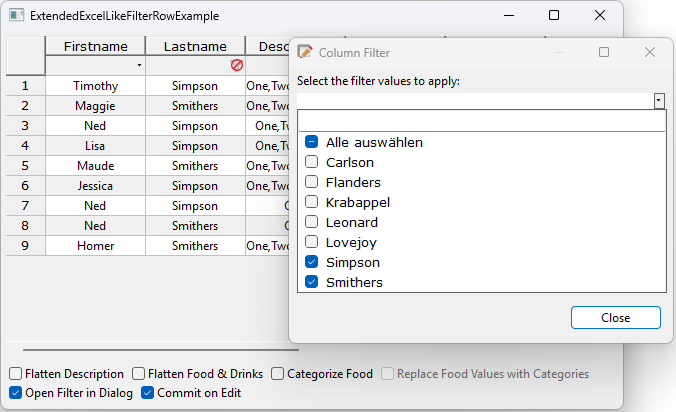
-
SVG Support
Since Eclipse 2025-06 (4.36) SWT supports rendering of SVGs. As the NatTable target platform was is updated to 2026-03, NatTable does now also support the rendering of SVGs. By using SVGs for images in NatTable, the dynamic scaling in percentage mode that was introduced with NatTable 2.6.0 is more useful, as the scaling of SVGs looks better than automatically scaled PNG images.
Internally there is a check if SVG rendering is supported at runtime, to avoid runtime errors if it is tried to load an SVG without the necessary bundles and fragments in place. If there are issues at runtime related to loading SVG images, the SVG support can be disabled by setting the newly introduced system property
org.eclipse.nebula.widgets.nattable.svgSupporttofalse.The default NatTable images in SVG format were contributed by JR-1993, so internally NatTable contains the default images as SVGs and as PNGs as fallback.
-
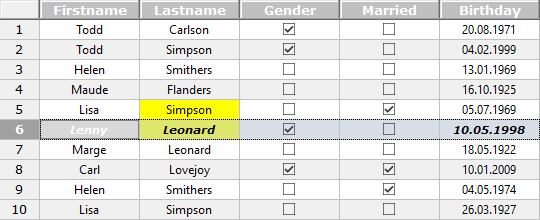
Blended selection background
The
BackgroundPainterwas extended to support blending of background colors for selected cells instead of replacing the background color of a selected cell. This makes it easier to configure the background in different conditional states, as only the conditional state for theNORMALmode needs to be configured.To enable the selection blending, the new configuration attribute
CellConfigAttributes#BLEND_SELECTION_BACKGROUNDneeds to be set totrue. By default the value isfalseto avoid rendering side effects on updating to NatTable 2.7.0.configRegistry.registerConfigAttribute( CellConfigAttributes.BLEND_SELECTION_BACKGROUND, Boolean.TRUE, DisplayMode.NORMAL, GridRegion.BODY);The
_5016_DataChangeLayerExampleand the _5017_DataChangeLayerTempStorageExample were updated to show the usage and behavior of that new selection background blending.