
Aidge ONNX API#
Import#
Method related to the import of an ONNX graph into Aidge.
- aidge_onnx.load_onnx(filename)#
Load an ONNX file and convert it into a
aidge_core.GraphView.- Parameters:
filename (str | bytes | bytearray) – Path to the ONNX file to load, or raw ONNX bytes
- Returns:
Aidge
aidge_core.GraphViewcorresponding to the ONNX model described by the onnx filefilename- Return type:
Register import functions#
- aidge_onnx.node_import.register_import(key: str, converter_function: ConverterType) None#
Add a new conversion function to the
aidge_onnx.node_import.ONNX_NODE_CONVERTER_dictionary. A conversion function must have the following signature :(onnx.NodeProto, list[aidge_core.Node], int) -> aidge_core.Node- Parameters:
key (str) – This chain of characters must correspond to the ONNX type (onnx/onnx) of the operator (in lowercase).
converter_function (Callable[[onnx.NodeProto, list[tuple[
aidge_core.Node], int], int],aidge_core.Node]) – Function which take as an input the ONNX node and a list of aidge nodes and output the corresponding Aidge node. This function must not connect the node. If the function fails to convert the operator, it must returnNone.
- aidge_onnx.node_import.supported_operators() list[str]#
Return a list of operators supported by the ONNX import.
- Returns:
List of string representing the operators supported by the ONNX import.
- Return type:
list[str]
- aidge_onnx.node_import.auto_register_import(*args) Callable[[ConverterType], ConverterType]#
Decorator used to register a converter to the
aidge_onnx.node_import.ONNX_NODE_CONVERTER_Example:
@auto_register_import("myOp")
def my_op_onverter(onnx_node, input_nodes, opset):
    ...
- Parameters:
args – Set of keys (str) which should correspond to the operator type defined by ONNX (onnx/onnx).
- aidge_onnx.node_import.ONNX_NODE_CONVERTER_#
This
defaultdictmaps the ONNX type to a function which can convert an ONNX Node into an Aidge Node. This means that if a key is missing fromaidge_onnx.node_import.ONNX_NODE_CONVERTER_, it will return the functionaidge_onnx.node_import.generic.import_generic()which import the ONNX node as an Aidge generic operator. It is possible to add keys to this dictionary at runtime usingaidge_onnx.node_import.register_converter()oraidge_onnx.node_import.auto_register()
Converters ONNX to Aidge#
- aidge_onnx.node_import.generic.import_generic(onnx_node: NodeProto, input_nodes: list[tuple[Node, int]], opset: int, inputs_tensor_info: list[ValueInfoProto | None]) Node | None#
- Parameters:
onnx_node (onnx.NodeProto) – ONNX node to convert
input_nodes (list[tuple[aidge_core.Node, int]]) – List of tuple of Aidge nodes with their output index, which constitute the input of the current node
opset (int, optional) – Indicate opset version of the ONNX model, default=None
Check ONNX import with Aidge#
If you want to verify the layerwise output consistency between Aidge and ONNX Runtime for your ONNX file, you can use the command-line tool:
usage: aidge_onnx_checker [-h] [--log-dir LOG_DIR] [--atol ATOL] [--rtol RTOL]
                          model_path

Compare ONNXRuntime with Aidge

positional arguments:
  model_path         Path to the ONNX model

options:
  -h, --help         show this help message and exit
  --log-dir LOG_DIR  Directory to save result logs (optional)
  --atol ATOL        Set the absolute precision to compare each value of the
                     intermediate outputs
  --rtol RTOL        Set the relative precision to compare each value of the
                     intermediate outputs
This tool compares the output tensors produced by Aidge and ONNX Runtime for each layer of your model and summarizes the results.
The typical output looks like this:
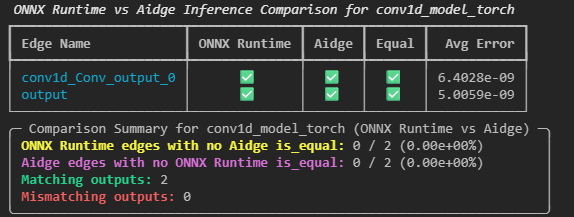
Each edge of the graphs is listed following the model’s topological order. If a layer exists in one framework but not the other, the corresponding column will display a cross (✗) for the missing framework and a check mark (✓) for the available one. This does not necessarily indicate an error in the model loading, it simply means there is no direct equivalent layer between the two frameworks.
The average error shown in the report corresponds to the mean difference between tensor values for all compared layers.
Optionally, the tool can log per-layer error data to a specified folder, making it easier to identify where discrepancies occur within the model.
Clean ONNX file#
When exporting a model to ONNX, the exported graph may be messy.
We defined a CLI tool that use Aidge in order to clean the ONNX.
This tool curate multiple functions (recipes) that are applied to the graph using Aidge graph matching and replacement algorithms. These functions are applied depending on the opset targeted and optimizations level desired by the user.
Optimization level are as follow:
O0: Training safe, with these optimizations the graph is still learnable.O1: Accuracy safe, with these optimizations the graph will be optimized for inference performances, potentially breaking learnability.O2: Approximation, with these optimizations the inference result may diverge from the original one in order to optimize inference speed.
CLI#
The CLI helper is:
usage: onnx_cleaner [-h] [--show-recipes] [-v]
                    [--input-shape INPUT_SHAPE [INPUT_SHAPE ...]]
                    [--ir-version IR_VERSION] [--opset-version OPSET_VERSION]
                    [-O {0,1,2}] [--training-safe] [--allow-nonexact]
                    [--skip SKIP [SKIP ...]] [--compare]
                    [input_model] [output_model]

positional arguments:
  input_model           Path to the input ONNX model.
  output_model          Path to save the simplified ONNX model.

options:
  -h, --help            show this help message and exit

helper / debugging:
  --show-recipes        Show available recipes.
  -v, --verbose         Set the verbosity level of console output. Use -v,
                        -vv, -vvv to increase verbosity.

format options:
  --input-shape INPUT_SHAPE [INPUT_SHAPE ...]
                        Overwrite the input shape. Format:
                        "input_name:dim0,dim1,..." or just "dim0,dim1,..." if
                        only one input. Example: "data:1,3,224,224" or
                        "1,3,224,224".
  --ir-version IR_VERSION
                        Specify ONNX IR version to save the model with.
                        Default: let ONNX decide.
  --opset-version OPSET_VERSION
                        Specify ONNX opset version to save the model with.
                        Default: let ONNX decide.

optimization options:
  -O {0,1,2}, --opt-level {0,1,2}
                        Optimization level: 0 = training-safe (minimal) 1 =
                        accuracy-safe (exact) 2 = approximate perf
                        optimizations
  --training-safe       Resulting graph remains learnable (overrides -O if
                        needed).
  --allow-nonexact      Permit optimizations that may change outputs
                        (accuracy-unsafe) for performance gains (overrides -O
                        if needed).
  --skip SKIP [SKIP ...]
                        Skip specific recipes by class name (e.g. --skip
                        FuseGeLU FuseLayerNorm).
  --compare             Run inference with both original and optimized model,
                        compare results.
Python API#
One can directly use the Python API to simplify an ONNX graph using aidge_onnx.onnx_cleaner.clean_onnx() or a Aidge aidge_core.GraphView using aidge_core.recipes.simplify_graph().
- aidge_onnx.onnx_cleaner.clean_onnx(onnx_to_clean: ModelProto, input_shape: dict[str, list[int]], name: str, ir_version: int | None = None, opset_version: int | None = None, compare: bool = True, skip: list[str] | None = None, training_safe: bool = True, allow_nonexact: bool = False) ModelProto#
Simplify an ONNX model and return the processed graph.
Converts the ONNX model to an Aidge GraphView, applies simplification recipes, and converts back to ONNX. Optionally compares inference results with the original model to verify equivalence.
- Parameters:
onnx_to_clean (onnx.ModelProto) – ONNX model to simplify
input_shape (dict[str, list[int]]) – Dict mapping input names to shape lists in nested format. Format: {name: [[dim1, dim2, …]]} If empty dict, shapes will be inferred from the model.
name (str) – Name for the cleaned model
ir_version (int | None, optional) – ONNX IR version to use for the output model, default=None
opset_version (int | None, optional) – ONNX opset version to use for the output model, default=None
compare (bool, optional) – If True, compare inference results with original model, default=True
skip (list[str] | None, optional) – List of recipe class names to skip, default=None
training_safe (bool, optional) – If True, only apply training-safe recipes, default=True
allow_nonexact (bool, optional) – If True, allow accuracy-unsafe optimizations, default=False
- Returns:
Simplified ONNX model
- Return type:
onnx.ModelProto
Available recipes#
The ONNX cleaner relies on the core Aidge graph manipulation recipes.
If you are looking for the exact Python module reference, see aidge_core.recipes.
Export#
Method related to the export of an Aidge aidge_core.GraphView to an ONNX file.
- aidge_onnx.export_onnx(graph_view: GraphView, path_to_save: str, inputs_dims: dict[str, list[list[int]]] | None = None, outputs_dims: dict[str, list[list[int]]] | None = None, enable_custom_op: bool = False, opset: int | None = None, ir_version: int | None = None)#
Export a
aidge_core.GraphViewto an ONNX file.- Parameters:
graph_view (
aidge_core.GraphView) –aidge_core.GraphViewto convert.path_to_save (str) – Path where to save the ONNX file, example
test.onnxinputs_dims (Mapping[str, list[list[int]]], optional) – input dimensions of the network, if provided,
outputs_dimsmust also be filled, this argument is a map, where the key is the name of the input node and the value is a list of dimensions ordered by the input index, defaults to Noneoutputs_dims (Mapping[str, list[list[int]]], optional) – output dimensions of the network, if provided,
inputs_dimsmust also be filled, this argument is a map, where the key is the name of the output node and the value is a list of dimensions ordered by the output index, defaults to Noneenable_custom_op (bool, optional) – If True, export will not fail for
aidge_core.GenericOperatorand will add the operator schema to a custom aidge domain, defaults to Falseopset (int, optional) – The version of the ONNX opset generated, defaults to None
ir_version (int, optional) – The version of the ONNX intermediate representation, if None the version will be decided by onnx.helper.make_model, defaults to None
Register export functions#
- aidge_onnx.node_export.register_export(key, parser_function) None#
Add a new conversion function to the
aidge_onnx.node_export.AIDGE_NODE_CONVERTER_dictionary. A conversion function must have the following signature :(aidge_core.Node, list[str], list[str], int, bool) -> onnx.NodeProto- Parameters:
key (str) – This chain of characters must correspond to the Aidge type.
converter_function (Callable[[aidge_core.Node, list[str], list[str], int | None], onnx.NodeProto]) – Function which take as an input an Aidge node, list of inputs name, outputs name and a boolean to handle verbosity level.
- aidge_onnx.node_export.supported_operators() list[str]#
Return a list of operators supported by the ONNX export.
- Returns:
List of string representing the operators supported by the ONNX import.
- Return type:
list[str]
- aidge_onnx.node_export.auto_register_export(*args) Callable#
Decorator used to register a converter to the
aidge_onnx.node_export.AIDGE_NODE_CONVERTER_Example:
@auto_register_export("myOp")
def my_op_converter(aidge_node, node_inputs_name, node_outputs_name):
    ...
- Parameters:
args – Set of keys (str) which should correspond to the operator type defined by Aidge.
Converters Aidge to ONNX#
- aidge_onnx.node_export.generic_export.generic_export(aidge_node: Node, node_inputs_name, node_outputs_name, initializer_list: list[TensorProto], opset: int | None = None, enable_custom_op: bool = False) None#
Function to export a
aidge_core.GenericOperatorto an ONNX node- Parameters:
aidge_node (aidge_core.Node) – Aidge node containing a
aidge_core.GenericOperatornode_inputs_name (list[str]) – list of names of inputs node
node_outputs_name (list[str]) – list of names of outputs node
opset (int, optional) – opset to use for the export, defaults to None
enable_custom_op (bool, optional) – If True, the export will not fait if the type associated to the
aidge_core.GenericOperatoris not , defaults to False
Supported operators#
Operator |
Version |
Aidge op. |
Import |
Export |
|---|---|---|---|---|
Abs
|
13 |
AbsOp |
✔️ |
✔️ |
Acos
|
22 |
— |
❌ |
❌ |
Acosh
|
22 |
— |
❌ |
❌ |
Add
|
14 |
AddOp |
✔️ |
✔️ |
AffineGrid
|
20 |
— |
❌ |
❌ |
And
|
7 |
AndOp |
✔️ |
✔️ |
ArgMax
|
13 |
ArgMaxOp |
✔️ |
✔️ |
ArgMin
|
13 |
ArgMinOp |
❌ |
❌ |
Asin
|
22 |
AsinOp |
✔️ |
✔️ |
Asinh
|
22 |
— |
❌ |
❌ |
Atan
|
22 |
AtanOp |
✔️ |
✔️ |
Atanh
|
22 |
— |
❌ |
❌ |
AveragePool
|
22 |
— |
✔️ |
❌ |
—
|
AvgPooling1DOp |
❌ |
✔️ |
|
—
|
AvgPooling2DOp |
❌ |
✔️ |
|
—
|
AvgPooling3DOp |
❌ |
✔️ |
|
—
|
BatchNorm2DOp |
❌ |
✔️ |
|
BatchNormalization
|
15 |
— |
✔️ |
❌ |
Bernoulli
|
22 |
— |
❌ |
❌ |
BitShift
|
11 |
BitShiftOp |
✔️ |
✔️ |
BitwiseAnd
|
18 |
— |
❌ |
❌ |
BitwiseNot
|
18 |
— |
❌ |
❌ |
BitwiseOr
|
18 |
— |
❌ |
❌ |
BitwiseXor
|
18 |
— |
❌ |
❌ |
BlackmanWindow
|
17 |
— |
❌ |
❌ |
Cast
|
21 |
CastOp |
✔️ |
✔️ |
CastLike
|
21 |
CastLikeOp |
❌ |
❌ |
Ceil
|
13 |
CeilOp |
✔️ |
✔️ |
Celu
|
12 |
— |
❌ |
❌ |
CenterCropPad
|
18 |
— |
❌ |
❌ |
Clip
|
13 |
ClipOp |
✔️ |
✔️ |
Col2Im
|
18 |
— |
❌ |
❌ |
—
|
ComplexToInnerPairOp |
❌ |
✔️ |
|
Compress
|
11 |
— |
❌ |
❌ |
Concat
|
13 |
ConcatOp |
✔️ |
✔️ |
ConcatFromSequence
|
11 |
— |
❌ |
❌ |
Constant
|
21 |
— |
✔️ |
❌ |
ConstantOfShape
|
21 |
ConstantOfShapeOp |
✔️ |
✔️ |
Conv
|
22 |
— |
✔️ |
❌ |
—
|
Conv1DOp |
❌ |
✔️ |
|
—
|
Conv2DOp |
❌ |
✔️ |
|
—
|
Conv3DOp |
❌ |
✔️ |
|
—
|
ConvDepthWise1DOp |
❌ |
✔️ |
|
—
|
ConvDepthWise2DOp |
❌ |
✔️ |
|
ConvInteger
|
10 |
— |
✔️ |
❌ |
ConvTranspose
|
22 |
— |
✔️ |
❌ |
—
|
ConvTranspose1DOp |
❌ |
✔️ |
|
—
|
ConvTranspose2DOp |
❌ |
✔️ |
|
—
|
ConvTranspose3DOp |
❌ |
✔️ |
|
Cos
|
22 |
CosOp |
✔️ |
✔️ |
Cosh
|
22 |
CoshOp |
✔️ |
✔️ |
CumSum
|
14 |
— |
❌ |
❌ |
DeformConv
|
22 |
— |
❌ |
❌ |
DepthToSpace
|
13 |
DepthToSpaceOp |
✔️ |
❌ |
DequantizeLinear
|
21 |
— |
✔️ |
❌ |
Det
|
22 |
— |
❌ |
❌ |
DFT
|
20 |
DFTOp |
✔️ |
✔️ |
Div
|
14 |
DivOp |
✔️ |
✔️ |
—
|
DropBlockOp |
❌ |
✔️ |
|
Dropout
|
22 |
DropoutOp |
✔️ |
✔️ |
DynamicQuantizeLinear
|
11 |
— |
❌ |
❌ |
Einsum
|
12 |
— |
❌ |
❌ |
Elu
|
22 |
— |
❌ |
❌ |
Equal
|
19 |
EqualOp |
✔️ |
✔️ |
Erf
|
13 |
ErfOp |
✔️ |
✔️ |
Exp
|
13 |
ExpOp |
✔️ |
✔️ |
Expand
|
13 |
ExpandOp |
✔️ |
✔️ |
EyeLike
|
22 |
— |
❌ |
❌ |
—
|
FCOp |
❌ |
✔️ |
|
Flatten
|
21 |
FlattenOp |
✔️ |
✔️ |
Floor
|
13 |
FloorOp |
✔️ |
✔️ |
Gather
|
13 |
GatherOp |
✔️ |
✔️ |
GatherElements
|
13 |
GatherElementsOp |
✔️ |
✔️ |
GatherND
|
13 |
GatherNDOp |
✔️ |
✔️ |
Gelu
|
20 |
— |
❌ |
✔️ |
Gemm
|
13 |
— |
✔️ |
✔️ |
GlobalAveragePool
|
22 |
— |
✔️ |
❌ |
—
|
GlobalAveragePoolingOp |
❌ |
✔️ |
|
GlobalLpPool
|
22 |
— |
❌ |
❌ |
GlobalMaxPool
|
22 |
— |
✔️ |
❌ |
Greater
|
13 |
GreaterOp |
✔️ |
✔️ |
GreaterOrEqual
|
16 |
GreaterOrEqualOp |
✔️ |
✔️ |
GridSample
|
22 |
GridSampleOp |
✔️ |
❌ |
GroupNormalization
|
21 |
— |
❌ |
❌ |
GRU
|
22 |
— |
✔️ |
❌ |
HammingWindow
|
17 |
— |
❌ |
❌ |
HannWindow
|
17 |
— |
✔️ |
✔️ |
Hardmax
|
13 |
HardmaxOp |
✔️ |
✔️ |
HardSigmoid
|
22 |
HardSigmoidOp |
✔️ |
✔️ |
HardSwish
|
22 |
— |
✔️ |
✔️ |
Identity
|
21 |
IdentityOp |
✔️ |
✔️ |
If
|
21 |
— |
❌ |
❌ |
ImageDecoder
|
20 |
— |
❌ |
❌ |
—
|
InnerPairToComplexOp |
❌ |
✔️ |
|
InstanceNormalization
|
22 |
— |
✔️ |
❌ |
IsInf
|
20 |
— |
❌ |
❌ |
IsNaN
|
20 |
— |
❌ |
❌ |
LayerNormalization
|
17 |
— |
✔️ |
❌ |
LeakyRelu
|
16 |
LeakyReLUOp |
✔️ |
✔️ |
Less
|
13 |
LessOp |
✔️ |
✔️ |
LessOrEqual
|
16 |
LessOrEqualOp |
✔️ |
✔️ |
—
|
LnOp |
❌ |
✔️ |
|
Log
|
13 |
— |
✔️ |
❌ |
LogSoftmax
|
13 |
LogSoftmaxOp |
✔️ |
✔️ |
Loop
|
21 |
— |
❌ |
❌ |
LpNormalization
|
22 |
— |
❌ |
❌ |
LpPool
|
22 |
— |
❌ |
❌ |
LRN
|
13 |
LRNOp |
✔️ |
✔️ |
LSTM
|
22 |
— |
✔️ |
❌ |
MatMul
|
13 |
MatMulOp |
✔️ |
✔️ |
MatMulInteger
|
10 |
— |
❌ |
❌ |
Max
|
13 |
MaxOp |
✔️ |
✔️ |
MaxPool
|
22 |
— |
✔️ |
❌ |
—
|
MaxPooling1DOp |
❌ |
✔️ |
|
—
|
MaxPooling2DOp |
❌ |
✔️ |
|
—
|
MaxPooling3DOp |
❌ |
✔️ |
|
MaxRoiPool
|
22 |
— |
❌ |
❌ |
MaxUnpool
|
22 |
— |
❌ |
❌ |
Mean
|
13 |
— |
❌ |
❌ |
MeanVarianceNormalization
|
13 |
— |
❌ |
❌ |
MelWeightMatrix
|
17 |
— |
❌ |
❌ |
Min
|
13 |
MinOp |
✔️ |
✔️ |
Mish
|
22 |
— |
❌ |
❌ |
Mod
|
13 |
ModOp |
✔️ |
✔️ |
Mul
|
14 |
MulOp |
✔️ |
✔️ |
Multinomial
|
22 |
— |
❌ |
❌ |
Neg
|
13 |
NegOp |
✔️ |
✔️ |
NegativeLogLikelihoodLoss
|
22 |
— |
❌ |
❌ |
NonMaxSuppression
|
11 |
NonMaxSuppressionOp |
✔️ |
✔️ |
NonZero
|
13 |
NonZeroOp |
✔️ |
✔️ |
Not
|
1 |
NotOp |
✔️ |
✔️ |
OneHot
|
11 |
OneHotOp |
✔️ |
✔️ |
Optional
|
15 |
— |
❌ |
❌ |
OptionalGetElement
|
18 |
— |
❌ |
❌ |
OptionalHasElement
|
18 |
— |
❌ |
❌ |
Or
|
7 |
— |
❌ |
❌ |
Pad
|
21 |
PadOp |
✔️ |
✔️ |
Pow
|
15 |
PowOp |
✔️ |
✔️ |
PRelu
|
16 |
— |
❌ |
❌ |
—
|
ProducerOp |
❌ |
✔️ |
|
QLinearConv
|
10 |
— |
✔️ |
✔️ |
QLinearMatMul
|
21 |
— |
✔️ |
✔️ |
QuantizeLinear
|
21 |
— |
✔️ |
❌ |
RandomNormal
|
22 |
— |
❌ |
❌ |
RandomNormalLike
|
22 |
RandomNormalLikeOp |
✔️ |
✔️ |
RandomUniform
|
22 |
— |
❌ |
❌ |
RandomUniformLike
|
22 |
— |
❌ |
❌ |
Range
|
11 |
RangeOp |
✔️ |
✔️ |
Reciprocal
|
13 |
ReciprocalOp |
✔️ |
✔️ |
ReduceL1
|
18 |
— |
✔️ |
✔️ |
ReduceL2
|
18 |
— |
✔️ |
✔️ |
ReduceLogSum
|
18 |
— |
❌ |
❌ |
ReduceLogSumExp
|
18 |
— |
❌ |
❌ |
ReduceMax
|
20 |
ReduceMaxOp |
✔️ |
✔️ |
ReduceMean
|
18 |
ReduceMeanOp |
✔️ |
✔️ |
ReduceMin
|
20 |
ReduceMinOp |
✔️ |
✔️ |
ReduceProd
|
18 |
— |
❌ |
❌ |
ReduceSum
|
13 |
ReduceSumOp |
✔️ |
✔️ |
ReduceSumSquare
|
18 |
— |
❌ |
❌ |
RegexFullMatch
|
20 |
— |
❌ |
❌ |
Relu
|
14 |
ReLUOp |
✔️ |
✔️ |
Reshape
|
21 |
ReshapeOp |
✔️ |
✔️ |
Resize
|
19 |
ResizeOp |
✔️ |
✔️ |
ReverseSequence
|
10 |
— |
❌ |
❌ |
RNN
|
22 |
— |
❌ |
❌ |
RoiAlign
|
22 |
— |
❌ |
❌ |
Round
|
22 |
RoundOp |
✔️ |
✔️ |
Scan
|
21 |
— |
❌ |
❌ |
Scatter
|
11 |
ScatterOp |
❌ |
✔️ |
ScatterElements
|
18 |
— |
✔️ |
❌ |
ScatterND
|
18 |
— |
❌ |
❌ |
—
|
SDLayerNormOp |
❌ |
✔️ |
|
—
|
SDShiftGELUOp |
❌ |
✔️ |
|
—
|
SDShiftmaxOp |
❌ |
✔️ |
|
—
|
SDShiftSiLUOp |
❌ |
✔️ |
|
Selu
|
22 |
— |
❌ |
❌ |
SequenceAt
|
11 |
— |
❌ |
❌ |
SequenceConstruct
|
11 |
— |
❌ |
❌ |
SequenceEmpty
|
11 |
— |
❌ |
❌ |
SequenceErase
|
11 |
— |
❌ |
❌ |
SequenceInsert
|
11 |
— |
❌ |
❌ |
SequenceLength
|
11 |
— |
❌ |
❌ |
SequenceMap
|
17 |
— |
❌ |
❌ |
Shape
|
21 |
ShapeOp |
✔️ |
✔️ |
Shrink
|
9 |
— |
❌ |
❌ |
Sigmoid
|
13 |
SigmoidOp |
✔️ |
✔️ |
Sign
|
13 |
SignOp |
❌ |
❌ |
Sin
|
22 |
SinOp |
✔️ |
✔️ |
Sinh
|
22 |
SinhOp |
✔️ |
✔️ |
Size
|
21 |
SizeOp |
✔️ |
✔️ |
Slice
|
13 |
SliceOp |
✔️ |
✔️ |
Softmax
|
13 |
SoftmaxOp |
✔️ |
✔️ |
SoftmaxCrossEntropyLoss
|
13 |
— |
❌ |
❌ |
Softplus
|
22 |
— |
✔️ |
✔️ |
Softsign
|
22 |
— |
❌ |
❌ |
SpaceToDepth
|
13 |
— |
❌ |
❌ |
Split
|
18 |
SplitOp |
✔️ |
✔️ |
SplitToSequence
|
11 |
— |
❌ |
❌ |
Sqrt
|
13 |
SqrtOp |
✔️ |
✔️ |
Squeeze
|
21 |
SqueezeOp |
✔️ |
✔️ |
STFT
|
17 |
STFTOp |
✔️ |
✔️ |
StringConcat
|
20 |
— |
❌ |
❌ |
StringNormalizer
|
10 |
— |
❌ |
❌ |
StringSplit
|
20 |
— |
❌ |
❌ |
Sub
|
14 |
SubOp |
✔️ |
✔️ |
Sum
|
13 |
SumOp |
✔️ |
✔️ |
Tan
|
22 |
TanOp |
✔️ |
✔️ |
Tanh
|
13 |
TanhOp |
✔️ |
✔️ |
TfIdfVectorizer
|
9 |
— |
❌ |
❌ |
ThresholdedRelu
|
22 |
— |
❌ |
❌ |
Tile
|
13 |
TileOp |
✔️ |
✔️ |
TopK
|
11 |
TopKOp |
✔️ |
✔️ |
Transpose
|
21 |
TransposeOp |
✔️ |
✔️ |
Trilu
|
14 |
TriluOp |
✔️ |
✔️ |
Unique
|
11 |
— |
❌ |
❌ |
Unsqueeze
|
21 |
UnsqueezeOp |
✔️ |
✔️ |
Upsample
|
10 |
— |
❌ |
❌ |
Where
|
16 |
WhereOp |
✔️ |
✔️ |
Xor
|
7 |
— |
❌ |
❌ |