
Git Issue Reporting
Git Issue Reporting
The git issue reporting feature allows users to automatically submit an issue to GitLab or GitHub whenever a major exception occurs within the 4diac IDE. It can be configured via
Preferences → 4diac IDE → Git Issue Reporting
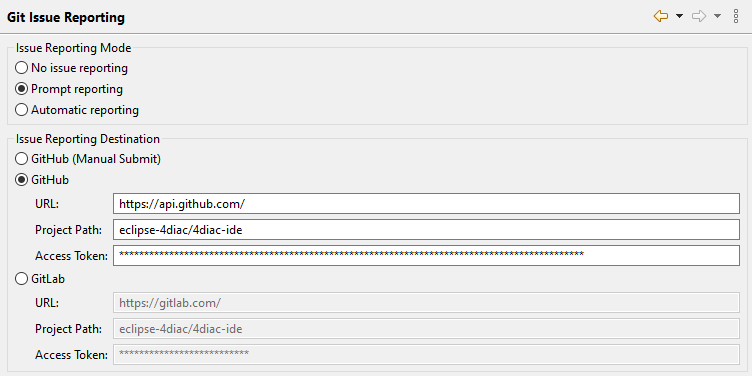
Users can configure three reporting modes:
-
No issue reporting: The error popup dialog will ask the user to report any occurring issue, but no option to do so automatically will be given. (Buttons are "OK" & "Details")
-
Prompt reporting (default): The error popup dialog will present a choice whether the user wants to automatically submit the issue or not. (Buttons are "Report Issue", "Close" & "Details")
-
Automatic reporting: The issue will be automatically reported when the error dialog is opened. (Buttons are "Close" & "Details")
To automatically report issues, a destination must be selected. Currently, GitLab and GitHub are available destination options. The manual GitHub reporting will open a browser to the main 4diac IDE repository and fill out the details of a new issue.
The two API reporting methods require the user to fill out the project path, URL, and access token.
The project path usually has the format <owner>/<project name>. For example, the project path to submit issues to the official 4diac IDE repository on GitHub would be eclipse-4diac/4diac-ide.
The access token must be generated by GitLab or GitHub user profiles accordingly. Please check the official documentation for GitLab and GitHub for more information.
Note that for fine-grained GitHub tokens, write permissions for issues must be explicitly given.
Since GitLab and GitHub can be hosted on custom domains, an additional base URL must be specified in the preferences, which links to the GitLab or GitHub instance.
Reporting Result
Once the reporting preferences are configured, users can easily report occurring exceptions. The issue will contain the 4diac IDE version and a stack trace. Additionally, a random session ID is provided, which can help identify issues that occur because of preceding issues. The labels "autoreport" and "bug" are added to issues which have been reported via the APIs.
To create the issues, API calls to GitLab and GitHub are made, the documentation for these specific calls can be found under the following links: