
Aidge quantization API#
Post-Training Quantization (PTQ)#
PTQ Overview#
In order to perform Post-Training Quantization (PTQ) with AIDGE, you will need to create an instance of the PTQ object over an existing GraphView. This object can be configured at construction, or afterwards, using the exposed configuration flags. To obtain the quantized version of the input GraphView, you will need to call the process() function of the PTQ instance, which takes a calibration dataset as an argument. You can also let the quantization ignore some nodes by using the not_quantize_node() function of the quantization module. Overall, the process looks like so :
ptq = aidge_quantization.PTQ(
        aidge_model,
        activation_precision=aidge_core.dtype.int8,
        accumulation_precision=aidge_core.dtype.int32,
        inference_precision=aidge_core.dtype.float32,
    )

ptq.channel_wise = False
ptq.use_zero_point = False

quantized_model = ptq.process(calibration_set)
Once the GraphView is quantized, you can check the internal error induced by the quantization process, node by node, using the diagnostic API:
diag = ptq.get_diagnostic()
report = diag.compute_quantization_errors(
    ["SNR"], isolate_error=False, producer_error=False
)
The main components of the PTQ API are listed below:
- class aidge_quantization.PTQ#
- class aidge_quantization.PTQDiagnostic#
- aidge_quantization.not_quantize_node(node: aidge_core.aidge_core.Node) None#
Performances#
Model |
FP acc. |
Scheme |
Requant. |
Quant. acc. |
|---|---|---|---|---|
69.748% |
W8A8 TW |
none |
69.162% |
|
W8A8 TW |
single shift |
67.406% |
||
70.832% |
W8A8 TW |
none |
64.692% |

Quantization Aware training (QAT)#
Configuration#
Before applying a QAT method, one must first annotate the wanted precisions in the graph. This can be done by hand, node by node, or automatically for the whole graph using the following helpers.
A typical usage example would be the following:
# Set the input/activation precision to int4
aidge_quantization.qat.apply_precision(
    aidge_model, aidge_quantization.qat.INPUT_PRECISION_ATTR, aidge_core.dtype.int4
)
# Set the weight precision to int4
aidge_quantization.qat.apply_precision(
    aidge_model, aidge_quantization.qat.PARAM_PRECISION_ATTR, aidge_core.dtype.int4
)

# Keep first and last layer at 8-bits input precision
aidge_quantization.qat.apply_precision_to_first(
    aidge_model,
    aidge_quantization.qat.INPUT_PRECISION_ATTR,
    aidge_core.dtype.int8,
    depth=1,
)
aidge_quantization.qat.apply_precision_to_last(
    aidge_model,
    aidge_quantization.qat.INPUT_PRECISION_ATTR,
    aidge_core.dtype.int8,
    depth=1,
)
- aidge_quantization.qat.apply_precision(*args, **kwargs)#
Overloaded function.
apply_precision(network: aidge_core.aidge_core.GraphView, precision_key: str, precision: aidge_core.aidge_core.dtype) -> None
Set a size-1 precision list on every linear node.
apply_precision(nodes: collections.abc.Sequence[aidge_core.aidge_core.Node], precision_key: str, precision: aidge_core.aidge_core.dtype) -> None
- aidge_quantization.qat.apply_precisions(*args, **kwargs)#
Overloaded function.
apply_precisions(network: aidge_core.aidge_core.GraphView, precision_key: str, precisions: collections.abc.Sequence[aidge_core.aidge_core.dtype]) -> None
Set a candidate list of DataTypes on every linear node.
apply_precisions(nodes: collections.abc.Sequence[aidge_core.aidge_core.Node], precision_key: str, precisions: collections.abc.Sequence[aidge_core.aidge_core.dtype]) -> None
- aidge_quantization.qat.apply_precision_to_first(network: aidge_core.aidge_core.GraphView, precision_key: str, precision: aidge_core.aidge_core.dtype, depth: SupportsInt | SupportsIndex = 1) None#
- aidge_quantization.qat.apply_precision_to_last(network: aidge_core.aidge_core.GraphView, precision_key: str, precision: aidge_core.aidge_core.dtype, depth: SupportsInt | SupportsIndex = 1) None#
- aidge_quantization.qat.apply_precisions_to_first(network: aidge_core.aidge_core.GraphView, precision_key: str, precisions: collections.abc.Sequence[aidge_core.aidge_core.dtype], depth: SupportsInt | SupportsIndex = 1) None#
- aidge_quantization.qat.apply_precisions_to_last(network: aidge_core.aidge_core.GraphView, precision_key: str, precisions: collections.abc.Sequence[aidge_core.aidge_core.dtype], depth: SupportsInt | SupportsIndex = 1) None#
- aidge_quantization.qat.clear_precision(*args, **kwargs)#
Overloaded function.
clear_precision(network: aidge_core.aidge_core.GraphView, precision_key: str) -> None
clear_precision(nodes: collections.abc.Sequence[aidge_core.aidge_core.Node], precision_key: str) -> None
- aidge_quantization.qat.has_precision(node: aidge_core.aidge_core.Node, precision_key: str) bool#
- aidge_quantization.qat.get_precisions(node: aidge_core.aidge_core.Node, precision_key: str) list[aidge_core.aidge_core.dtype]#
Return the list of allowed DataTypes; empty if absent.
- aidge_quantization.qat.is_fixed_precision(node: aidge_core.aidge_core.Node, precision_key: str) bool#
True if and only if the attribute holds exactly one DataType.
- aidge_quantization.qat.get_fixed_bits(node: aidge_core.aidge_core.Node, precision_key: str) int#
Bit width of the unique precision, or 0 for a candidate set / absent attribute.
LSQ method#
- aidge_quantization.lsq.setup_quantizers(*args, **kwargs)#
Overloaded function.
setup_quantizers(network: aidge_core.aidge_core.GraphView) -> None
Insert the LSQ quantizers in the network and add a the initialization call to the forward stack.
- param network:
The GraphView to be trained.
- type network:
setup_quantizers(network: aidge_core.aidge_core.GraphView, nb_bits: typing.SupportsInt | typing.SupportsIndex) -> None
Deprecated overload. Use setup_quantizers(network) instead.
- aidge_quantization.lsq.post_training_transform(network: aidge_core.aidge_core.GraphView, true_integers: bool) None#
Transform a LSQ-quantized graph to a standard quantized graph ready for integer inference.
This method rewrites the graph in place by replacing Learned Step Size Quantization (LSQ) nodes with explicit quantizers, quantizing linear-layer biases, optionally fusing Batch Normalization into linear operators, and introducing explicit scaling operations to preserve the effective output scale.
The transformation applies to
Conv2D,PaddedConv2D,ConvDepthWise2D,PaddedConvDepthWise2D, and fully connected (FC) operators.- Parameters:
graphView (GraphView) – Graph to transform. The graph is modified in place.
true_integers (bool) – If
True, use integer data types for quantized computations wherever supported. Input and parameter quantizer precisions are obtained from the corresponding QAT precision annotations. Non-negative input quantization ranges are mapped to unsigned types. Biases useint32when supported by the transformation, and the linear output is converted to int32 before being cast tofloat32for the explicit scaling operation.
- Raises:
AssertionError – If an input LSQ node cannot be found upstream of a supported linear operator.
Transformation details:
Locate linear operators and LSQ nodes
The method searches for convolution, depthwise convolution, padded convolution, padded depthwise convolution, and fully connected nodes.
For each linear operator, it identifies the upstream input LSQ node by traversing the graph backwards through non-LSQ nodes. The parameter LSQ node is obtained from the linear operator’s second parent.
If the expected input LSQ node cannot be found, the method raises an assertion error.
Replace LSQ nodes with standard quantizers
Let \(s_x\) denote the input LSQ step size and \(s_w\) the parameter LSQ step size.
The corresponding quantizers use the reciprocal step sizes:
\[\begin{split}Q_x(x) = \operatorname{Quantize}\left(x;\frac{1}{s_x},0\right) \\ Q_w(w) = \operatorname{Quantize}\left(w;\frac{1}{s_w},0\right)\end{split}\]The quantizers preserve the clipping ranges of their respective LSQ nodes, use zero offset, and have
float32input data types.When
true_integersisTrue, the output data types are selected using the input-precision and parameter-precision QAT annotations. If the input LSQ range is non-negative, the input data type is converted to its unsigned counterpart.Operators along the path from the input LSQ node to the linear operator are assigned the selected input quantization data type.
Quantize the linear bias
The input and parameter step sizes define the base scaling factor:
\[S_0 = s_x s_w\]The bias quantizer uses the reciprocal of this factor:
\[S_b = \frac{1}{S_0} = \frac{1}{s_x s_w}\]When
true_integersisTrueand Batch Normalization is not detected immediately after the linear operator, the bias is quantized inint32, thus introducing a slight rounding approximation.Fuse Batch Normalization into the linear operator
If Batch Normalization is present, its parameters are folded into the linear operator’s bias and its multiplicative factor is incorporated into a per-channel scaling tensor.
Let \(u_c\) denote the linear accumulation for output channel \(c\), excluding the bias. Let \(b_c\) denote the linear bias in the quantized accumulation domain. The corresponding pre-normalization output in the real domain is
\[y_c = S_0 (u_c + b_c)\]Let \(\gamma_c\), \(\beta_c\), \(\mu_c\), and \(v_c\) denote the Batch Normalization scale, shift, running mean, and running variance, respectively. Let \(\epsilon\) denote the Batch Normalization epsilon.
The inference-time Batch Normalization equation is
\[\operatorname{BN}(y_c) = \gamma_c \frac{y_c - \mu_c}{\sqrt{v_c + \epsilon}} + \beta_c\]The per-channel output scaling is then
\[S_c = S_0 \frac{\gamma_c} {\sqrt{v_c + \epsilon}}\]The fused bias is computed by the implementation as
\[b'_c = \operatorname{round}\left( b_c - \frac{\mu_c}{S_0} + \frac{\beta_c}{S_c}\right)\]After fusion, the scaled linear output is
\[y'_c = S_c (u_c + b'_c)\]Therefore, Batch Normalization can be removed from the graph while preserving its affine transformation, with a slight approximation due to fused-bias rounding if
true_integersisTrue.Insert an explicit output scaling operation
A multiplication node is inserted after each processed linear operator.
If Batch Normalization was fused, the scaling tensor contains one value per output channel and has shape
\[(1,C_{\mathrm{out}},1,1)\]Otherwise, the scaling tensor contains the scalar
\[S_0 = s_x s_w\]The multiplication restores the effective output scale after the quantized linear computation.
When
true_integersisTrue, the linear operator output is int32 and a cast to float32 is inserted before the scaling operation.Fold constant producers
The method searches for
Producer->Quantizerpatterns and applies constant folding to the producer. This allows quantization operations on constant tensors to be evaluated ahead of inference.Fuse compatible scaling and quantization operations
Finally,
fuseScalingsAndQuantizers(graphView)is called to combine or absorb scaling operations and quantizers whenever the graph structure permits.
Notes:
The graph is modified in place. Nodes may be replaced, inserted, removed, or assigned new data types.
Batch Normalization fusion requires a
BatchNorm2Dnode immediately after a supported linear operator. An optionalReLUmay follow it.The fused bias is rounded, so exact floating-point equivalence is not guaranteed.
The transformation assumes that the LSQ nodes, QAT precision annotations, linear operator inputs, and Batch Normalization parameters conform to the expected graph structure.
SAT method#
- aidge_quantization.sat.insert_param_clamping(network: aidge_core.aidge_core.GraphView) None#
Insert a TanhClamp node on the weight input of every linear node that carries a fixed precision under
aidge_quantization.qat.PARAM_PRECISION_ATTR.- Parameters:
network (aidge_core.GraphView) – The GraphView to modify.
- aidge_quantization.sat.insert_param_scaling_adjust(network: aidge_core.aidge_core.GraphView) None#
Insert ScaleAdjust nodes on the weight input of every linear node that carries a fixed precision under
aidge_quantization.qat.PARAM_PRECISION_ATTR, except those followed by a BatchNorm2D (paper 3.3.1: BN absorbs the rescaling).- Parameters:
network (aidge_core.GraphView) – The GraphView to modify.
- aidge_quantization.sat.insert_sat_nodes(network: aidge_core.aidge_core.GraphView) None#
Run
insert_param_clampingfollowed byinsert_param_scaling_adjust.This is the Phase-1 entry point: it wraps every parametrized linear node with the SAT clamp/scale chain, but does not insert any quantizer yet. Train the resulting model with the usual optimizer to obtain the “SAT parametrized but unquantized” stage.
- Parameters:
network (aidge_core.GraphView) – The GraphView to modify.
- aidge_quantization.sat.insert_param_quantizers(network: aidge_core.aidge_core.GraphView, mode: aidge_quantization.aidge_quantization_cuda.DoReFaMode = <DoReFaMode.Offset: 0>) None#
Insert DoReFa weight quantizers on every linear node carrying a fixed precision under
aidge_quantization.qat.PARAM_PRECISION_ATTR.The bit width is read from the attribute; the
modeargument selects which DoReFa scheme is used:DoReFaMode.Offset— Q = 2*q_k(0.5*(x+1)) - 1, codes in[0, 2^b - 1]. Correct for b >= 1.
DoReFaMode.Symmetric— Q = q_k(x), codes in[-2^(b-1)+1, 2^(b-1)-1]. Requires b >= 2.
- Parameters:
network (aidge_core.GraphView) – The GraphView to modify.
mode (aidge_quantization.DoReFaMode) – DoReFa scheme.
- aidge_quantization.sat.insert_activ_quantizers(network: aidge_core.aidge_core.GraphView, init_alpha: SupportsFloat | SupportsIndex = 1.0) None#
Insert CG-PACT activation quantizers on every linear node carrying a fixed precision under
aidge_quantization.qat.INPUT_PRECISION_ATTR.The bit width is read from the attribute.
init_alphasets the initial value of the trainable clipping level; the paper uses 8.0 for ImageNet-scale post-ReLU activations, but CIFAR-scale networks are usually better off around 1.0 - 2.0.- Parameters:
network (aidge_core.GraphView) – The GraphView to modify.
init_alpha (float) – Initial CG-PACT alpha (must be > 0).
- aidge_quantization.sat.post_training_transform(network: aidge_core.aidge_core.GraphView, true_integers: bool) None#
Fold the SAT parametrization into a standard export graph:
TanhClamp and ScaleAdjust are absorbed and the weight producer is overwritten with its integer levels;
DoReFa nodes are removed (their effect is captured by the integer weight and the output Mul);
CG-PACT nodes are replaced with a standard
QuantizerMetaOperator on the activation path;a
Mulnode rescales the output of each linear layer to undo the DoReFa/ScaleAdjust/CG-PACT code-to-real conversion.
- Parameters:
network (aidge_core.GraphView) – The GraphView trained with SAT.
true_integers (bool) – If True, switch the linear ops to Int32 so downstream kernels run in integer precision.
Predefined operators#
CGPACT#
        %%{init: {'flowchart': { 'curve': 'monotoneY'}, 'fontFamily': 'Verdana' } }%%
graph TD

    Op("<b>CGPACTOp</b>


    "):::operator

    In0[data_input]:::text-only -->|"In[0]"| Op
    In1[alpha]:::text-only -->|"In[1]"| Op


    Op -->|"Out[0]"| Out0[data_output]:::text-only


    classDef text-only fill-opacity:0, stroke-opacity:0;

    classDef operator stroke-opacity:0;
- aidge_quantization.aidge_quantization_cuda.CGPACT(range: SupportsInt | SupportsIndex = 255, name: str = '') aidge_core.aidge_core.Node#
DoReFa#
        %%{init: {'flowchart': { 'curve': 'monotoneY'}, 'fontFamily': 'Verdana' } }%%
graph TD

    Op("<b>DoReFaOp</b>


    "):::operator

    In0[data_input]:::text-only -->|"In[0]"| Op


    Op -->|"Out[0]"| Out0[data_output]:::text-only


    classDef text-only fill-opacity:0, stroke-opacity:0;

    classDef operator stroke-opacity:0;
- aidge_quantization.aidge_quantization_cuda.DoReFa(range: typing.SupportsInt | typing.SupportsIndex = 255, mode: aidge_quantization.aidge_quantization_cuda.DoReFaMode = <DoReFaMode.Offset: 0>, name: str = '') aidge_core.aidge_core.Node#
-
std::shared_ptr<Node> Aidge::DoReFa(std::size_t range = 255, DoReFaMode mode = DoReFaMode::Offset, const std::string &name = "")#
Factory function to create a DoReFa operator node.
- Parameters:
range – Quantization range (default: 255)
mode – Quantization mode (default: Default)
name – Node name (default: empty)
- Returns:
std::shared_ptr<Node> Shared pointer to the created node
FixedQ#
        %%{init: {'flowchart': { 'curve': 'monotoneY'}, 'fontFamily': 'Verdana' } }%%
graph TD

    Op("<b>FixedQOp</b>


    "):::operator

    In0[data_input]:::text-only -->|"In[0]"| Op


    Op -->|"Out[0]"| Out0[data_output]:::text-only


    classDef text-only fill-opacity:0, stroke-opacity:0;

    classDef operator stroke-opacity:0;
- aidge_quantization.aidge_quantization_cuda.FixedQ(nb_bits: SupportsInt | SupportsIndex = 8, span: SupportsFloat | SupportsIndex = 4.0, is_output_unsigned: bool = False, name: str = '') aidge_core.aidge_core.Node#
LSQ#
        %%{init: {'flowchart': { 'curve': 'monotoneY'}, 'fontFamily': 'Verdana' } }%%
graph TD

    Op("<b>LSQOp</b>


    "):::operator

    In0[data_input]:::text-only -->|"In[0]"| Op
    In1[step_size]:::text-only -->|"In[1]"| Op


    Op -->|"Out[0]"| Out0[data_output]:::text-only


    classDef text-only fill-opacity:0, stroke-opacity:0;

    classDef operator stroke-opacity:0;
- aidge_quantization.aidge_quantization_cuda.LSQ(range: tuple[SupportsInt | SupportsIndex, SupportsInt | SupportsIndex] = (0, 255), nb_channels: SupportsInt | SupportsIndex = 1, name: str = '') aidge_core.aidge_core.Node#
ScaleAdjust#
        %%{init: {'flowchart': { 'curve': 'monotoneY'}, 'fontFamily': 'Verdana' } }%%
graph TD

    Op("<b>ScaleAdjustOp</b>


    "):::operator

    In0[data_input]:::text-only -->|"In[0]"| Op


    Op -->|"Out[0]"| Out0[data_output]:::text-only
    Op -->|"Out[1]"| Out1[scaling]:::text-only


    classDef text-only fill-opacity:0, stroke-opacity:0;

    classDef operator stroke-opacity:0;
- aidge_quantization.aidge_quantization_cuda.ScaleAdjust(name: str = '') aidge_core.aidge_core.Node#
TanhClamp#
        %%{init: {'flowchart': { 'curve': 'monotoneY'}, 'fontFamily': 'Verdana' } }%%
graph TD

    Op("<b>TanhClampOp</b>


    "):::operator

    In0[data_input]:::text-only -->|"In[0]"| Op


    Op -->|"Out[0]"| Out0[data_output]:::text-only
    Op -->|"Out[1]"| Out1[scaling]:::text-only


    classDef text-only fill-opacity:0, stroke-opacity:0;

    classDef operator stroke-opacity:0;
- aidge_quantization.aidge_quantization_cuda.TanhClamp(name: str = '') aidge_core.aidge_core.Node#
Importing and exporting quantized models to ONNX#
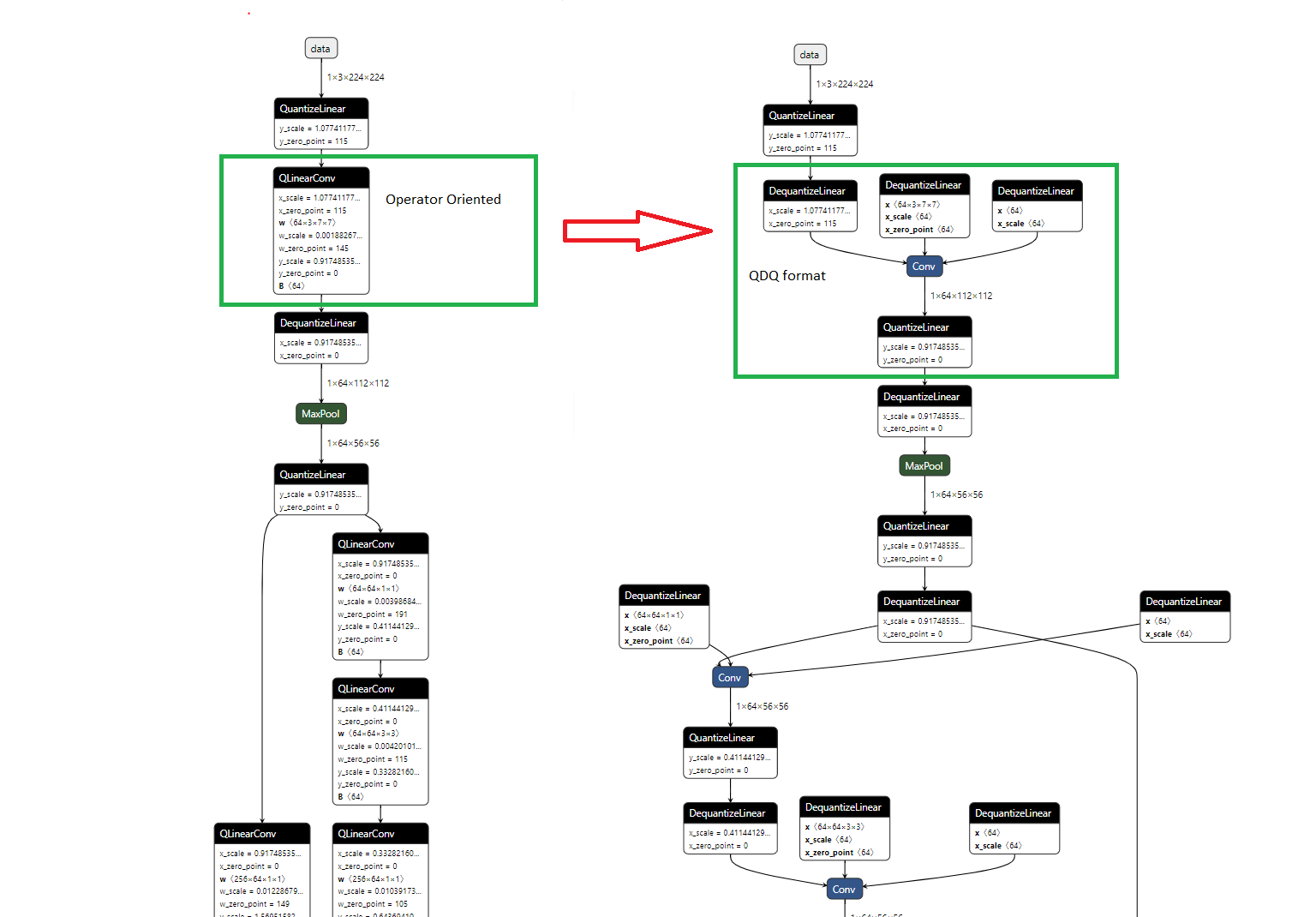
ONNX uses different representations for quantized models than Aidge. The ONNX standard distinguishes two formats for quantized models:
QOP or QOperator: Similar to a fully quantized Operator, it takes int8 as input and returns int8 as output. Although under the hood it is equivalent to QDQ.
QDQ or Quantize-Dequantize: Uses the full precision operator and inserts quantize and dequantize nodes.
See figure below:
For more information please refer to ONNX documentation.
In order to handle export of quantized models to ONNX, we propose multiple functions to transform an Aidge quantized graph to/from the QDQ and QOP format.
QDQ/QOP work with different dynamics than Aidge quantization, meaning that the transformation to and from QDQ is not straightforward and there is a risk of precision, approximation or rounding errors appearing. If you would like to understand in more detail how these functions work, see the “transformation method” subsection.
The following methods enable transforming the graph before exporting it to ONNX.
- aidge_quantization.set_to_qdq(graph_view)#
Transform a freshly quantized model to QDQ format.
This function is only guaranteed to work on quantized graph that hasn’t been modified!
- aidge_quantization.set_to_qop(graph, qops_selected=[], qdq_needed=False)#
The following methods enable transforming a graph loaded from ONNX to make it compatible with the Aidge representation (for example for export)
- aidge_quantization.from_qop(graph_view, qops_to_expand=[], to_qdq=False)#
- aidge_quantization.from_qdq(graph_view)#
Usage example:#
Convert a quantized Aidge model to QDQ (resp. QOP)
quantized_network: aidge_core.GraphView = ...

aidge_quantization.set_to_qdq(quantized_network)
# Model is ready to be exported!
aidge_onnx.export_onnx(quantized_network, "QDQ_network")
Load a QDQ model (ORT quantized model):
quantized_network: aidge_core.GraphView = aidge_onnx.load("QDQ_network")

aidge_quantization.from_qdq(quantized_network)
# quantized_network is now Aidge compatible!
For a more complete example and tutorial, please refer to QDQ_ONNX_tutorial
Transformation method:#
In Aidge, quantization manages only the quantized dtype (most often int8), performing inference in int8 or int32 for accumulations. Contrary to Aidge, and as mentioned previously, QDQ and by extension QOP, surround their operators with Dequantizers at their inputs and quantize nodes at their outputs. While keeping the operator in full precision.
One performs computations in int8 (or int32 for accumulations), while the other performs all operations in full precision. Meaning that just adding or removing Dequantizer nodes would not work because the dynamics change.
To take into account these modifications, the following formulas are used:
Affine operators, FC example:
In Aidge a quantized FC would look like:
        %%{init: {'flowchart': { 'curve': 'monotoneY'}, 'fontFamily': 'Verdana' } }%%
flowchart TD
input0((in#0)):::inputCls -->|Float32| Q_in["Quantize_in<br/>Sx"]
Q_in -->|Int8| FC1["FC_1"]

W1["W_1"] -->|Float32| Q_w["Quantize_w<br/>Sw"]
Q_w -->|Int8| FC1

B1["B_1"] -->|Float32| Q_b["Quantize_b<br/>Sb"]
Q_b -->|Int32| FC1

FC1 -->|Int32| Q_y["Quantize_y<br/>Sy"]

Q_y -->|int8| output0((out#0)):::outputCls

classDef inputCls fill:#afa
classDef outputCls fill:#ffa
While in QDQ, it would look like:
        %%{init: {'flowchart': { 'curve': 'monotoneY'}, 'fontFamily': 'Verdana' } }%%

flowchart TD
input0((in#0)):::inputCls -->|Float32| Q_in["Quantize_in<br/>Sx"]
Q_in -->|Int8| DQ_in["DeQuantize_in<br/>1/Sx"]

W1["W_1"] -->|Float32| Q_w["Quantize_w<br/>Sw"]
Q_w -->|Int8| DQ_w["DeQuantize_w<br/>1/Sw"]

B1["B_1"] -->|Float32| Q_b["Quantize_b<br/>Sb"]
Q_b -->|Int32| DQ_b["DeQuantize_b<br/>1/Sb"]

DQ_in -->|Float32| FC1["FC_1"]
DQ_w -->|Float32| FC1
DQ_b -->|Float32| FC1

FC1 -->|Float32| Q_y["Quantize_y<br/>Sy'"]
Q_y -->|int8| output0((out#0)):::outputCls

classDef inputCls fill:#afa
classDef outputCls fill:#ffa
Let \(x \in \mathbb{R}^n\) be the input tensor, the scaling factors (layer-wise) \(\{s_{in}, s_w, s_b, s_y\} \in \mathbb{R}^4\) and the weight and bias respectively \(W \in \mathbb{R}^{m \times n}\), \(b \in \mathbb{R}^m\).
We can write the quantized output of \(FC_1\), \(y \in \mathbb{R}^m\), as:
Let’s factorize out the scaling factors for the weights and inputs:
Let
Then
So to pass from a quantized Aidge model to QDQ: - The output/activation quantizer scaling factor must be equal to \(s_y \cdot s_w \cdot s_{in}\) - The bias quantizer scaling factor must be equal to \(\frac{s_b}{s_w \cdot s_{in}}\)
Add example
Consider an Add operator with inputs \(x \in \mathbb{R}^n\) and \(w \in \mathbb{R}^n\).
Let the scaling factors be (layer-wise)
\(\{s_{in}, s_w, s_y\}\).
The quantized output of the Add operator can be written as:
For the QDQ representation, the operator works in full precision and the quantization scales are handled by Quantizers/Dequantizers.
Making the quantization and dequantization operations explicit:
To pass from a quantized Aidge model to QDQ: - The output/activation quantizer scaling factor must be equal to \(s_y \cdot s_w \cdot s_{in}\) - Both input dequantizer scaling factors must be equal, so \(s'_{dq,x} = s'_{dq,w} = s_{dq_w} \cdot s_{dq,in}\)