
Aidge learning API#
Introduction#
Aidge provides its own native learning module. The primary purpose of Aidge Learning is to support Aidge’s IR for automated model optimization, notably advanced QAT, across heterogeneous deployment targets:
Ability to apply automated quantization schemes that are easily verifiable and customizable by users;
Formalized and fully reproducible support for industry-standard models and their derivatives;
Focus on custom hardware development, necessitating specific training strategies.
Basic example of training pipeline in Aidge (for a single epoch):
# Define the model (or load an existing ONNX one)
model = ...
model.set_backend("cuda")

# Initialize parameters (weights and biases)
aidge_core.init_producer(model, "Producer-1>(Conv2D|FC)", aidge_core.he_filler)
aidge_core.init_producer(model, "Producer-2>(Conv2D|FC)", lambda x: aidge_core.constant_filler(x, 0.01))

# Define the data provider (using either aidge_backend_opencv or torch DataLoader)
dataprovider = ...

# Define the optimizer and set the parameters to train
opt = aidge_learning.SGD(momentum=0.9)
opt.set_parameters(aidge_core.producers(model))

# Define the learning rate scheduler
learning_rates = aidge_learning.constant_lr(0.01)
opt.set_learning_rate_scheduler(learning_rates)

scheduler = aidge_core.SequentialScheduler(model)
for i, (input, label) in enumerate(tqdm(dataprovider)):
    # Forward pass
    pred = scheduler.forward(data=[input])[0]
    # Reset the gradient
    opt.reset_grad()
    # Compute loss
    loss = aidge_learning.loss.CELoss(pred, label)
    # Compute accuracy (optional)
    acc = aidge_learning.metrics.Accuracy(pred, label, 1)[0]
    # Backward pass
    scheduler.backward()
    # Optimize the parameters
    opt.update()
About gradient handling#
There is no “autograd” mechanism in Aidge, because the computational graph is explicitly defined, and the gradient computation path is determined from the outset.
Gradients are accumulated by default in the backward implementations of the operators.
Gradients are automatically reset just before each forward pass (it is the first forward hook registered by default for all nodes), except if the node has an attribute grad.no_reset.
When producer nodes are added to the optimizer parameters list with aidge_learning.Optimizer.set_parameters, the attribute grad.no_reset is automatically set for these nodes.
As a result, their gradients are not reset automatically.
For such nodes, a call to aidge_learning.Optimizer.reset_grad is required to clear the gradients.
This allows gradients to be accumulated across multiple forward-backward iterations before being reset.
When performing multiple iterations, make sure to scale the loss accordingly using the scaling argument, as shown in the example below:
# Number of iterations before each optimizer update step
nb_iters = 8

opt.reset_grad()

for i, (input, label) in enumerate(tqdm(dataprovider)):
    pred = scheduler.forward(False, data=[input])[0]
    loss = aidge_learning.loss.CELoss(pred, label, 1 / nb_iters)
    scheduler.backward()

    if (i + 1) % nb_iters == 0 or (i + 1) == len(dataprovider):
        opt.update()
        opt.reset_grad()

    pbar.set_postfix(loss=f"{loss[0]:.4f}")
Components#
Fillers#
The aidge_core.init_producer method can be used to match in the graph the Producer to be filled with a filler:
Usage example:
# Initialize the weights
aidge_core.init_producer(model, "Producer-1>(Conv2D|FC)", aidge_core.he_filler)
# Initialize the bias
aidge_core.init_producer(model, "Producer-2>(Conv2D|FC)", lambda x: aidge_core.constant_filler(x, 0.01))
Note
Fillers are part of aidge_core and not aidge_learning.
The available fillers are:
- aidge_core.constant_filler(tensor: aidge_core.aidge_core.Tensor, value: object) None#
- aidge_core.normal_filler(tensor: aidge_core.aidge_core.Tensor, mean: object = 0.0, stdDev: object = 1.0) None#
- aidge_core.uniform_filler(tensor: aidge_core.aidge_core.Tensor, min: object, max: object) None#
- aidge_core.xavier_uniform_filler(tensor: aidge_core.aidge_core.Tensor, scaling: object = 1.0, varianceNorm: aidge_core.aidge_core.VarianceNorm = <VarianceNorm.FanIn: 0>) None#
- aidge_core.xavier_normal_filler(tensor: aidge_core.aidge_core.Tensor, scaling: object = 1.0, varianceNorm: aidge_core.aidge_core.VarianceNorm = <VarianceNorm.FanIn: 0>) None#
- aidge_core.he_filler(tensor: aidge_core.aidge_core.Tensor, varianceNorm: aidge_core.aidge_core.VarianceNorm = <VarianceNorm.FanIn: 0>, meanNorm: object = 0.0, scaling: object = 1.0) None#
Losses#
- aidge_learning.loss.MSE(graph: aidge_core.aidge_core.Tensor, target: aidge_core.aidge_core.Tensor, scaling: SupportsFloat | SupportsIndex = 1.0) aidge_core.aidge_core.Tensor#
Compute the Mean Square Error loss. This function returns the loss and set the
grad()of the prediction input.
- aidge_learning.loss.BCE(graph: aidge_core.aidge_core.Tensor, target: aidge_core.aidge_core.Tensor, scaling: SupportsFloat | SupportsIndex = 1.0) aidge_core.aidge_core.Tensor#
- aidge_learning.loss.CELoss(graph: aidge_core.aidge_core.Tensor, target: aidge_core.aidge_core.Tensor, scaling: SupportsFloat | SupportsIndex = 1.0) aidge_core.aidge_core.Tensor#
- aidge_learning.loss.KD(student_prediction: aidge_core.aidge_core.Tensor, teacher_prediction: aidge_core.aidge_core.Tensor, temperature: SupportsFloat | SupportsIndex = 2.0) aidge_core.aidge_core.Tensor#
Compute the Knowledge Distillation loss. This function returns the loss and set the
grad()of the prediction input.
- aidge_learning.loss.multiStepCELoss(graph: aidge_core.aidge_core.Tensor, target: aidge_core.aidge_core.Tensor, nbTimeSteps: SupportsInt | SupportsIndex, scaling: SupportsFloat | SupportsIndex = 1.0) aidge_core.aidge_core.Tensor#
Gradient accumulation#
GradientAccumulator stages weighted gradients for one or more target
tensors and commits them only after validation and preparation. It does not
compute losses, run backward, or update model parameters. See the
gradient accumulation tutorial
for a runnable example.
- class aidge_learning.GradientAccumulator#
Stage and transactionally combine gradients for multiple tensors.
- __init__(self: aidge_learning.aidge_learning.GradientAccumulator) None#
- add(self: aidge_learning.aidge_learning.GradientAccumulator, target: aidge_core.aidge_core.Tensor, gradient: aidge_core.aidge_core.Tensor, weight: SupportsFloat | SupportsIndex = 1.0) None#
Stage a weighted addition to the target gradient.
- clear(self: aidge_learning.aidge_learning.GradientAccumulator) None#
Discard staged operations without changing gradients.
- finalize(self: aidge_learning.aidge_learning.GradientAccumulator) None#
Validate and commit staged gradients; does not run backward.
- set(self: aidge_learning.aidge_learning.GradientAccumulator, target: aidge_core.aidge_core.Tensor, gradient: aidge_core.aidge_core.Tensor, weight: SupportsFloat | SupportsIndex = 1.0) None#
Stage a weighted replacement base for the target gradient.
- zero(self: aidge_learning.aidge_learning.GradientAccumulator, target: aidge_core.aidge_core.Tensor) None#
Stage a zero base for the target gradient.
-
class GradientAccumulator#
Stage and combine tensor gradients before committing them to their targets.
finalize() validates and prepares every result before changing any target. Validation, allocation, transfer, or arithmetic failures leave target gradients unchanged and retain the staged operations. A successful finalization clears them. This class neither runs backward nor updates model parameters.
Each target may have at most one explicit base (zero or set). Without one, add extends the target’s existing gradient, or starts from zero. Staging the base before or after additions has the same meaning.
Targets must contain initialized float16, float32, or float64 data. Supplied gradients must be contiguous and match their targets’ shape, dtype, backend, and device. Weights must be finite and non-negative.
Public Functions
Stage a zero base for target.
Stage a weighted replacement base for target.
Stage a weighted addition to target.
-
void finalize()#
Validate, prepare, and commit all staged operations.
- Throws:
std::invalid_argument – for invalid tensors, weights, or values.
std::overflow_error – for non-finite or unrepresentable results.
-
inline void clear() noexcept#
Discard staged operations without modifying target gradients.
-
inline bool empty() const noexcept#
-
inline std::size_t pendingOperations() const noexcept#
Optimizers#
The base optimizer class is :class:` aidge_learning.Optimizer`:
- class aidge_learning.Optimizer#
- __init__(self: aidge_learning.aidge_learning.Optimizer) None#
- learning_rate(self: aidge_learning.aidge_learning.Optimizer) float#
- learning_rate_scheduler(self: aidge_learning.aidge_learning.Optimizer) Aidge::LRScheduler#
- parameters(self: aidge_learning.aidge_learning.Optimizer) list[aidge_core.aidge_core.Node]#
- reset_grad(self: aidge_learning.aidge_learning.Optimizer) None#
- set_learning_rate_scheduler(self: aidge_learning.aidge_learning.Optimizer, arg0: Aidge::LRScheduler) None#
- set_parameters(self: aidge_learning.aidge_learning.Optimizer, arg0: collections.abc.Sequence[aidge_core.aidge_core.Node]) None#
- update(self: aidge_learning.aidge_learning.Optimizer) None#
-
class Optimizer#
Interface for optimization classes. Parameters to optimize and the learning rate scheduler should be specified outside of the constructor in their own setter functions to avoid constructors with too many parameters in derived classes.
Subclassed by Aidge::Adam, Aidge::SGD
Public Functions
-
Optimizer() = default#
-
virtual ~Optimizer() noexcept#
-
inline virtual std::shared_ptr<Attributes> attributes() const#
-
inline constexpr float learningRate() const noexcept#
-
inline const LRScheduler &learningRateScheduler() const noexcept#
-
inline void setLearningRateScheduler(const LRScheduler &lrscheduler)#
-
Optimizer() = default#
The available optimizers are:
- class aidge_learning.Adam#
- __init__(self: aidge_learning.aidge_learning.Adam, beta1: SupportsFloat | SupportsIndex = 0.8999999761581421, beta2: SupportsFloat | SupportsIndex = 0.9990000128746033, epsilon: SupportsFloat | SupportsIndex = 9.99999993922529e-09) None#
-
class Adam : public Aidge::Optimizer#
Description of the Adam optimizer.
Public Types
-
using Attributes_ = StaticAttributes<AdamAttr, GENERATE_LIST_ATTR_TYPE(LIST_ADAM_ATTR)>#
-
template<AdamAttr e>
using attr = typename Attributes_::template attr<e>#
Public Functions
-
inline Adam(const float beta1 = 0.9f, const float beta2 = 0.999f, const float epsilon = 1.0e-8f)#
-
inline virtual std::shared_ptr<Attributes> attributes() const override#
-
inline virtual void update() final override#
Update each Tensor registered with respect to the associated uptade function.
Public Members
-
const std::shared_ptr<Attributes_> mAttributes#
-
using Attributes_ = StaticAttributes<AdamAttr, GENERATE_LIST_ATTR_TYPE(LIST_ADAM_ATTR)>#
- class aidge_learning.SGD#
- __init__(self: aidge_learning.aidge_learning.SGD, momentum: SupportsFloat | SupportsIndex = 0.0, dampening: SupportsFloat | SupportsIndex = 0.0, weight_decay: SupportsFloat | SupportsIndex = 0.0) None#
-
class SGD : public Aidge::Optimizer#
Description of the SGD optimizer.
Public Types
-
using Attributes_ = StaticAttributes<SGDAttr, GENERATE_LIST_ATTR_TYPE(LIST_SGD_ATTR)>#
-
template<SGDAttr e>
using attr = typename Attributes_::template attr<e>#
Public Functions
-
inline SGD(const float momentum = 0.0f, const float dampening = 0.0f, const float weightDecay = 0.0f)#
-
inline virtual std::shared_ptr<Attributes> attributes() const override#
-
inline virtual void update() final override#
Update each Tensor registered with respect to the associated uptade function.
Public Members
-
const std::shared_ptr<Attributes_> mAttributes#
-
using Attributes_ = StaticAttributes<SGDAttr, GENERATE_LIST_ATTR_TYPE(LIST_SGD_ATTR)>#
Learning rate scheduling#
The base learning rate scheduling class is :class:` aidge_learning.LRScheduler`:
- class aidge_learning.LRScheduler#
- __init__(*args, **kwargs)#
- learning_rate(self: aidge_learning.aidge_learning.LRScheduler) float#
- lr_profile(self: aidge_learning.aidge_learning.LRScheduler, arg0: SupportsInt | SupportsIndex) list[float]#
- set_nb_warmup_steps(self: aidge_learning.aidge_learning.LRScheduler, arg0: SupportsInt | SupportsIndex) None#
- step(self: aidge_learning.aidge_learning.LRScheduler) int#
- update(self: aidge_learning.aidge_learning.LRScheduler) None#
-
class LRScheduler#
Manage the learning rate evolution.
Public Functions
-
LRScheduler() = delete#
-
inline LRScheduler(const float initialLR, std::function<float(float, const std::size_t)> stepFunc = constant_lr_step, const std::size_t nb_warmup_steps = 0)#
Construct a new LRScheduler object. Default is ConstantLR.
- Parameters:
initialLR – Initial learning rate. Will default to 0 if a negative value is passed.
stepFunc – Recursive update function for learning rate value. Default is the Constant function.
nb_warmup_steps – Number of warm-up steps before starting to use
stepFuncfor learning rate update. If specified, learning rate will linearly increase from 0 toinitialLR. Default is 0.
-
inline LRScheduler(const LRScheduler &other)#
-
LRScheduler &operator=(const LRScheduler&) = default#
-
inline constexpr std::size_t step() const noexcept#
-
inline constexpr float learningRate() const noexcept#
-
inline constexpr void setNbWarmupSteps(const std::size_t nb_warmup_steps) noexcept#
-
inline constexpr void update()#
Update the learning rate to the next value.
Note
If the current step is lower than the switch step, the learning rate follows a linear function from 0 to the initial learning rate
Note
Else, the learning rate is updated using the provided function.
-
std::vector<float> lr_profile(const std::size_t nbStep) const#
-
inline constexpr void reset() noexcept#
Public Static Functions
-
static inline float constant_lr_step(float val, const std::size_t)#
-
LRScheduler() = delete#
The available learning rate schedulers are:
- aidge_learning.constant_lr(initial_lr: SupportsFloat | SupportsIndex) aidge_learning.aidge_learning.LRScheduler#
-
LRScheduler Aidge::learning::ConstantLR(const float initialLR)#
- aidge_learning.step_lr(initial_lr: SupportsFloat | SupportsIndex, step_size: SupportsInt | SupportsIndex, gamma: SupportsFloat | SupportsIndex = 0.10000000149011612) aidge_learning.aidge_learning.LRScheduler#
-
LRScheduler Aidge::learning::StepLR(const float initialLR, const std::size_t stepSize, float gamma = 0.1f)#
Example:
max_steps = len(train_loader) * nb_epochs
learning_rate = aidge_learning.step_lr(0.1, max_steps // 4, 0.1)
Learning rate profile can be logging with the following utility function:
lr_prof = learning_rate.lr_profile(max_steps)
aidge_learning.utils.log_lr_profile(
    lr_prof, max_steps, len(train_loader), "lr_prof.png"
)

- aidge_learning.cosine_lr(initial_lr: SupportsFloat | SupportsIndex, max_steps: SupportsInt | SupportsIndex, min_decay: SupportsFloat | SupportsIndex = 0.0) aidge_learning.aidge_learning.LRScheduler#
-
LRScheduler Aidge::learning::CosineLR(const float initialLR, const std::size_t maxSteps, float minDecay = 0.0f)#
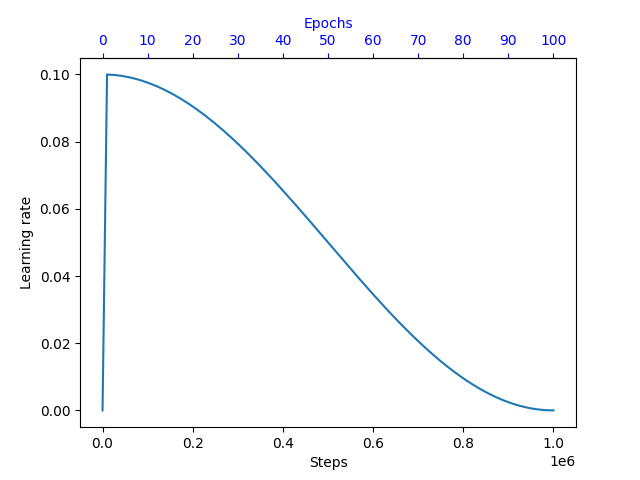
Example:
max_steps = len(train_loader) * nb_epochs
learning_rate = aidge_learning.cosine_lr(0.1, max_steps, 0.0001)
learning_rate.set_nb_warmup_steps(len(train_loader))
- aidge_learning.poly_lr(initial_lr: SupportsFloat | SupportsIndex, max_steps: SupportsInt | SupportsIndex, power: SupportsFloat | SupportsIndex = 0.0) aidge_learning.aidge_learning.LRScheduler#
-
LRScheduler Aidge::learning::PolyLR(const float initialLR, const std::size_t maxSteps, float power = 0.0f)#
Metrics#
- aidge_learning.metrics.Accuracy(prediction: aidge_core.aidge_core.Tensor, target: aidge_core.aidge_core.Tensor, axis: SupportsInt | SupportsIndex) aidge_core.aidge_core.Tensor#
Confusion Matrix#
- class aidge_learning.metrics.ConfusionTable#
- __init__(self: aidge_learning.aidge_learning.metrics.ConfusionTable) None#
- accuracy(self: aidge_learning.aidge_learning.metrics.ConfusionTable) float#
- add_fn(self: aidge_learning.aidge_learning.metrics.ConfusionTable, arg0: SupportsInt | SupportsIndex) None#
- add_fp(self: aidge_learning.aidge_learning.metrics.ConfusionTable, arg0: SupportsInt | SupportsIndex) None#
- add_tn(self: aidge_learning.aidge_learning.metrics.ConfusionTable, arg0: SupportsInt | SupportsIndex) None#
- add_tp(self: aidge_learning.aidge_learning.metrics.ConfusionTable, arg0: SupportsInt | SupportsIndex) None#
- f_score(self: aidge_learning.aidge_learning.metrics.ConfusionTable, beta: SupportsFloat | SupportsIndex = 1.0) float#
- fall_out(self: aidge_learning.aidge_learning.metrics.ConfusionTable) float#
- false_discovery_rate(self: aidge_learning.aidge_learning.metrics.ConfusionTable) float#
- false_omission_rate(self: aidge_learning.aidge_learning.metrics.ConfusionTable) float#
- get_metric(self: aidge_learning.aidge_learning.metrics.ConfusionTable, arg0: aidge_learning.aidge_learning.metrics.ConfusionTableMetric) float#
- informedness(self: aidge_learning.aidge_learning.metrics.ConfusionTable) float#
- iu(self: aidge_learning.aidge_learning.metrics.ConfusionTable) float#
- markedness(self: aidge_learning.aidge_learning.metrics.ConfusionTable) float#
- miss_rate(self: aidge_learning.aidge_learning.metrics.ConfusionTable) float#
- negative_predictive_value(self: aidge_learning.aidge_learning.metrics.ConfusionTable) float#
- precision(self: aidge_learning.aidge_learning.metrics.ConfusionTable) float#
- sensitivity(self: aidge_learning.aidge_learning.metrics.ConfusionTable) float#
- specificity(self: aidge_learning.aidge_learning.metrics.ConfusionTable) float#
-
class ConfusionTable#
Public Functions
-
inline ConfusionTable()#
-
inline double sensitivity() const#
Sensitivity, recall, hit rate, or true positive rate (TPR)
-
inline double specificity() const#
Specificity, selectivity or true negative rate (TNR)
-
inline double precision() const#
Precision or positive predictive value (PPV)
-
inline double negativePredictiveValue() const#
Negative predictive value (NPV)
-
inline double missRate() const#
Miss rate or false negative rate (FNR)
-
inline double fallOut() const#
Fall-out or false positive rate (FPR)
-
inline double falseDiscoveryRate() const#
False discovery rate (FDR)
-
inline double falseOmissionRate() const#
False omission rate (FOR)
-
inline double iu() const#
IU rate (iu): From mean IU metrics: https://arxiv.org/pdf/1411.4038.pdf.
-
inline double accuracy() const#
Accuracy (ACC)
-
inline double fScore(double beta = 1.0) const#
F-score.
-
inline double informedness() const#
Informedness or Bookmaker Informedness (BM)
-
inline double markedness() const#
Markedness (MK)
-
inline double getMetric(ConfusionTableMetric metric) const#
-
inline void tp(uint64_t tp)#
-
inline void tn(uint64_t tn)#
-
inline void fp(uint64_t fp)#
-
inline void fn(uint64_t fn)#
-
inline uint64_t tp() const#
true positive (TP), eqv. with hit
-
inline uint64_t tn() const#
true negative (TN), eqv. with correct rejection
-
inline uint64_t fp() const#
false positive (FP), eqv. with false alarm, Type I error
-
inline uint64_t fn() const#
false negative (FN), eqv. with miss, Type II error
-
inline uint64_t relevant() const#
-
inline ConfusionTable()#
- class aidge_learning.metrics.ConfusionMatrix#
- __init__(self: aidge_learning.aidge_learning.metrics.ConfusionMatrix, size: SupportsInt | SupportsIndex) None#
- aggregate(*args, **kwargs)#
Overloaded function.
aggregate(self: aidge_learning.aidge_learning.metrics.ConfusionMatrix, target: aidge_core.aidge_core.Tensor, pred: aidge_core.aidge_core.Tensor) -> None
aggregate(self: aidge_learning.aidge_learning.metrics.ConfusionMatrix, target: collections.abc.Sequence[typing.SupportsInt | typing.SupportsIndex], pred: collections.abc.Sequence[typing.SupportsInt | typing.SupportsIndex]) -> None
aggregate(self: aidge_learning.aidge_learning.metrics.ConfusionMatrix, target: typing.SupportsInt | typing.SupportsIndex, pred: typing.SupportsInt | typing.SupportsIndex) -> None
- clear(self: aidge_learning.aidge_learning.metrics.ConfusionMatrix) None#
- get_confusion_table(self: aidge_learning.aidge_learning.metrics.ConfusionMatrix, target: SupportsInt | SupportsIndex) aidge_learning.aidge_learning.metrics.ConfusionTable#
- get_confusion_tables(self: aidge_learning.aidge_learning.metrics.ConfusionMatrix) list[aidge_learning.aidge_learning.metrics.ConfusionTable]#
-
class ConfusionMatrix#
Public Functions
-
inline ConfusionMatrix(uint64_t size)#
-
void aggregate(uint64_t target, uint64_t pred)#
-
void aggregate(const std::vector<uint64_t> &target, const std::vector<uint64_t> &pred)#
-
ConfusionTable getConfusionTable(uint64_t target) const#
-
std::vector<ConfusionTable> getConfusionTables() const#
-
void clear()#
-
inline virtual ~ConfusionMatrix()#
-
inline ConfusionMatrix(uint64_t size)#
Data pre-processing#
Image pre-processing and data loading can be performed either directly with Aidge or using external libraries such as Torchvision. Both approaches are supported, allowing you to integrate Aidge into existing training pipelines with minimal changes.
With Aidge#
Aidge provides an OpenCV backend that performs dataset loading and image pre-processing directly inside the data pipeline. Transformations are executed before data reaches the model and can target either the input images or the labels.
For example, the following micro-graph converts integer class labels into one-hot encoded tensors:
label_one_hot = aidge_core.MetaOperatorOp(
    "LabelOneHot",
    aidge_core.sequential(
        [
            aidge_core.OneHot(depth=nb_classes),
            aidge_core.Squeeze(),
            aidge_core.Cast(aidge_core.dtype.float32),
        ]
    ),
)
The dataset is then wrapped in a DataProvider, which is responsible for batching, shuffling, and applying transformations:
train_dataset = aidge_backend_opencv.ILSVRC2012_Directory(
    data_path=args.imagenet_path, train=True
)
train_loader = aidge_core.DataProvider(
    train_dataset,
    backend=args.backend,
    batch_size=args.batch_size,
    shuffle=True,
    drop_last=True,
)
train_loader.set_backend(args.backend, args.dev)
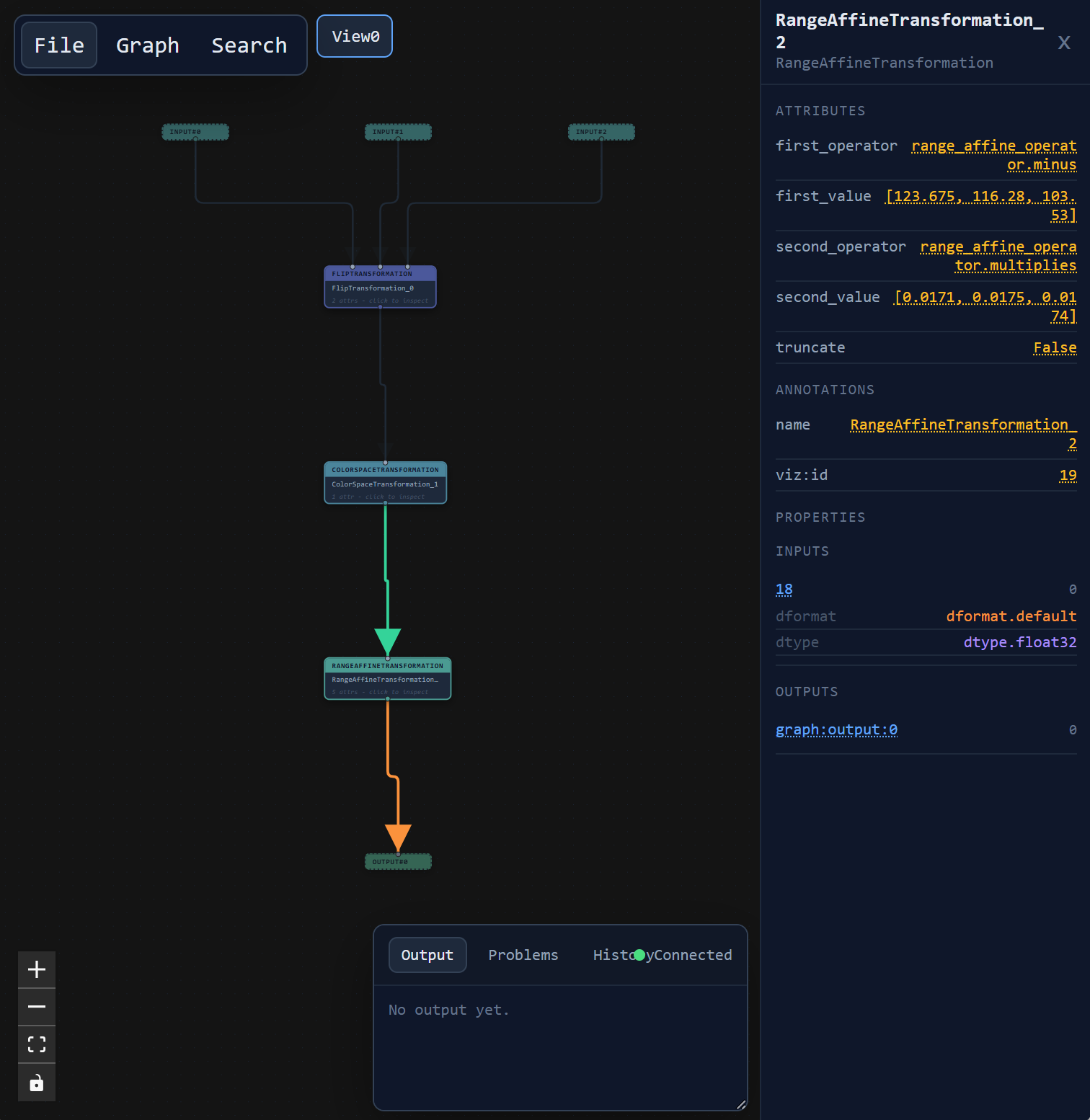
Transformations are attached independently to each dataset channel:
Channel 0: image transformations (data augmentation, color conversion, normalization);
Channel 1: label transformations (one-hot encoding).
train_loader.transforms(
    0,
    aidge_core.sequential(
        [
            aidge_backend_opencv.RandomFlipTransformation(horizontal_flip=0.5),
            aidge_backend_opencv.ColorSpaceTransformation(
                aidge_backend_opencv.colorspace.rgb
            ),
            aidge_backend_opencv.RangeAffineTransformation(
                aidge_backend_opencv.range_affine_operator.minus,
                [123.675, 116.28, 103.53],
                aidge_backend_opencv.range_affine_operator.multiplies,
                [0.0171, 0.0175, 0.0174],
            ),
        ]
    ),
)
train_loader.transforms(
    1,
    label_one_hot.get_micro_graph(),
)
One important point to note is that data transformation graphs are first-class Aidge graphs. They use the exact same formalism as neural network computation graphs, allowing data pre-processing pipelines to be built, manipulated, composed, optimized, and executed just like model graphs.
Once configured, the training loop directly receives Aidge tensors that are already pre-processed and transferred to the selected backend:
for i, (input, label) in enumerate(pbar):
    pred = scheduler.forward(False, data=[input])[0]

    ...
This approach keeps the entire pre-processing pipeline inside Aidge and avoids additional tensor conversions during training.
With Torchvision#
Existing Torchvision datasets and transforms can also be used without modification. This is particularly useful when migrating an existing PyTorch project to Aidge.
Image transformations are defined using the standard Torchvision API:
from torchvision import datasets, transforms
import torch.utils.data

train_transforms = transforms.Compose(
    [
        transforms.RandomHorizontalFlip(),
        transforms.ToTensor(),
        transforms.Normalize(
            mean=[0.485, 0.456, 0.406], std=[0.229, 0.224, 0.225]
        ),
    ]
)

train_dataset = datasets.ImageFolder(
    f"{args.imagenet_path}/train", transform=train_transforms
)
train_loader = torch.utils.data.DataLoader(
    train_dataset,
    batch_size=args.batch_size,
    shuffle=True,
    drop_last=True,
    num_workers=32,
)
Before inference, the PyTorch tensors must be converted to Aidge tensors and transferred to the target backend. Label pre-processing can then be performed using the same Aidge micro-graph as in the previous example.
for i, (input, label) in enumerate(train_loader):
    input = aidge_core.Tensor(input.numpy())
    input.to_backend(args.backend, args.dev)
    label = aidge_core.Tensor(label.numpy())
    label.to_backend(args.backend, args.dev)
    label = label_one_hot.forward(label)[0]

    pred = scheduler.forward(False, data=[input])[0]

    ...
This interoperability allows Aidge to be integrated into existing PyTorch data pipelines while keeping model execution inside Aidge.
Training Monitoring#
With Aidge’s Dashboard#
Aidge provides a built-in training dashboard for monitoring experiments. If preferred, standard visualization tools such as TensorBoard can also be used.
Create a dashboard instance:
monitor = aidge_learning.dashboard.TrainingDashboard(
    path="runs/"
    + args.filename[: -len(".onnx")]
    + datetime.datetime.now().strftime("_%Y%m%d-%H%M%S")
)
Logging scalar values#
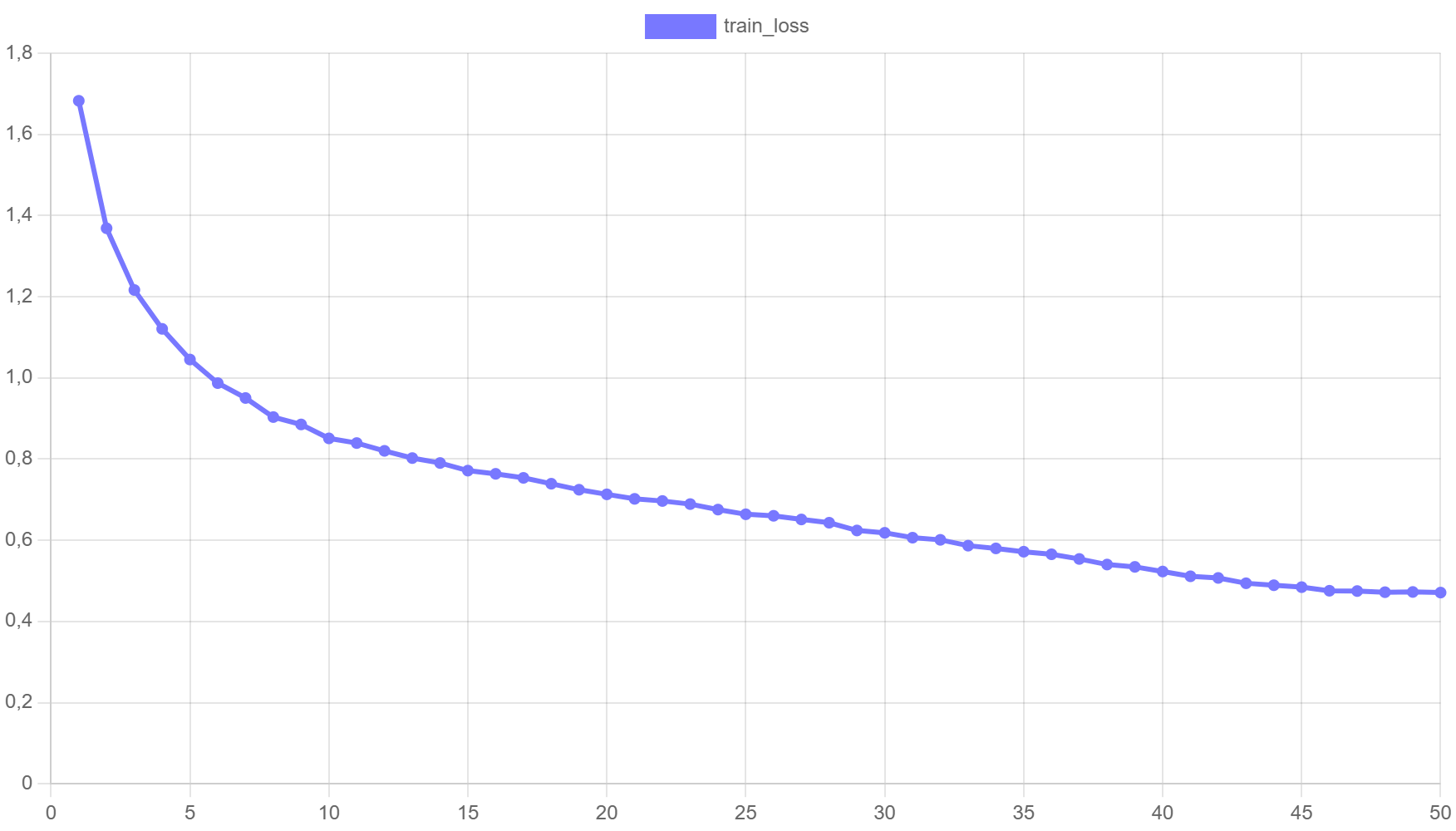
Training metrics can be logged with optional visualization settings:
monitor.log(
    "learning_rate",
    opt.learning_rate(),
    step=epoch,
    plot={
        "color": "rgb(192, 75, 75)",
    },
)

monitor.log(
    "train_loss",
    average_loss,
    step=epoch,
    plot={
        "y_begin_at_zero": True,
    },
)

monitor.log("test_accuracy", accuracy, step=epoch)
Result:
Visualizing input samples#
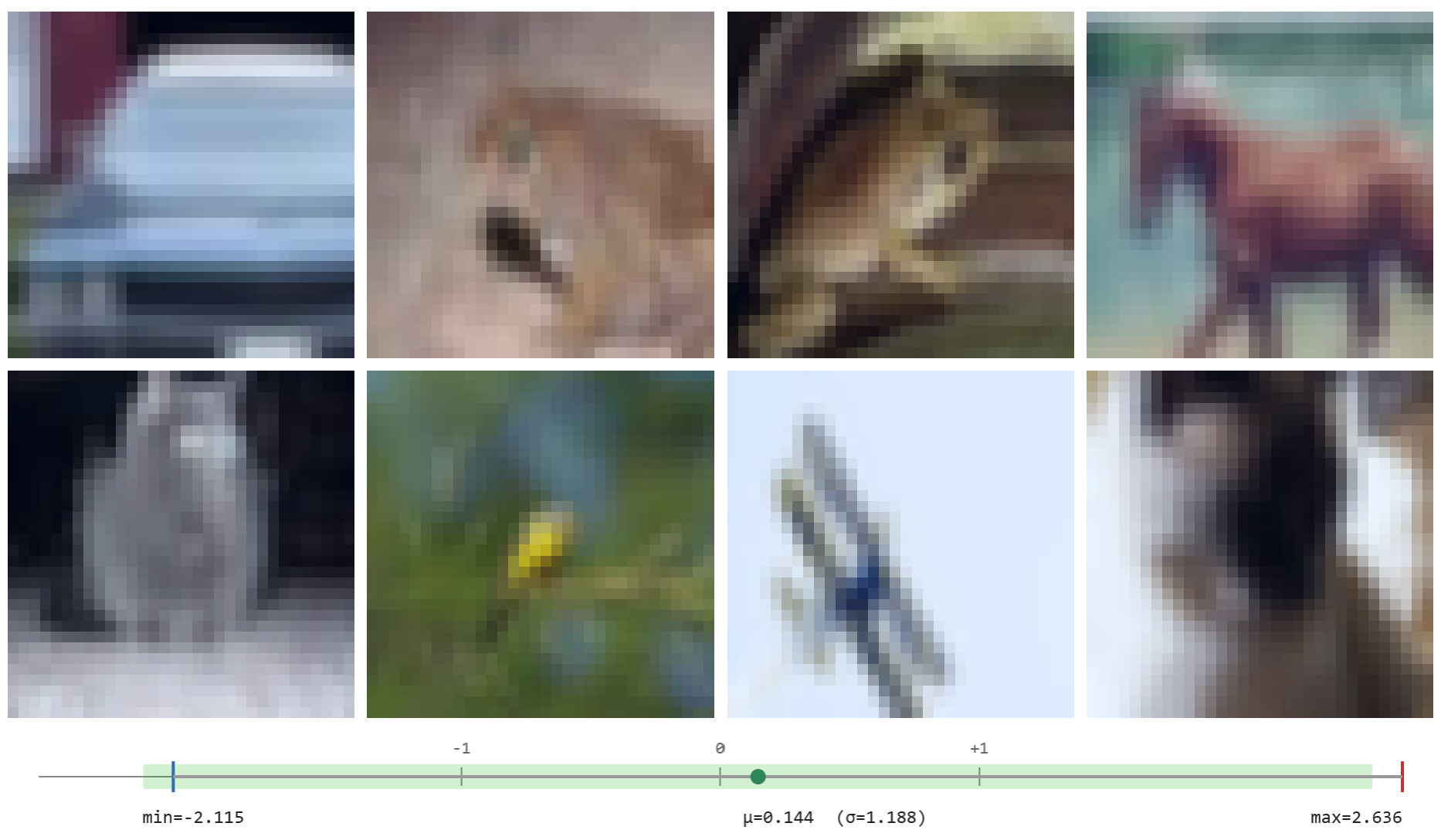
Image batches can be logged directly for inspection:
for i, (input, label) in enumerate(validation_loader):
    ...
    monitor.log("train_batch", input)
    ...
Result:
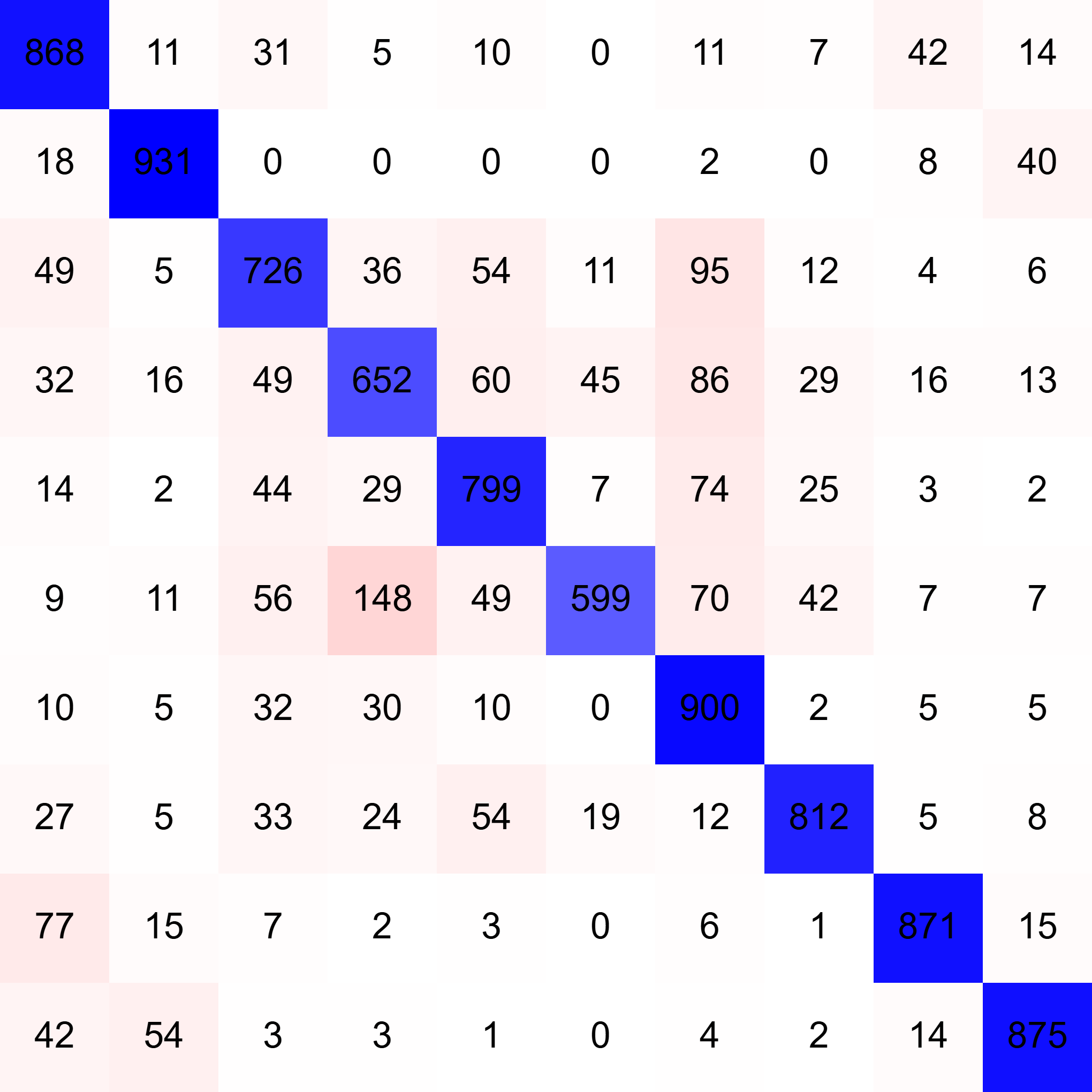
Logging confusion matrices#
Metrics such as confusion matrices can also be accumulated and displayed:
confusion_matrix = aidge_learning.metrics.ConfusionMatrix(10)
...

for i, (input, label) in enumerate(validation_loader):
    ...
    pred = scheduler.forward(False, data=[input])[0]
    confusion_matrix.aggregate(label, pred)

monitor.log("confusion_matrix", confusion_matrix, step=epoch)
Result:
With TensorBoardX#
Aidge can also integrate seamlessly with TensorBoard through the TensorBoardX package.
Create a SummaryWriter:
from tensorboardX import SummaryWriter

board_writer = SummaryWriter(
    log_dir="runs/"
    + args.filename
    + datetime.datetime.now().strftime("_%Y%m%d-%H%M%S")
)
Training metrics can then be logged using the standard TensorBoard API:
board_writer.add_scalar(
    tag="train/learning-rate",
    scalar_value=opt.learning_rate(),
    global_step=epoch,
)

board_writer.add_scalar(
    tag="train/loss",
    scalar_value=np.array(average_loss),
    global_step=epoch,
)

board_writer.add_scalar(
    tag="test/accuracy",
    scalar_value=accuracy,
    global_step=epoch,
)