

Sequence diagrams#

Note

The executable of this demonstration is system_demo_example

Initialization Sequence#

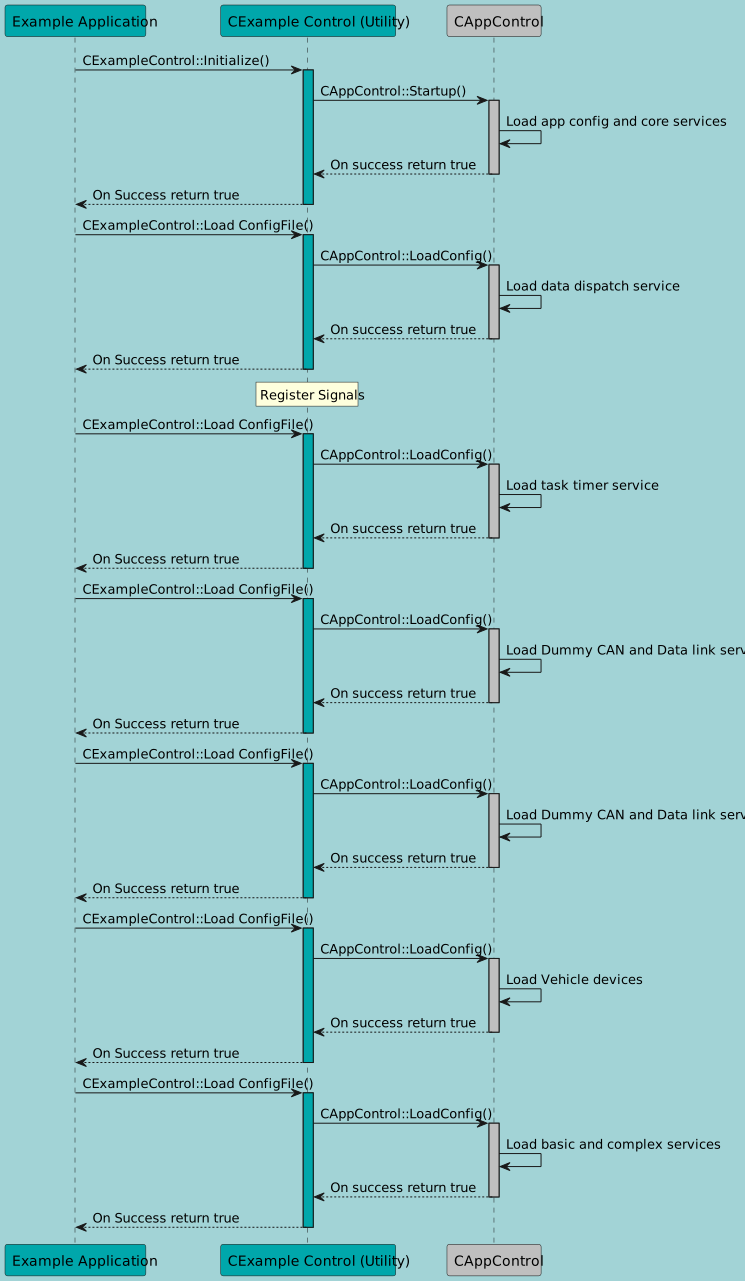
This sequence diagram explains the initialization phase of the system demo example code. During this phase when the components are loaded the system Enum EObjectStatus is sdv::EObjectStatus::configuring and the components can be initialized. After setting Enum EObjectStatus to sdv::EObjectStatus::running the initialization of the system is done.
@startuml

skinparam BackgroundColor #A2D3D6
Participant "Example Application" as EA #00A7AB
Participant "CExample Control (Utility)" as EC #00A7AB
Participant "CAppControl" as AC #BFBFBF

EA->EC : CExampleControl::Initialize()
activate EC #00A7AB
EC->AC : CAppControl::Startup()
activate AC #BFBFBF
AC->AC : Load app config and core services


AC -->EC : On success return true
deactivate AC
EC -->EA : On Success return true
deactivate EC

EA->EC : CExampleControl::Load ConfigFile()
activate EC #00A7AB
EC->AC : CAppControl::LoadConfig()
activate AC #BFBFBF
AC->AC : Load data dispatch service

AC -->EC : On success return true
deactivate AC
EC -->EA : On Success return true
deactivate EC

rnote over EC
Register Signals
end rnote

EA->EC : CExampleControl::Load ConfigFile()
activate EC #00A7AB
EC->AC : CAppControl::LoadConfig()
activate AC #BFBFBF
AC->AC : Load task timer service

AC -->EC : On success return true
deactivate AC
EC -->EA : On Success return true
deactivate EC

EA->EC : CExampleControl::Load ConfigFile()
activate EC #00A7AB
EC->AC : CAppControl::LoadConfig()
activate AC #BFBFBF
AC->AC : Load Dummy CAN and Data link service

AC -->EC : On success return true
deactivate AC
EC -->EA : On Success return true
deactivate EC

EA->EC : CExampleControl::Load ConfigFile()
activate EC #00A7AB
EC->AC : CAppControl::LoadConfig()
activate AC #BFBFBF
AC->AC : Load Dummy CAN and Data link service

AC -->EC : On success return true
deactivate AC
EC -->EA : On Success return true
deactivate EC

EA->EC : CExampleControl::Load ConfigFile()
activate EC #00A7AB
EC->AC : CAppControl::LoadConfig()
activate AC #BFBFBF
AC->AC : Load Vehicle devices

AC -->EC : On success return true
deactivate AC
EC -->EA : On Success return true
deactivate EC

EA->EC : CExampleControl::Load ConfigFile()
activate EC #00A7AB
EC->AC : CAppControl::LoadConfig()
activate AC #BFBFBF
AC->AC : Load basic and complex services

AC -->EC : On success return true
deactivate AC
EC -->EA : On Success return true
deactivate EC

@enduml

Initialization sequence#

Shutdown Sequence#

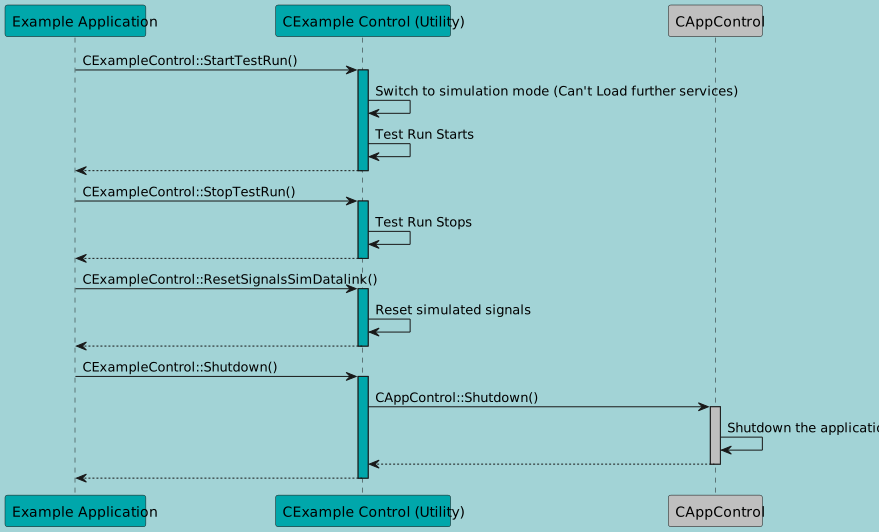
This sequence includes the testing loop. Before this loop the system Enum EObjectStatus must be set to sdv::EObjectStatus::running. If signals are registered, they must be unregistered for a graceful shutdown. If the data link is loaded, this is done by the data link component.
@startuml

skinparam BackgroundColor #A2D3D6
Participant "Example Application" as EA #00A7AB
Participant "CExample Control (Utility)" as EC #00A7AB
Participant "CAppControl" as AC #BFBFBF

EA->EC : CExampleControl::StartTestRun()
activate EC #00A7AB
EC->EC : Switch to simulation mode (Can't Load further services)
EC->EC : Test Run Starts
EC-->EA
deactivate EC

EA->EC : CExampleControl::StopTestRun()
activate EC #00A7AB
EC->EC : Test Run Stops
EC-->EA
deactivate EC

EA->EC : CExampleControl::ResetSignalsSimDatalink()
activate EC #00A7AB
EC->EC : Reset simulated signals
EC-->EA
deactivate EC

EA->EC : CExampleControl::Shutdown()
activate EC #00A7AB
EC->AC : CAppControl::Shutdown()
activate AC #BFBFBF
AC->AC : Shutdown the application
AC-->EC
deactivate AC #BFBFBF
EC-->EA
deactivate EC

@enduml

Shutdown sequence#

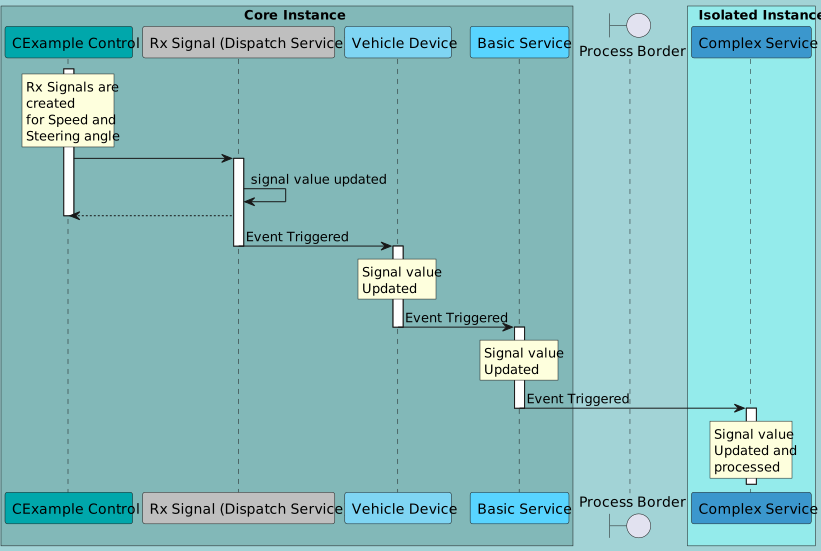
Sequence diagram Reception:#
@startuml

skinparam defaultFontColor black

box "Core Instance" #82b8b8ff
Participant "CExample Control" as EC #00A7AB
Participant "Rx Signal (Dispatch Service)" as RX #BFBFBF
Participant "Vehicle Device" as VD #7FD5F3
Participant "Basic Service" as BS #58D4FF
end box

boundary "Process Border"


skinparam BackgroundColor #A2D3D6

box "Isolated Instance" #94ebebff
Participant "Complex Service" as CS #3B97CD
end box

rnote over EC
Rx Signals are
created
for Speed and
Steering angle
endrnote

activate EC

EC->RX

activate RX

RX->RX : signal value updated
RX --> EC

deactivate EC


RX -> VD : Event Triggered
deactivate RX
activate VD

rnote over VD
Signal value
Updated
endrnote

VD -> BS : Event Triggered
deactivate VD
activate BS


rnote over BS
Signal value
Updated
endrnote

BS -> CS : Event Triggered
deactivate BS

activate CS
rnote over CS
Signal value
Updated and
processed
endrnote

deactivate CS

@enduml

Reception sequence#

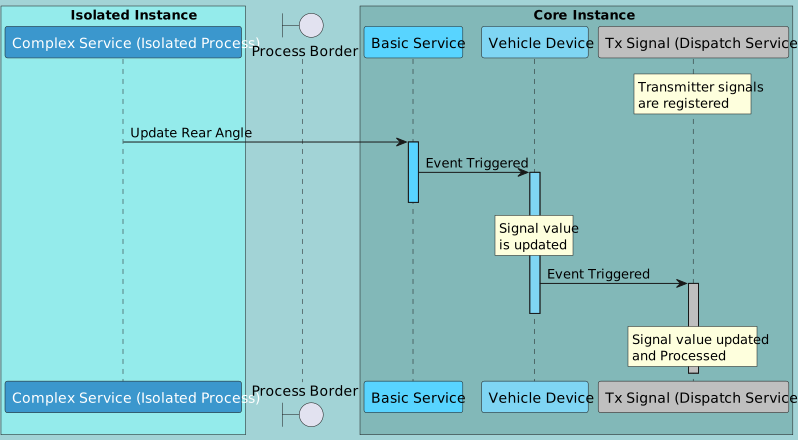
Sequence diagram Transmission:#
@startuml

skinparam defaultFontColor white
skinparam BackgroundColor #A2D3D6

box "Isolated Instance" #94ebebff
Participant "Complex Service (Isolated Process)" as CS #3B97CD
end box


skinparam defaultFontColor black

boundary "Process Border"

box "Core Instance" #82b8b8ff
Participant "Basic Service" as BS #58D4FF
Participant "Vehicle Device" as VD #7FD5F3
Participant "Tx Signal (Dispatch Service)" as TX #BFBFBF
end box


rnote over TX
Transmitter signals
are registered
endrnote


CS -> BS : Update Rear Angle

activate BS #58D4FF

BS -> VD : Event Triggered


activate VD #7FD5F3

deactivate BS

rnote over VD
Signal value
is updated
endrnote

VD -> TX : Event Triggered

activate TX #BFBFBF

deactivate VD

rnote over TX
Signal value updated
and Processed
endrnote

@enduml

Transmission sequence#