
Exporting AI models with Aidge: the fundamentals#
Aidge provides a powerful and flexible strategy for exporting AI models on a wide range of embedded devices. This guide will walk you through the core principles behind Aidge’s export capabilities.
Architecture at a glance#
Source-code export is one part of a three-layer architecture:
aidge_coreowns the hardware model, graph preparation, shared export contracts, registries, and the top-levelexport()orchestration.Exporter packages such as
aidge_export_cppandaidge_export_arm_cortexmown kernels, templates, target-specific export assets, and project composition.aidge_deployconsumes the resulting buildable project. It builds, transfers, flashes, executes, and parses results without regenerating model sources.
The hand-off is an ExportArtifact containing a directory and an
ExportManifest stored as .aidge-export.json. The manifest describes
the generated artifact and its runtime protocol; the hardware model remains
the authoritative source for hardware facts.
See Export Code Structure for the detailed object model, registries, extension points, target directory convention, and complete control flow. See Deploy Structure and User Guide for the consumer side of the boundary.
Dual export strategy#
Aidge supports two main export approaches, designed to balance compatibility and control:
ONNX export for universal integration
Aidge allows seamless export to the ONNX format, ensuring broad compatibility with popular SDKs, frameworks, and toolchains. This format serves as a common ground for integrating AI models into a wide variety of ecosystems, accelerating deployment and interoperability.
This export path is the foundation for interoperability with tools like TensorRT, enabling the deployment of quantized and optimized models on NVIDIA GPUs.See our tutorials for step-by-step ONNX export and TensorRT integration.
Source code generation
For applications requiring tight integration and more granular control, Aidge can generate high-quality and portable C/C++ source code. It supports:
Bare-metal deployments with no runtime dependencies.
Multi-platform deployment, including reference C++ and architecture-specific optimizations (such as ARM).
Safety-critical environments requiring transparent and auditable code.
Flexible source code generation system#
The code generation process in Aidge is powered by a template-driven engine, used in export modules like aidge_export_cpp, aidge_export_arm, or aidge_export_acetone.
See our comprehensive tutorials on:
Main stages of the export pipeline#
The export process assumes that the AI model has already been trained and optimized — for example, through pruning, quantization, or compression. This optimized model may originate from an external framework (imported into Aidge via its interoperability features), or be produced directly using Aidge’s native optimization modules such as aidge_quantization, aidge_pruning, or aidge_compression.
The pipeline of an export module proceeds through the following key stages:
- Model preparationAdapt the model for code generation by:
Fusing Aidge operators to match the export kernels implementations and/or remove unneeded operators.
Inserting or adjusting operations (e.g., Transpose) to match the constraints and capabilities of the target hardware kernels.
- Model schedulingDefine an execution schedule for the prepared model, establishing the order and structure of operations to be exported, as well as an optimized memory management strategy.
- Source code generationFinally, generate the target-specific, standalone source code representing the optimized and scheduled model.
Understanding how Aidge generates a deployable code
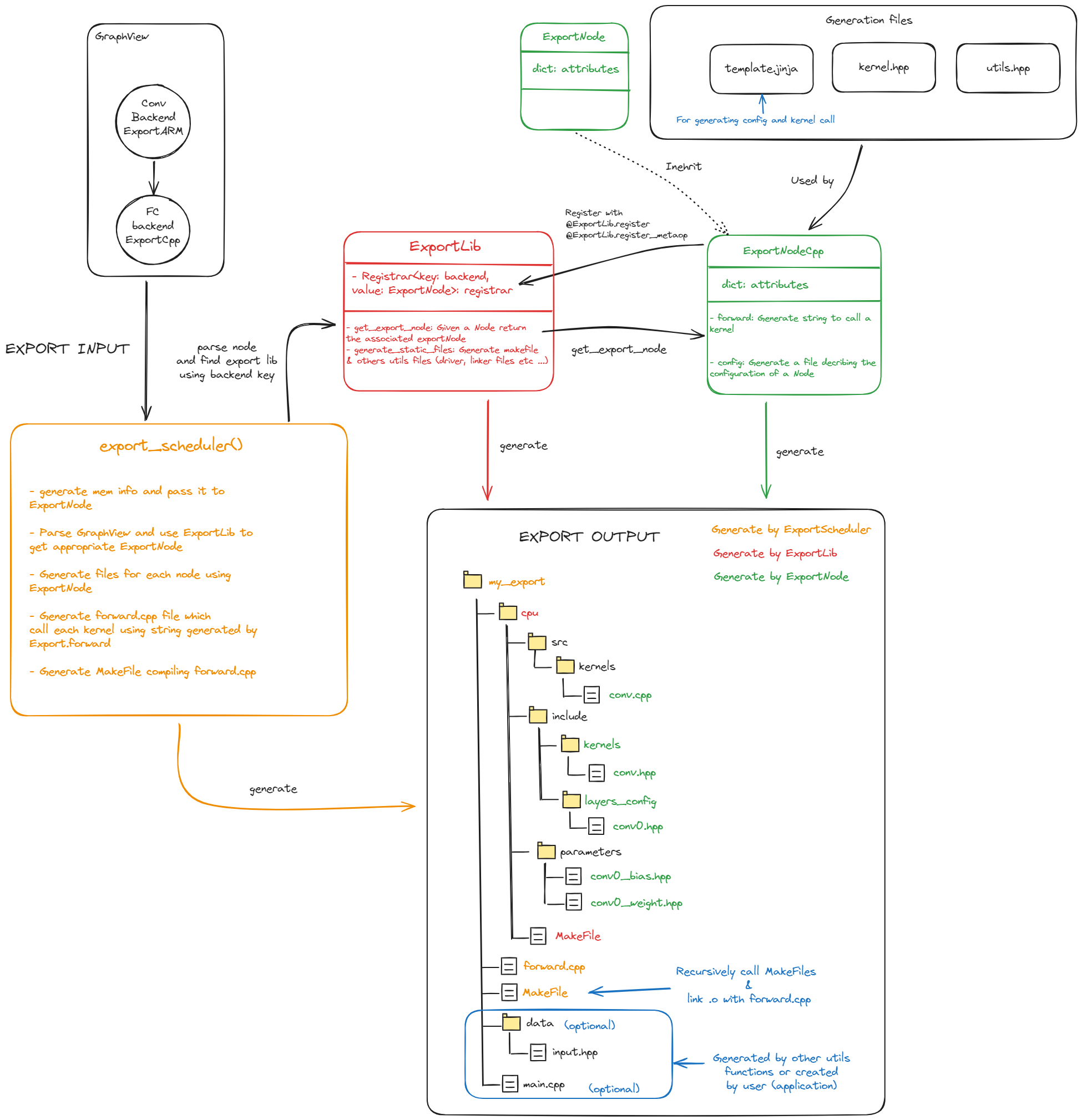
The code generation process is orchestrated by several key components:
export_scheduler:
This acts as the central coordinator of the entire export process. It’s responsible for orchestrating all export tasks and managing the code generation scheduling, ensuring a smooth workflow.
ExportLib:
This serves as a shared utility library. It provides foundational functions, helper tools, and standard interfaces that are used across all of Aidge’s export modules, promoting consistency and reusability.
ExportNode:
These are specialized components tailored for converting graph nodes into target-specific code using templates. Their adaptable nature allows Aidge to support a wide range of hardware platforms. For instance, the ExportNodeCpp generates a portable, structured C++ code of each node.
Key architectural benefits#
The design of Aidge’s export system offers significant advantages:
Clear separation of concerns
Each component within the system has a well-defined role and responsibility. This clear delineation simplifies maintenance, makes debugging easier, and facilitates future evolution and expansion of the system.
Customization of exports
While some export features are shared across the various exports (scheduler_export()), the system is designed to be flexible and it is very easy to develop a new customized export. Please check the tutorial to get more information on the steps involved in creating a new export.
Template-driven engine
Aidge utilizes a powerful Jinja templating engine. This allows for the dynamic generation of context-aware code that is precisely tailored to the specific requirements of each individual graph node, ensuring highly optimized and efficient output.