
Adding an operator on Aidge#
This tutorial will walk you through the steps needed to add a new operator to the Aidge platform.
The tutorial is divided into two parts:
I. Adding a New Operator Steps:
Detailed steps for defining and implementing a new operator. This section is mainly to understand the structure of an already added operator.
II. Test Case:
Guidelines for creating and running a test case for the new operator.
I. Adding a New Operator Steps#
To add an operator you need to go though 3 modules:
Core Module: Define operator classes, attributes, and setup necessary functions.
Backend Module: Define the implementation of the Operator and register the actual computation (kernel) that the operator performs.
ONNX Module: Set up the logic to read and import an Operator from ONNX files or to export them back to ONNX format.
Before beginning the tutorial please check if you got the good path for each module
[ ]:
import pathlib


def find_module_path(root_path, module_name):
    module_path = root_path / "aidge" / module_name
    if module_path.exists() and module_path.is_dir():
        print(f'Path for module "{module_name}": {module_path}')
        return module_path
    else:
        print("Couldn't find path for module: ", module_name)
        return None


# Set root path for aidge, change this if you moved this notebook
root_path = pathlib.Path().absolute().parent.parent.parent

# Find paths for the needed modules
aidge_core_path = find_module_path(root_path, "aidge_core")
aidge_backend_cpu_path = find_module_path(root_path, "aidge_backend_cpu")
aidge_onnx_path = find_module_path(root_path, "aidge_onnx")
1. Core Module: Defining Operator Class and Attributes#
In the core module, the Operator class defines the operator type, attributes and the python binding.
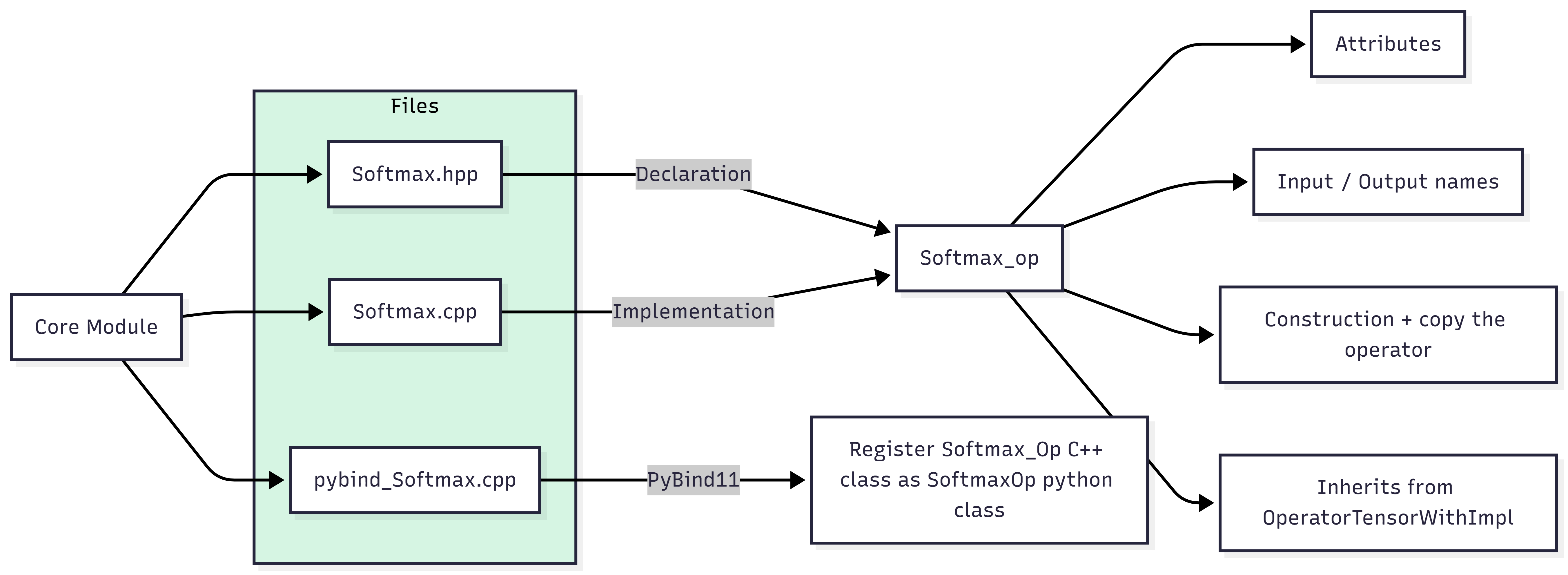
Core Files: Softmax.hpp and Softmax.cpp and pybind_Softmax.cpp
[ ]:
from IPython.display import display, Markdown


def display_file_content_markdown(file_path):
    try:
        with open(file_path, "r") as file:
            content = file.read()
            display(Markdown(f"### {file_path}\n```cpp\n{content}\n```"))
    except FileNotFoundError:
        print(f"Error: {file_path} not found.")


display_file_content_markdown(aidge_core_path / "include/aidge/operator/Softmax.hpp")
display_file_content_markdown(aidge_core_path / "src/operator/Softmax.cpp")
What is Softmax_Op?#
Softmax_Op is a class that represents the Softmax operation in AIDGE. It defines:
the operator’s attributes (like the axis),
input/output names,
and how to construct and copy the operator.
It inherits from OperatorTensorWithImpl, which connects it to the backend implementation (e.g., CPU, GPU).
Key Components#
Attributes#
The Softmax_Op uses a single attribute:
Axis– the axis along which softmax is applied.
These attributes are wrapped in a StaticAttributes structure, enabling type-safe access and serialization:
using Attributes_ = StaticAttributes<SoftmaxAttr, GENERATE_LIST_ATTR_TYPE(LIST_SOFTMAX_ATTR)>;
Constructor#
This initializes the operator with the specified axis and sets up the attribute container:
Softmax_Op(std::int32_t axis);
The default constructor is deleted to enforce required initialization:
Softmax_Op() = delete;
Copy Constructor#
Allows creating a new instance by copying attributes but not input tensors (important for graph transformations):
Softmax_Op(const Softmax_Op& op);
Static Metadata#
These members define the operator type and expected input/output tensor names:
static constexpr const char* const Type = "Softmax";
static constexpr const char* const InputsName[] = {"data_input"};
static constexpr const char* const OutputsName[] = {"data_output"};
Factory Function#
There’s a helper function to easily create a Softmax node in the graph:
std::shared_ptr<Node> Softmax(std::int32_t axis, const std::string& name = "");
This creates a Node that wraps the operator, ready to be inserted into a computation graph.
[ ]:
display_file_content_markdown(
    aidge_core_path / "python_binding/operator/pybind_Softmax.cpp"
)
Python Binding for Softmax Operator#
To expose the Softmax operator to Python, we define its binding using PyBind11 in the init_Softmax function.
Binding Overview#
The C++ class Softmax_Op is registered as a Python class named SoftmaxOp, and the helper function Softmax(...) is also exposed for easy node creation.
The binding:
Allows creating a
SoftmaxOpwith theaxisargument.Provides access to input/output names and attributes.
Exposes the operator type as a static member.
Registers the operator so it can be used in Python computation graphs.
What’s Exposed#
Operator: SoftmaxOp#
Constructor:
SoftmaxOp(axis)Static methods:
get_inputs_name()get_outputs_name()attributes_name()
Static property:
Type
Node: Softmax(axis, name="")#
Creates a node wrapping the SoftmaxOp operator.
2. Backend Module: Implementing the Softmax Kernel and Registration#
The backend module defines the computational kernels forward() and backward() for the Softmax operation.
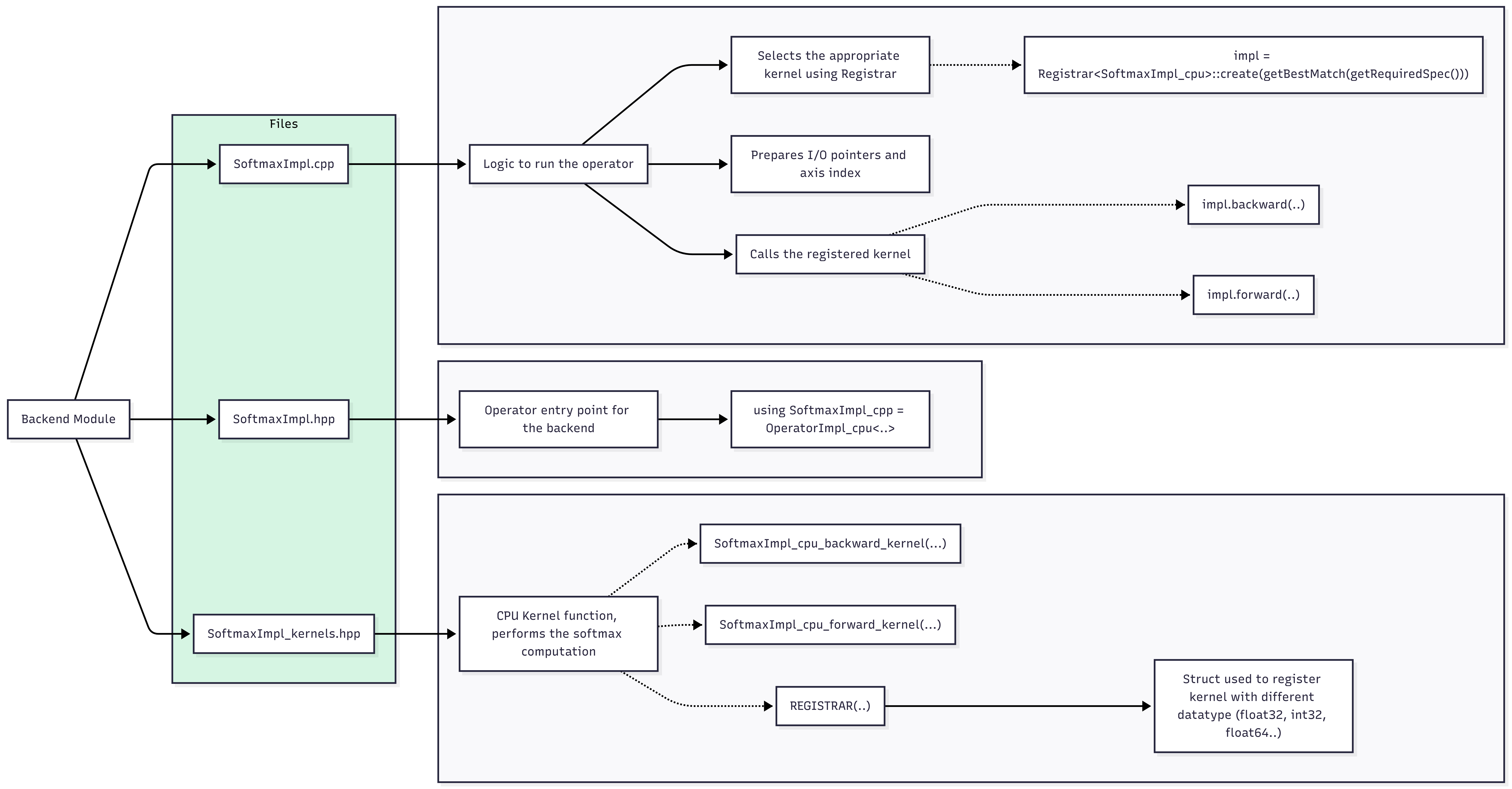
In this module, we need to add the class OperatorImpl and the kernels for forward and/or backward operation. The files we need to add are:
SoftmaxImpl_kernels.hpp, SoftmaxImpl.hpp and SoftmaxImpl.cpp
[ ]:
display_file_content_markdown(
    aidge_backend_cpu_path
    / "include/aidge/backend/cpu/operator/SoftmaxImpl_kernels.hpp"
)
display_file_content_markdown(
    aidge_backend_cpu_path / "include/aidge/backend/cpu/operator/SoftmaxImpl.hpp"
)
display_file_content_markdown(aidge_backend_cpu_path / "src/operator/SoftmaxImpl.cpp")
SoftmaxImpl_kernels.hpp#
REGISTRAR, for instance to register the kernel with float32 input/output:REGISTRAR(SoftmaxImpl_cpu,
{DataType::Float32},
{ProdConso::inPlaceModel, SoftmaxImpl_cpu_forward_kernel<float, float>, nullptr});
SoftmaxImpl.hpp#
This file defines the operator’s CPU implementation entry point:
using SoftmaxImpl_cpu = OperatorImpl_cpu<Softmax_Op,
    void(std::size_t, const std::vector<DimSize_t>&, const void*, void*)>;
Here, the function signature void(std::size_t, const std::vector&, const void, void) matches the expected kernel interface:
Axis index
Input tensor shape
Input buffer pointer
Output buffer pointer
The registration line:
REGISTRAR(Softmax_Op, "cpu", SoftmaxImpl_cpu::create);
SoftmaxImpl.cpp#
Implements the logic to run the operator:
Dynamically selects the appropriate kernel using Registrar::create(…).
Prepares input/output pointers and axis index.
Calls the registered kernel.
3. ONNX Module: Reading and Converting ONNX Nodes#
The import module provides a Python function to translate ONNX Softmax nodes into your platform’s operators.
Import File: softmax.py
[ ]:
display_file_content_markdown(
    aidge_onnx_path / "aidge_onnx/node_import/onnx_converters/softmax.py"
)
ONNX Import: Softmax Operator#
The ONNX importer for Softmax is defined using the @auto_register_import("softmax") decorator. This enables automatic handling of ONNX Softmax nodes during model import.
Function Summary#
Converts an ONNX Softmax node into an AIDGE SoftmaxOp. It handles the axis attribute according to ONNX spec and returns an aidge_core.Node.
Attribute Handling#
Uses 'axis' from ONNX if provided.

Defaults to:

    axis = 1 for opset < 11

    axis = -1 otherwise
⚠️ Fallback for Unsupported Attributes#
If the ONNX node has unsupported attributes, a warning is logged and the function returns None, allowing fallback to a generic operator.
Node Creation#
Creates an aidge_core.SoftmaxOp and wraps it in an AIDGE Node
Finally, the export operation from AIDGE to ONNX: Export File: softmax.py
[ ]:
display_file_content_markdown(
    aidge_onnx_path / "aidge_onnx/node_export/aidge_converters/softmax.py"
)
II. Test Case#
In this part of the tutorial, we give you a test case to add a new operator to Aidge using the steps explained in the previous section.
Requirements:
[ ]:
%pip install numpy \
    onnx \
    onnxruntime \
    aidge-core \
    aidge-backend-cpu \
    aidge-onnx
As an example, we choose the Shrink Operator which is not supported by Aidge.
As explained in the ONNX doc:
Let’s start by creating an ONNX model with this operator:
[ ]:
import onnx
import onnx.helper as helper
from onnx import TensorProto

# Model inputs and outputs
input_tensor = helper.make_tensor_value_info("input", TensorProto.FLOAT, [None])
output_tensor = helper.make_tensor_value_info("output", TensorProto.FLOAT, [None])

# Attributes for Shrink operator
bias = 1.5  # Values within [-1.5, 1.5] will become 0
lambd = 1.5  # Optional, typically set to the same value as bias

# Shrink node definition
shrink_node = helper.make_node(
    "Shrink",
    inputs=["input"],
    outputs=["output"],
    lambd=lambd,
    bias=bias,
)

# Define the computation graph
graph = helper.make_graph(
    nodes=[shrink_node],
    name="ShrinkGraph",
    inputs=[input_tensor],
    outputs=[output_tensor],
    initializer=[],
)

# Set opset version to 9 (compatible with Shrink operator) and IR version to 9
opset_import = [helper.make_operatorsetid("", 9)]
model = helper.make_model(
    graph, producer_name="shrink_model", opset_imports=opset_import, ir_version=9
)

# Save the model to a file
onnx.save(model, "shrink_model.onnx")

print(
    "ONNX model with Shrink operator has been saved as 'shrink_model.onnx' with opset version 9 and IR version 9"
)
Now let’s try to load the model on Aidge:
[ ]:
import aidge_core
import aidge_backend_cpu
import aidge_onnx

aidge_model = aidge_onnx.load_onnx("shrink_model.onnx")
In order to support the Shrink Operator, we’ll have to add it to the Aidge plateform. This requires, as explained earlier, going through three modules:
aidge_core
aidge_backend
aidge_onnx
1. Core Module#
In order to create a new operator using a supported one as a reference, you need to check:
the attributes
For the attributes, Softmax has only one attribute: axis (int32_t) whereas Shrink has two attributes: lambd (float) and bias (float).
number of inputs and outputs and the category of inputs ( Data, Param, OptionalData, OptionalParam )
For inputs/outputs, both operators have 1 data input and 1 output.
the computation of the outputs dimensions ( forwardDims() ).
// add the init of the operator
void init_Shrink(py::module&);
// also inside the function init_Aidge(py::module& m)
    init_Shrink(m);
2. Backend Module#
void SoftmaxImpl_cpu_forward_kernel(std::size_t axisIdx, const std::vector<DimSize_t>& inputDims, const void* input_, void* output_)
to:
void ShrinkImpl_cpu_forward_kernel(float lambda, float bias, const std::vector<DimSize_t>& inputDims, const void* input_, void* output_)
make sure to change the Operator implementation entry point for the backend in ShrinkImpl.hpp:
using SoftmaxImpl_cpu = OperatorImpl_cpu<Softmax_Op,
    void(std::size_t, const std::vector<DimSize_t>&, const void*, void*)>;
to:
using ShrinkImpl_cpu = OperatorImpl_cpu<Shrink_Op,
    void(float, float, const std::vector<DimSize_t>&, const void*, void*)>;
After making all the needed modifications, add the ShrinkImpl header to aidge_backend_cpu/include/aidge/backend/cpu.hpp
⚠️ If you don’t add the header your operator will not be added to the Registrar and you will get this error when you try to compile a model containing your operator:
RuntimeError: missing or invalid registrar key: cpu for registrable object
Finally, you have to add unit tests for the added operator, like the ones done for Softmax:
[ ]:
display_file_content_markdown(
    aidge_backend_cpu_path / "unit_tests/operator/Test_SoftmaxImpl.cpp"
)
3. ONNX Module#
softmax_axis = -1

   if 'axis' in onnx_attrs:
       softmax_axis = onnx_attrs['axis']
       del onnx_attrs['axis']
   elif opset < 11:
       softmax_axis = 1
you can write:
    if 'lambda' in onnx_attrs:
        shrink_lambda = onnx_attrs['lambda']
        del onnx_attrs['lambda']
    if 'bias' in onnx_attrs:
        shrink_bias = onnx_attrs['bias']
        del onnx_attrs['bias']

#shrink_lambda = 0.5
#shrink_bias = 0.0
Uncomment attributes values if you want to define them outside of onnx.
Please make sure to respect ONNX documentation: default values, optional or mandatory attribute, OPSET version of the operator …
[ ]:
import aidge_core
import aidge_backend_cpu
import aidge_onnx
import numpy as np

model_path = "shrink_model.onnx"
aidge_model = aidge_onnx.load_onnx(model_path)
[ ]:
# Setup input
input_data = np.array([2.0, -2.0, 1.0, -1.0, 0.5], dtype=np.float32)
input_tensor = aidge_core.Tensor(input_data)

# Setup model's features: data type, backend and input dimensions
aidge_model.compile("cpu", aidge_core.dtype.float32, dims=[[5]])

# Set up the scheduler
scheduler = aidge_core.SequentialScheduler(aidge_model)

print(aidge_model.get_ordered_nodes()[0].get_operator().attr.dict())

if not aidge_onnx.has_native_coverage(aidge_model):
    print("The model has unsupported operator, cannot run inference!")
else:
    # Run inference !
    scheduler.forward(data=[input_tensor])  # provide an input

    # Check results
    print("Input:", input_data)
    for outNode in aidge_model.get_output_nodes():
        output_aidge = np.array(outNode.get_operator().get_output(0))
        print("Aidge output: {}".format(output_aidge))
And finally, it’s a good practice to check if you have the same inference results as ONNX:
First let’s check what are ONNX values for attributes.
[ ]:
import onnx

onnx_model = onnx.load(model_path)

for node in onnx_model.graph.node:
    if node.op_type == "Shrink":
        for attr in node.attribute:
            print(f"{attr.name} = {attr.f}")
[ ]:
import onnxruntime as ort

# Load the ONNX model
session = ort.InferenceSession(model_path)

# Check the input name for the model
input_name = session.get_inputs()[0].name
output_name = session.get_outputs()[0].name

# Run inference
output = session.run([output_name], {input_name: input_data})

# Print the result
print("Input:", input_data)
print("ONNX Output:", output[0])
[ ]: