
Export of a classifier on AudioMoth and memory optimization with Tiling in Aidge#

0 - Context#
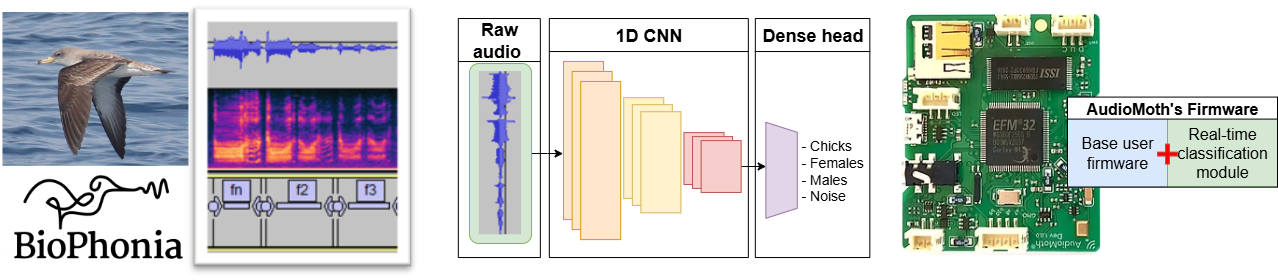
We trained a bioacoustic classification model on a dataset composed primarily of shearwater vocalizations, sourced from Biophonia. The resulting model detects shearwater calls among other acoustic events with an ~90% accuracy.
This notebook presents the workflow for exporting the model using Aidge for deployment on the AudioMoth platform. The target hardware imposes a stringent memory constraint, with only 32kB of RAM available, making model deployment particularly challenging.
Note: For the purpose of demonstrating only the tiling and export methodology with Aidge, the model used in this notebook is a model with random weights. However, the models achieving the performances presented below were trained on Biophonia’s dataset.
1- Export of a reduced model#
1.a- Architecture and performances tradeoff before export#
The table below summarizes the architecture and performance of our best-performing model (first row). However, this model is too large to be deployed on AudioMoth, as the raw application firmware provides only 25kB of available RAM.
To accommodate this memory constraint, we developed a reduced model (second row) with a smaller memory footprint. This reduction comes at the cost of lower accuracy, but the model is expected to fit within the available RAM budget.

So let’s try exporting this reduced model !
1.b- Exporting the reduced model with Aidge#
The following code will load our model from ONNX format into Aidge, then perform an export to C++ code.
[ ]:
# Imports
import subprocess

from IPython.display import Image, HTML
import numpy as np

import aidge_core
from aidge_core.utils import run_command
import aidge_backend_cpu
import aidge_export_cpp
import aidge_model_explorer
import aidge_onnx

aidge_core.Log.set_console_level(aidge_core.Level.Error)  # Reduce useless logs
[ ]:
# Load model from ONNX to Aidge and print summary
onnx_dir = "./"
model_name = "1D_classifier"
INPUT_SIZE = 2048
INPUT_SHAPE = (1, 1, INPUT_SIZE)
model_path = onnx_dir + "model_" + model_name + ".onnx"

#### A- Base Graph
### A.1 Import the model from onnx to aidge graph
# LOADING ONNX GRAPH
graph = aidge_onnx.load_onnx(model_path)
# aidge_onnx.native_coverage_report(graph)

# LOAD INPUT AND ADD IT TO THE GRAPH
np_input = np.random.random(INPUT_SHAPE)
aidge_input = aidge_core.Tensor(np_input)

### A.2 compile, forward
graph.set_backend("cpu")
graph.forward_dims([INPUT_SHAPE], allow_data_dependency=True)
s = aidge_core.SequentialScheduler(graph)
s.generate_scheduling()
s.forward(data=[aidge_input])
model_stats = aidge_core.StaticAnalysis(graph)
model_stats.summary()

# Save outputs for comparison
out_tensors = []
for out, id in graph.get_ordered_outputs():
    out_tensors.append(out.get_operator().get_output(id))
[ ]:
# Visualize the graph in model explorer
a = aidge_model_explorer.visualize(graph, "graph_basic")  # visu basic graph
[ ]:
# Export the reduced model
target = aidge_core.hw_model.get_target_by_name("host")
board_files_path = target.board_files_path
export_folder = "model_export_" + model_name

#  B- Export basic graph
graph.set_backend(aidge_export_cpp.ExportLibCpp._name)
aidge_core.adapt_to_backend(graph)
graph.forward_dims([INPUT_SHAPE])
s_export = aidge_core.SequentialScheduler(graph)
s_export.generate_scheduling()
print("EXPORT basic model...")
aidge_core.export_utils.scheduler_export(
    s_export,
    export_folder,
    memory_manager=aidge_core.mem_info.generate_optimized_memory_info,
    memory_manager_args={
        "stats_folder": f"{export_folder}/stats",
        "wrapping": False,
        "display_names": True,
    },
)

# Create main.cpp
aidge_core.export_utils.generate_main_compare_cpp(export_folder, graph, out_tensors)

# Copy target build files, when provided by the target
if board_files_path is not None:
    aidge_core.export_utils.copy_folder(
        board_files_path,
        export_folder,
    )
[ ]:
# Run validation of compiled code
print("COMPILATION")
aidge_core.export_utils.compile_export(export_folder)

print("RUN EXPORT")
cmd_gen = run_command(["./build/run_export"], cwd=export_folder)
try:
    for std_line in cmd_gen:
        print(std_line, end="")
except subprocess.CalledProcessError as e:
    print(0, f"An error occurred: {e}\nComparison failed.")
1.c- Visualize exported CPP code#
With treecommand, we visualize the code generate by Aidge. The model_forward function is ready to be compiled in our AudioMoth firmware.
[ ]:
!tree $export_folder -L 3
1.d- Spotting a RAM peak issue !#
The picture below is generated by the memory manager during export. It shows how the memory manager will allocate the memory when resolving the operations during model inference. It is really handy as it shows the ram peak: the maximum RAM memory that will be needed for the model.
We can read a ram peak that will not fit in our 25kB budget.
[ ]:
# Memory scheduling and ram peak figure
Image(filename=export_folder + "/stats/memory_info.png")
2- Export of a reduced model with memory optimization : Tiling#
2.a- Description of the Tiling method#
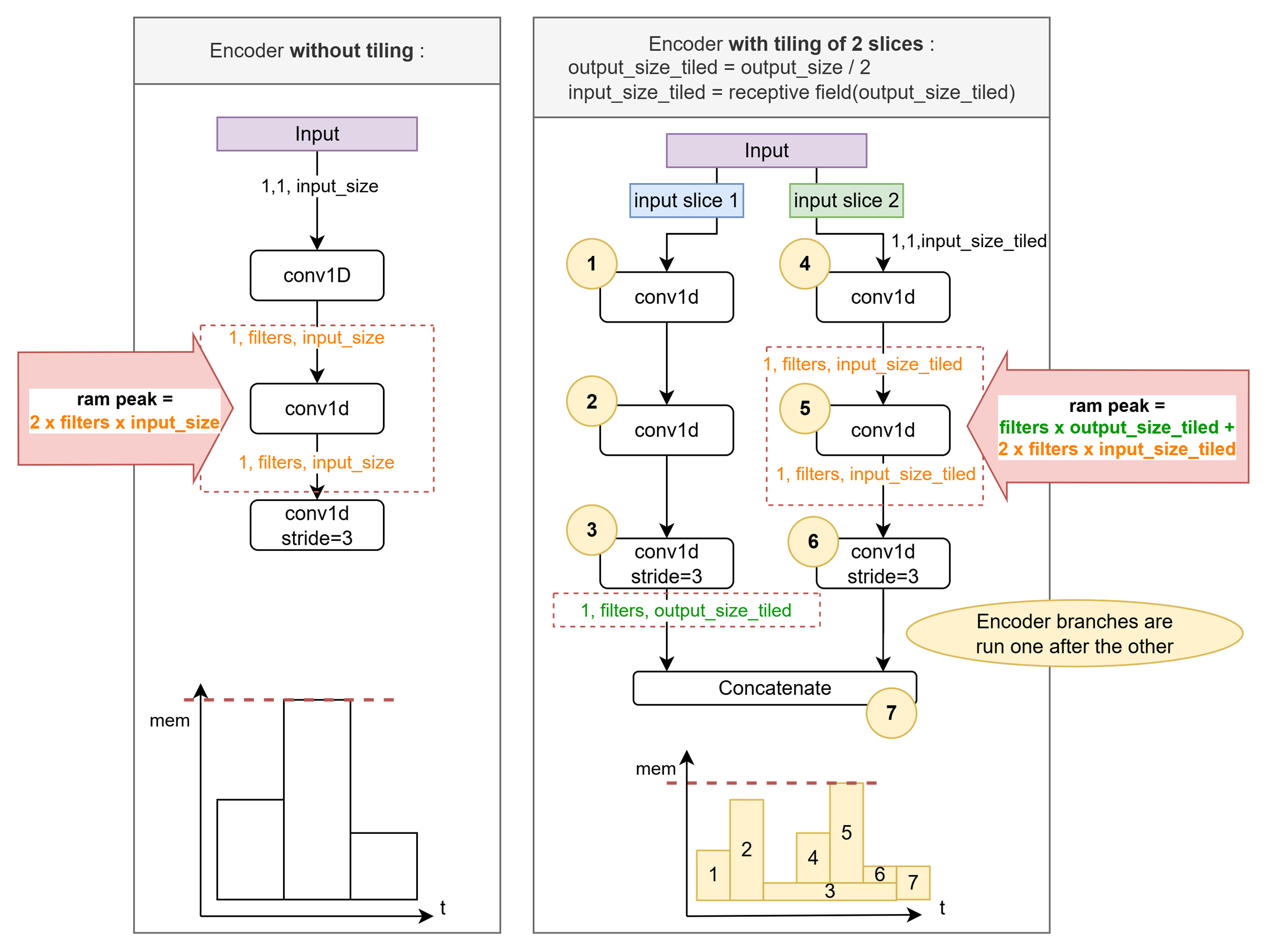
On the figure above, the operation responsible for the memory peak is the first convolution.
Thanks to Aidge’s graph representation of the model, we are able to easily implement tiled convolutions, reducing the ram peak of the convolutions.
The figure below illustrates how tiling with 2 slices allow to reduce the ram peak:
We compute encoder’s output size when split in 2 output slices.
We compute corresponding input slices size (It equals the receptive field of an output slice).
For each input slice we run the same 1D-CNN-encoder.
Concatenate the output slices.
It gives identical results for a reduced ram peak.
2.b- Creating a tiled model with 6 slices from the reduced model#
[ ]:
N_SLICES = 6
[ ]:
# Load model form ONNX, compute a test output
onnx_dir = "./"
model_name = "1D_classifier"
nb_filters = [2, 3, 8]
dr = 5
nb_convs = 3
INPUT_SIZE = 2048
model_path = onnx_dir + "model_" + model_name + ".onnx"

stride = 3
n_blocks = len(nb_filters)
nconvs = nb_convs * n_blocks

#### A- Base Graph
### A.1 Import the model from onnx to aidge graph
# LOADING ONNX GRAPH
graph = aidge_onnx.load_onnx(model_path)
# aidge_onnx.native_coverage_report(graph)

# LOAD INPUT AND ADD IT TO THE GRAPH
np_input = np.random.random((1, 1, INPUT_SIZE)).astype(np.float32)
aidge_input = aidge_core.Tensor(np_input)

### A.2 compile, forward
graph.set_backend("cpu")
graph.forward_dims([np_input.shape], allow_data_dependency=True)
s = aidge_core.SequentialScheduler(graph)
s.generate_scheduling()
s.forward(data=[aidge_input])

for outNode in graph.get_output_nodes():
    output_aidge = np.array(outNode.get_operator().get_output(0))
[ ]:
# Create the tiled model

#### B- Tiled Graph create
### B.2 Get output values from basic graph, and "encoder" subgraph
encoder_out = np.array(
    aidge_core.SinglePassGraphMatching(graph)
    .match("ReLU->Reshape")[0]
    .root_node.get_operator()
    .get_output(0)
)
graph_out = np.array(
    aidge_core.SinglePassGraphMatching(graph)
    .match("Softmax->$")[0]
    .root_node.get_operator()
    .get_output(0)
)
encoder_graph = (
    aidge_core.SinglePassGraphMatching(graph)
    .match("Conv1D->ReLU" + (nconvs - 1) * "->Conv1D->ReLU")[0]
    .graph
)  # does not take the producers TODO generalize

### B.2 Compute receptive field to slice the input properly
# Tiling function


def receptive_field(out_field_size):
    # The encoder has n_blocks "convolution blocks"
    # each block has nconvs convolutions :
    # (n_convs-1) convolutions with dilation + 1 convolution with stride.
    in_field_size = out_field_size
    bloc_reduction = (nb_convs - 1) * 2 * dr
    for _ in range(n_blocks):
        in_field_size *= stride
        in_field_size += bloc_reduction
    return in_field_size


def tiling_slices_sizes(in_size, out_size, n_slices):
    assert n_slices <= out_size
    slice_out_size = int(out_size / n_slices)
    slices_out_size = n_slices * [slice_out_size]
    for i in range(out_size % n_slices):
        slices_out_size[i] += 1
    slices_out_idx = [sum(slices_out_size[:i]) for i in range(n_slices)]
    slices_in_size = [receptive_field(o) for o in slices_out_size]
    slices_in_idx = [
        receptive_field(sum(slices_out_size[: i + 1])) - s
        for i, s in enumerate(slices_in_size)
    ]
    return slices_in_size, slices_in_idx, slices_out_size, slices_out_idx


# Compute slice lengths and indices
slices_in_len, slices_in_idx, slices_out_len, slices_out_idx = tiling_slices_sizes(
    np_input.shape[-1], encoder_out.shape[-1], N_SLICES
)
print(f"Slice input of shape {np_input.shape[-1]} into {N_SLICES} slices:")
print("in len", slices_in_len)
print("in idx", slices_in_idx)
print("out len", slices_out_len)
print("out idx", slices_out_idx)

### B.3 Create a new graph_tiled to slice the input + connect each slice to an "encoder" + concatenate each encoder output.
# Create tiled model and input node
graph_tiled = aidge_core.GraphView()

# Add Identity as first node before the slicing
data_input_identity = aidge_core.Identity(name="IDENTITY")
graph_tiled.add(data_input_identity)

# Prepare the concatenation node
concat_node = aidge_core.Concat(len(slices_in_len), 2, name="concat_slices")
graph_tiled.add(concat_node)

# Create tiled encoders
for i, (in_len, in_idx, out_len, out_idx) in enumerate(
    zip(slices_in_len, slices_in_idx, slices_out_len, slices_out_idx)
):
    # Create slice node
    slice_name = f"slice_{in_idx}"
    slice_node = aidge_core.Slice(
        [0, 0, in_idx], [1, 1, in_idx + in_len], [0, 1, 2], [1, 1, 1], f"slice_{in_idx}"
    )
    data_input_identity.add_child(slice_node)
    graph_tiled.add(slice_node)

    # Add tiled encoder
    encoder_clone = encoder_graph.clone()
    for nc, n in zip(
        encoder_clone.get_ordered_nodes(), encoder_graph.get_ordered_nodes()
    ):
        nc.set_name(n.name() + "_tile" + str(i))
        if nc.type() == ("Conv1D"):
            for j, producer in enumerate(n.get_parents()[1:]):
                encoder_clone.add(producer)
                producer.add_child(nc, 0, j + 1)
    graph_tiled.add(encoder_clone)

    # Add encoder to Slice node
    slice_node.add_child(encoder_clone)

    # Connect to concatenate
    aidge_core.SinglePassGraphMatching(encoder_clone).match("ReLU->$")[
        0
    ].root_node.add_child(concat_node, 0, i)

# Add classification head
classif_head = (
    aidge_core.SinglePassGraphMatching(graph).match("Reshape->FC->Softmax")[0].graph
)
classif_head_clone = classif_head.clone()
for nc, n in zip(
    classif_head_clone.get_ordered_nodes(), classif_head.get_ordered_nodes()
):
    nc.set_name(n.name() + "_tiled")
    for j, producer in enumerate(n.get_parents()[1:]):
        classif_head_clone.add(producer)
        producer.add_child(nc, 0, j + 1)
graph_tiled.add(classif_head_clone)
concat_node.add_child(classif_head_clone, 0)
[ ]:
aidge_model_explorer.visualize(graph_tiled, "graph_tiled") # visu tiled graph
[ ]:
# Validate isomorphism

### B.4 Validate graph and graph_tiled provide same results
# Compile
graph_tiled.set_backend("cpu")
graph_tiled.set_datatype(aidge_core.dtype.float32)
graph_tiled.forward_dims([INPUT_SHAPE])
# scheduler
s_tiled = aidge_core.SequentialScheduler(graph_tiled)
s_tiled.tag_fork_branches(True)
s_tiled.set_scheduling_policy(aidge_core.SchedulingPolicy.LowestMemoryFirst)
s_tiled.generate_scheduling()
graph_tiled.save("graph_tiled")
s_tiled.forward(data=[aidge_input])
for outNode in graph_tiled.get_output_nodes():
    output_aidge = np.array(outNode.get_operator().get_output(0))
assert np.allclose(output_aidge, graph_out)
print("### Isomorphism validated!")

# Save outputs for comparison
out_tensors = []
for out, id in graph.get_ordered_outputs():
    out_tensors.append(out.get_operator().get_output(id))
[ ]:
# Export tiled model

#### C Export tiled model
graph_tiled.set_backend(aidge_export_cpp.ExportLibCpp._name)
aidge_core.adapt_to_backend(graph_tiled)
graph_tiled.forward_dims([np_input.shape])
# scheduler
s_tiled_export = aidge_core.SequentialScheduler(graph_tiled)
s_tiled_export.tag_fork_branches(True)
s_tiled_export.set_scheduling_policy(aidge_core.SchedulingPolicy.LowestMemoryFirst)
s_tiled_export.generate_scheduling()

export_folder_tiled = "model_export_" + model_name + f"_tiled{N_SLICES}"
print("EXPORT tiled model...")
aidge_core.export_utils.scheduler_export(
    s_tiled_export,
    export_folder_tiled,
    memory_manager=aidge_core.mem_info.generate_optimized_memory_info,
    memory_manager_args={
        "stats_folder": f"{export_folder_tiled}/stats",
        "wrapping": False,
        "display_names": False,
    },
)

# Create main.cpp
aidge_core.export_utils.generate_main_compare_cpp(
    export_folder_tiled, graph, out_tensors
)

# Copy target build files, when provided by the target
if board_files_path is not None:
    aidge_core.export_utils.copy_folder(
        board_files_path,
        export_folder_tiled,
    )
[ ]:
# Run validation of compiled code
print("COMPILATION")
aidge_core.export_utils.compile_export(export_folder_tiled)

print("RUN EXPORT")
cmd_gen = run_command(["./build/run_export"], cwd=export_folder_tiled)
try:
    for std_line in cmd_gen:
        print(std_line, end="")
except subprocess.CalledProcessError as e:
    print(0, f"An error occurred: {e}\nComparison failed.")
2.c- Ram peak with tiling fits AudioMioth’s budget#
The figure below shows that with tiling the memory peak is reduced below the 25kB budget.
The exported model is ready to be compiled into AudioMoth’s firmware.
[ ]:
# Tiled model ram peak and memory allocations
Image(export_folder_tiled + "/stats/memory_info.png")
[ ]:
# Comparison of memory peak with and without tiling
image_path1 = export_folder + "/stats/memory_info.png"
image_path2 = export_folder_tiled + "/stats/memory_info.png"

HTML(
    f"""
    <div class="row">
            <img src={image_path1} style="width:49%"> </img>
            <img src={image_path2} style="width:49%"> </img>
    </div>
    """
)
Conclusion#
We had the goal of exporting our classification model to a memory limited platform with a 25kB ram budget.
Toward this goal we demonstrated in this notebook:
How to import our model from ONNX to Aidge and generate CPP code files that can be compiled on Audiomoth.
How to use tiling in Aidge to reduce the ram peak
