The Data By-Pass pattern delegates large data transfers to an external high-performance proxy while still using Ditto’s policy system for access control.
Overview
You may have services that expose functionality through Ditto’s messaging API as part of your digital twin – for example, a history service providing access to a time-series database through a Thing’s interface. You use Ditto’s policy system to secure access to these services.
However, some data volumes are too large for the Ditto cluster. Serialization costs, roundtrip times, and message size quotas make it impractical to return large query results as Ditto message responses.
How it works
Architecture
The pattern involves five components:
- Database: Where your larger data sets reside
- Database provider microservice: Manages the database connection and exposes it through the Thing messaging API
- Thing: A digital twin with an extended API through the microservice
- Client: An application requesting data via the Thing messaging API
- High-performance data proxy: A third-party proxy (e.g., nginx-based) that sits between the database and the client for actual data delivery
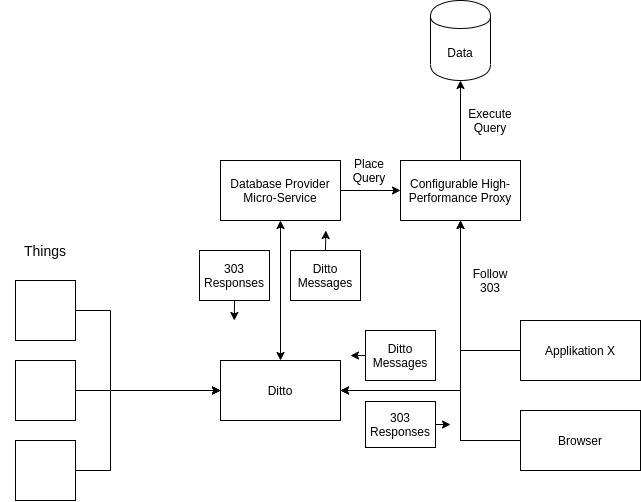
Request flow
- The client sends a query as a Ditto message to a Thing.
- The provider microservice (listening via WebSocket) receives the message.
- The microservice formulates the database query and stores it at the high-performance proxy under a randomly generated, hard-to-guess URL with a 5-minute expiration.
- The microservice returns the proxy URL with a
Locationheader (HTTP 303) as the Ditto message response. - The client follows the redirect to retrieve the actual data from the proxy.
The proxy itself has no credentials – it only serves pre-prepared queries on expiring random URLs. The provider microservice holds the admin credentials for the proxy’s configuration API.
Security
Access to the database is secured through Ditto policies and scoped to individual Things. The actual data transfer bypasses the Ditto cluster entirely.
Configuration
Policy setup
Restrict access to the provider microservice using message:/ resources. If the microservice listens for messages on the topic /services/history:
{
  "subjects": {},
  "resources": {
    "message:/": {
      "grant": [],
      "revoke": ["READ", "WRITE"]
    },
    "message:/inbox/messages/services/history": {
      "grant": ["READ"],
      "revoke": []
    },
    "message:/outbox/messages/services/history": {
      "grant": ["WRITE"],
      "revoke": []
    }
  }
}
The first entry revokes all message access for subjects of this type (optional). The second entry allows the microservice to read incoming queries. The third entry allows the microservice to send responses.
You can also scope this to individual Features for more fine-grained access control.
Examples
Proxy implementation
The ceryx proxy project was used for the reference implementation. It was enhanced with delegation features (a modified nginx with Redis for storing randomly generated IDs correlated with prepared queries and authentication). See the fork’s source code or the container image.
Known uses
othermo GmbH uses this pattern for a history service. The service connects to Ditto via WebSocket and responds to /history messages. It translates the messaging API into InfluxDB queries, stores them at the proxy with a 5-minute expiring URL, and returns the URL to the client. The provider service uses InfluxDB tags to scope data by thingId, policy, and path information.
Discussion
Benefits:
- Higher data throughput compared to routing everything through Ditto
- Ditto’s policy system secures and scopes data access from clients to databases
Drawbacks:
- You must add and maintain a third-party proxy application
- You need a custom messaging API, which adds complexity
- You must implement query language translation from messages to your database
Open issues:
- Ditto does not natively support managing and communicating custom messaging APIs