A Policy enables developers to configure fine-grained access control for Things and other entities easily.
Authorization concept
A specific policy provides someone (called subject), permission to read and/or write a given resource.
policy:/) allows to manage the
policy itself.Find an example at the end of the page.
Please note, that in most cases it makes sense to grant read permission in addition to write permission, because write does not imply read.
Model specification
Subjects
Subjects in a policy define who gets permissions granted/revoked on the resources
of a policy entry.
Each subject ID contains a prefix defining the subject “issuer” (so which party issued the authentication) and an actual
subject, separated with a colon:
<subject-issuer>:<subject>
The subject can be one of the following ones:
nginx:<nginx-username>- when using nginx as pre-authentication provider - by default enabled in the Ditto installation’s nginx<other-pre-auth-provider>:<username>- when using another custom provider as pre-authentication provider which sets thex-ditto-pre-authenticatedHTTP header-
google:<google-user-id>- in general different JWT - the currently supported are listed in the table:Prefix Type Description google jwt A JWT issued by Google <custom-openid-connect-provider>:<jwt-sub-claim>- custom OpenID Connect compliant providers - supported providers are listed at OpenID Connect - Certified OpenID Provider Servers and Services - can be configured in Ditto defining the prefix in Ditto’s config file.
Thesubclaim from the JWT and the configured provider name are used in the form<provider>:<jwt-sub-claim>.
Expiring Policy subjects
When a Policy subject contains an "expiry" timestamp (formatted as ISO-8601 string), this subject will be
automatically deleted once this timestamp was reached.
When providing an "expiry" for a Policy subject, this timestamp is rounded up:
- by default to the next full hour
- this is configurable via the environment variable
POLICY_SUBJECT_EXPIRY_GRANULARITYof the policies service which takes a HOCON duration, e.g.:- configured to “1s”: a received “expiry” is rounded up to the next full second
- configured to “30s”: a received “expiry” is rounded up to the next half minute
- configured to “1h”: a received “expiry” is rounded up to the next full hour (default)
- configured to “12h”: a received “expiry” is rounded up to the next half day
- configured to “1d”: a received “expiry” is rounded up to the next full day
- configured to “15d”: a received “expiry” is rounded up to the next half month
Once an expired subject is deleted, it will immediately no longer have access to the resources protected by the policy it was deleted from.
Subject deletion announcements
To get notified when a subject is deleted, the "announcement" object can be configured in the respective subject section.
{
  "type": "my-subject",
  "expiry": "2099-12-31T23:59:59Z",
  "announcement": {
    "beforeExpiry": "1h",
    "whenDeleted": true,
    "requestedAcks": {
      "labels": ["my-connection:my-issued-acknowledgement"],
      "timeout": "10s"
    }
  }
}
Here are the meanings of the fields of "announcement":
"beforeExpiry": The duration before expiration of the subject when a subject deletion announcement should be published if no previous subject deletion announcement was acknowledged.
Supported unit suffixes:"ms": for milliseconds"s": for seconds"m": for minutes"h": for hours
"whenDeleted": Boolean value to describe whether a subject deletion announcement should be published whenever a subject is manually deleted (e.g. via overwrite of a policy entry) from a policy, if no previous subject deletion announcement was acknowledged."requestedAcks": Settings for at-least-once delivery of announcements via acknowledgements:"labels": Array of Requested acknowledgement labels of the websocket or connectivity channel from which the issued acknowledgement is expected."timeout": Time in minutes (1m), seconds (60s), or milliseconds (600ms) how long to wait for acknowledgements before retrying to publish a timed out announcement.
The subject deletion announcements are published to any websocket or connection that has subscribed for policy announcements and was authenticated with the relevant subject ID.
Actions
Policy actions are available via Ditto’s HTTP API and can be invoked for certain policy entries or for complete policies.
They require neither READ nor WRITE permission, but instead a granted EXECUTE permission on the specific action
name, e.g. for a single policy entry:
policy:/entries/{label}/actions/{actionName}
Action activateTokenIntegration
When authenticated using OpenID Connect, it is possible to inject a subject into policies that expires when the JWT expires. The form of the injected subject (the token integration subject) is configurable globally in the Ditto installation.
A user is authorized to inject the token integration subject when granted the EXECUTE permission on a policy entry.
The WRITE permission is not necessary. To activate or deactivate a token integration subject, send a POST
request to the following HTTP routes:
- POST /api/2/policies/{policyId}/actions/activateTokenIntegration
Injects a new subject into all matched policy entries calculated with information extracted from the authenticated JWT.- the authenticated token must be granted the
EXECUTEpermission to perform theactivateTokenIntegrationaction - one of the subject IDs must be contained in the authenticated token
- at least one
READpermission to athing:/resource path must be granted
- the authenticated token must be granted the
- POST /api/2/policies/{policyId}/actions/deactivateTokenIntegration
Removes the calculated subject with information extracted from the authenticated JWT from all matched policy entries.- the authenticated token must be granted the
EXECUTEpermission to perform thedeactivateTokenIntegrationaction - one of the subject IDs must be contained in the authenticated token
- the authenticated token must be granted the
- POST /api/2/policies/{policyId}/entries/{label}/actions/activateTokenIntegration
Injects the calculated subject into the policy entry calculated with information extracted from the authenticated JWT.- the authenticated token must be granted the
EXECUTEpermission to perform theactivateTokenIntegrationaction - one of the subject IDs must be contained in the authenticated token
- at least one
READpermission to athing:/resource path must be granted
- the authenticated token must be granted the
- POST /api/2/policies/{policyId}/entries/{label}/actions/deactivateTokenIntegration
Removes the calculated subject with information extracted from the authenticated JWT from the policy entry.- the authenticated token must be granted the
EXECUTEpermission to perform thedeactivateTokenIntegrationaction - one of the subject IDs must be contained in the authenticated token
- the authenticated token must be granted the
The injected subject pattern is configurable in Ditto and is by default:
integration:{{policy-entry:label}}:{{jwt:aud}}
To configure the token integration subject, set the path
ditto.gateway.authentication.oauth.token-integration-subject
in gateway-extension.conf, or set the environment variable OAUTH_TOKEN_INTEGRATION_SUBJECT for Gateway Service.
ditto.gateway.authentication.oauth.token-integration-subject =
  "my-token-integration-issuer:{{policy-entry:label}}:{{jwt:sub}}"

ditto.gateway.authentication.oauth.token-integration-subject =
  ${?OAUTH_TOKEN_INTEGRATION_SUBJECT}
The placeholders below are usable as a part of the activateTokenIntegration configuration:
| Placeholder | Description |
|---|---|
{{ header:<header-name> }} |
HTTP header values passed along the HTTP action request |
{{ jwt:<jwt-body-claim> }} |
any standard or custom claims in the body of the JWT - e.g., jwt:sub for the JWT “subject” |
{{ policy-entry:label }} |
label of the policy entry in which the token integration subject is injected |
Which Resources can be controlled?
A Policy can contain access control definitions for several resources:
- Policy: Someone who was granted write permission at the policy root resource (i.e.
policy:/) is allowed to manage the policy itself. - Thing: The resource can be defined as fine-grained as necessary for the respective use case: e.g.
thing:/as top-level resource or on sub-resources such asthing:/features. At runtime, the permissions are propagated down to all Thing sub-entities.- In case you grant read permission on top-level and revoke it at a sub-entity, the subject can read the upper part only.
- In case you omit a subject at top-level but grant permission at a sub-entity, the subject can access the lower part only (and the Thing ID).
Policy
The Policy resource (addressable as policy:/) defines the access control for the Policy itself.
| Resource | Addressed data, description |
|---|---|
| policy:/ | The Policy itself (top-level) Applies to the Policy and all of its sub-resources. |
| policy:/policyId | The Policy’s ID. However, such a reference is not recommended because write is not supported anyway, and read on the ID only, does not provide any benefit. |
| policy:/entries | Applies to all entries of the Policy. |
| policy:/entries/X | Applies to all subjects and resources of the specific entry X. |
| policy:/entries/X/subjects | Applies to all subjects of the specific entry X. |
| policy:/entries/X/subjects/Y | Applies to subject Y of the specific entry X. |
| policy:/entries/X/resources | Applies to all resources of the specific entry X. |
| policy:/entries/X/resources/Y | Applies to resource Y of the specific entry X. |
The Things example at the end of the page also defines access control on the policy resource.
Thing
The Thing resource (addressable as thing:/) defines the access control for Things.
The access control definitions defined in a Policy’s Thing resource will be applied to all Things referencing this Policy.
| Resource | Addressed data, description |
|---|---|
| thing:/ | The Thing itself (top-level). Applies to the Thing and all of its sub-resources. |
| thing:/thingId | The Thing’s ID. Not recommended, because write is not supported anyway and read on the ID only does not provide any benefit. |
| thing:/policyId | Applies to the Policy ID of the Thing, which implicitly defines its access control. Please double-check write permissions on this resource. |
| thing:/attributes | Applies to all attributes of the Thing. |
| thing:/attributes/X | Applies to the specific attribute X and its sub-paths. X may be a nested path such as tire/pressure. |
Find a Things example at the end of the page.
Feature
| Resource | Addressed data, description |
|---|---|
| thing:/features | Applies to all Features of the Thing. |
| thing:/features/X | Applies to the Feature with ID X and all its sub-paths. |
| thing:/features/X/properties | Applies to all properties of the Feature X. |
| thing:/features/X/properties/Y | Applies to the property with path Y (and its sub-paths) of the Feature with ID X. Y may be a nested path such as tire/pressure. |
| thing:/features/X/desiredProperties | Applies to all desired properties of the Feature X. |
| thing:/features/X/desiredProperties/Y | Applies to the desired property with path Y (and its sub-paths) of the Feature with ID X. Y may be a nested path such as tire/pressure. |
Find a Things example at the end of the page.
Message
The Message resource (addressable as message:/) defines the access control for Messages.
The access control definitions defined in a Policy’s Message resource will be applied to all Messages sent to or from Things referencing this Policy.
- For sending messages to a Thing or its Features write permission is required
- For receiving messages from a Thing or its Features read permission is required.
Such permissions can be defined at resources of different granularity.
| Resource | Addressed data, description |
|---|---|
| message:/ | All messages (top-level) Applies to all messages sent to or from Things referencing this Policy and all messages sent to or from features of these Things. |
| message:/inbox | Applies to all messages sent to a specific Thing (or multiple things referencing this Policy) |
| message:/inbox/messages/X | Applies to all messages on message-subject X, sent to the Things referencing this Policy |
| message:/outbox | Applies to all messages sent from the Things referencing this Policy |
| message:/outbox/messages/X | Applies to all messages on message-subject X, sent from the Things referencing this Policy |
| message:/features | Messages for all Features Applies to all messages sent to or from all Features of Things referencing this Policy |
| message:/features/Y | Applies to all messages sent to or from Feature Y of the Things referencing this Policy |
| message:/features/Y/inbox | Applies to all messages sent to Feature Y of the Things referencing this Policy |
| message:/features/Y/inbox/messages/X | Applies to all messages on message-subject X sent to Feature Y of the Things referencing this Policy |
| message:/features/Y/outbox | Applies to all messages sent from Feature Y of the Things referencing this Policy |
| message:/features/Y/outbox/messages/X | Applies to all messages on message-subject X sent from Feature Y of the Things referencing this Policy |
message:/inbox and message:/outbox do not address feature-related messages.
For providing access to feature-related messages, you have to either grant top-level permission (message:/) or grant permission to the resource message:/features (or the required sub-resources).The Things example at the end of the page also defines access control on messages.
Grant and Revoke some Permission
| Change | Permission | Description |
|---|---|---|
| grant | READ | All subjects named in the section are granted read permission on the resources specified in the path, and all nested paths, except they are revoked at a deeper level, or another policy entry (label). |
| grant | WRITE | All subjects named in the section are granted write permission on the resources specified in the path, and all nested paths, except they are revoked at a deeper level, or another policy entry (label). |
| grant | EXECUTE | All subjects named in the section are granted execute permission on the resources specified in the path, and all nested paths, except they are revoked at a deeper level, or another policy entry (label). |
| revoke | READ | All subjects named in the section are prohibited to read on the resources specified in the path, and all nested paths, except they are granted again such permission at a deeper level, or another policy entry (label). |
| revoke | WRITE | All subjects named in the section are prohibited to write on the resources specified in the path, and all nested paths, except they are granted again such permission at a deeper level, or another policy entry (label). |
| revoke | EXECUTE | All subjects named in the section are prohibited to execute on the resources specified in the path, and all nested paths, except they are granted again such permission at a deeper level, or another policy entry (label). |
Namespaces
Since Ditto version 3.9.0, each entry can also specify namespaces to restrict the entry to Things/Policies whose
namespace matches at least one configured pattern.
If the field is omitted or empty, the entry applies to all Thing/Policy namespaces. This keeps existing policies
(created before Ditto 3.9.0) backward compatible.
Supported namespace patterns are:
com.acme- matches only the exact namespacecom.acmecom.acme.*- matches namespaces belowcom.acme, for examplecom.acme.vehicles, but notcom.acmeitself
If an entry should apply to both the base namespace and all nested namespaces, both patterns must be specified:
["com.acme", "com.acme.*"].
This is useful for multi-tenant setups where one policy should protect Things from several tenants, but a specific entry should only grant access for one tenant subtree.
Policy imports
With policy imports it is possible to import entries from other referenced policies. Which parts of the referenced policy are imported is controlled by two properties of a policy.
Firstly, the imported policy can define for each entry whether and how a policy entry is importable by others using JSON field importable.
The field can have one of the following three values:
implicit(default): the policy entry is imported without being listed in the importing policy individuallyexplicit: the policy entry is only imported if it is listed in the importing policynever: the policy entry is not imported, regardless of being listed in the importing policy
If the field is not specified, the default value is implicit.
Additionally, each entry can specify allowedAdditions to control what kinds of additions referencing
entries are permitted to merge into this entry via references. Valid values are "subjects",
"resources", and "namespaces".
The semantics are:
- Field omitted (absent) — no restriction. The referencing entry’s own subjects, resources, and namespaces merge in as usual. This is the upgrade-friendly default: pre-existing entries that don’t declare the field continue to behave as before.
- Field present, explicitly empty
[]— no additions allowed. The referencing entry’s own subjects, resources, and namespaces are stripped at enforcement time; only the referenced entry’s content is effective. - Field present with values — only the listed kinds of additions survive. Other own additions are stripped.
allowedAdditions is enforced as a runtime filter on the referencing entry’s own additions, not as a
write-time policy contract. If a referencing entry declares own subjects/resources/namespaces that the strictest
allowedAdditions across all its references does not permit, those own additions are silently stripped at
enforcement time — the write itself is not rejected. This is intentional: the effective permissions of an entry
depend on the live state of every referenced entry, which can change over time, so the authoritative check
happens during enforcement.
Example of a policy specifying different types of importable entries and allowed additions:
{
  "entries": {
    "DEFAULT": {
      "subjects": { ... },
      "resources": { ... }
    },
    "IMPLICIT": {
      "subjects": { ... },
      "resources": { ... },
      "namespaces": [ "com.acme", "com.acme.*" ],
      "importable": "implicit",
      "allowedAdditions": [ "subjects" ]
    },
    "EXPLICIT": {
      "subjects": { ... },
      "resources": { ... },
      "importable": "explicit",
      "allowedAdditions": [ "subjects", "resources", "namespaces" ]
    },
    "NEVER": {
      "subjects": { ... },
      "resources": { ... },
      "importable": "never"
    }
  }
}
Example of a tenant-scoped reader entry:
{
  "entries": {
    "TENANT_READER": {
      "subjects": {
        "test:bob": {
          "type": "pre-authenticated"
        }
      },
      "resources": {
        "thing:/": {
          "grant": [ "READ" ],
          "revoke": []
        }
      },
      "namespaces": [ "com.acme", "com.acme.*" ]
    }
  }
}
Secondly, the importing policy may define a set of entries (identified by their label) it wants to import in addition to those entries that are implicitly imported.
Example of a policy importing two other policies:
{
  "policyId": "ditto:importing-policy",
  "entries": {  ...  },
  "imports": {
    "ditto:imported-policy" : {
      // import the "EXPLICIT" entry and entries that are of importable type implicit
      "entries": [ "EXPLICIT" ]
    },
    "ditto:another-imported-policy" : { } // import only entries that are of importable type implicit
  }
}
Entry references
Optionally, a policy entry can declare references to inherit subjects, resources, and namespaces from other
policy entries. Each reference is an object in the references array that points to either:
- Import reference — an entry in an imported policy:
{"import": "policyId", "entry": "label"} - Local reference — an entry within the same policy:
{"entry": "label"}
This enables template-based policy reuse: the imported (template) policy defines resources (the “what”), and the referencing entry defines its own local subjects (the “who”), while resources and namespaces are additively merged from the referenced entries.
Local references and import references are resolved with the same merge semantics — the only difference is where the referenced entry is looked up (within the same policy vs. in an imported policy):
- Subjects from referenced entries are merged additively with the entry’s own subjects. Subjects sharing the same subject ID are de-duplicated, with the referenced entry’s instance winning.
- Resources from referenced entries are merged additively. For overlapping resource paths, permissions are merged as a union of grants and revokes. Referenced revokes are always preserved and cannot be removed by the referencing entry.
- Namespaces from referenced entries are merged additively with any locally defined namespaces.
For both kinds of references, allowedAdditions on the referenced entry acts as a runtime filter on
the referencing entry’s own subjects/resources/namespaces. The strictest set across all references on
an entry applies — see the section above. References to entries marked importable: never are skipped at
resolution time and rejected at write time, regardless of whether the reference is local or import — the
importable: never flag is the policy author’s “do not inherit from me” signal and applies uniformly.
References resolve one level deep, not transitively:
- A local reference resolves to the raw content of the referenced entry (its own subjects/resources/ namespaces). It does not follow the referenced entry’s own references — even mutual local references (A → B and B → A) terminate after a single pass with each side seeing only the other’s raw content.
- An import reference resolves against the entries the importing policy can already see. By default that
is just the directly imported policy’s own entries. To make an import reference reach across an extra
layer (e.g. to inherit content that the imported policy itself only obtains via its own imports), the
importing policy must declare those deeper imports via
transitiveImportson the corresponding import. Without that, the deeper target is not in the resolved set and the reference silently resolves to no inherited content.
When multiple references on the same entry contain a subject with the same subject ID, the
first-listed reference wins (later references’ instances of that subject ID are skipped). This matters
when subjects differ in expiry or announcement: those properties come from the first reference’s
subject. Avoid duplicate subject IDs across references unless the ordering is intentional; if you need
specific expiry semantics, list the reference that carries the desired expiry first.
Note: granting WRITE access on an entry’s references sub-resource (policy:/entries/{label}/references)
is equivalent in authority to granting WRITE on the entire entry, because references can inherit any content
the rest of the policy declares. Policy designers should grant references write rights only to subjects who
could already modify the entry’s resources directly.
Example: role-based access template for a power plant
A central template policy defines the roles and permissions that apply to all power plants in an organization.
Each entry specifies allowedAdditions: ["subjects"] so that the individual power plant policies can add
their own employees while the centrally defined permissions remain unchanged and under central control.
Template policy (energy-corp:power-plant-roles):
{
  "policyId": "energy-corp:power-plant-roles",
  "entries": {
    "operator": {
      "subjects": {},
      "resources": {
        "thing:/features/reactor": { "grant": ["READ", "WRITE"], "revoke": [] },
        "thing:/features/turbine":  { "grant": ["READ", "WRITE"], "revoke": [] },
        "thing:/features/cooling":  { "grant": ["READ", "WRITE"], "revoke": [] }
      },
      "importable": "implicit",
      "allowedAdditions": [ "subjects" ]
    },
    "safetyInspector": {
      "subjects": {},
      "resources": {
        "thing:/features/reactor":    { "grant": ["READ"], "revoke": [] },
        "thing:/features/cooling":    { "grant": ["READ"], "revoke": [] },
        "thing:/features/safetyLogs": { "grant": ["READ"], "revoke": [] }
      },
      "importable": "implicit",
      "allowedAdditions": [ "subjects" ]
    }
  }
}
A specific power plant imports this template and assigns its employees to the predefined roles using entries with
references:
{
  "policyId": "energy-corp:plant-42-policy",
  "imports": {
    "energy-corp:power-plant-roles": {}
  },
  "entries": {
    "operator": {
      "references": [{ "import": "energy-corp:power-plant-roles", "entry": "operator" }],
      "subjects": {
        "integration:plant42-operators": { "type": "operator-group" }
      }
    },
    "safetyInspector": {
      "references": [{ "import": "energy-corp:power-plant-roles", "entry": "safetyInspector" }],
      "subjects": {
        "oauth2:frank.grimes@energy-corp.com": { "type": "employee" }
      }
    },
    "admin": {
      "subjects": { "oauth2:plant-42-admin@energy-corp.com": { "type": "employee" } },
      "resources": { "policy:/": { "grant": ["READ", "WRITE"], "revoke": [] } }
    }
  }
}
With this setup the operator subjects (plant42-operators) receive READ and WRITE access to the
reactor, turbine, and cooling features, while the safety inspector (frank.grimes) receives READ-only access to
reactor, cooling, and safety logs — all defined centrally. If the organization later adds a new resource to the
operator role in the template, every power plant that imports it automatically inherits the change.
An entry can also reference multiple entries, including local entries within the same policy:
{
  "references": [
    { "import": "energy-corp:power-plant-roles", "entry": "operator" },
    { "entry": "shared-subjects" }
  ],
  "subjects": {
    "integration:plant42-operators": { "type": "operator-group" }
  }
}
A subject creating or modifying a policy with policy imports must have the following permissions:
- permission on the importing policy to
WRITEthe modified policy import or policy imports - permission on the imported policy to
READentries that are implicitly or explicitly referenced in the policy imports
The entries of the importing policy and the entries of the imported policy are merged at runtime and evaluated as if the entries were defined in one single policy. The same rules for the evaluation of grant/revoke permissions apply to imported entries in the same way as for entries defined in the importing policy itself. This also means that changes to an imported policy are reflected in all policies that import it. For direct access to the entities protected by a policy (things, policies, …) via e.g. HTTP this happens instantaneously. When searching things it may take some time to sync the changes as the search index is eventually consistent. This is particularly the case if the changed policy is imported by a large number of other policies.
Transitive import resolution
By default, policy imports are resolved one level deep: if policy A imports from policy B, A gets B’s inline entries only. If B itself imports entries from policy C, those entries are not visible to A.
The transitiveImports field on a policy import enables selective multi-level resolution. It contains
an explicit list of policy IDs that the directly imported policy itself imports from, which should be
resolved before extracting entries.
Why transitiveImports works with references
Transitive import resolution is a natural complement to references. An intermediate policy can
define entries with references that reference a template policy, adding local subjects while
inheriting resources. Without transitiveImports, a consuming policy could only see the intermediate
policy’s inline entries — it would not be able to resolve the references chain back to the
original template.
For example, a global template defines roles with resources, and each regional policy creates entries
with references that point back to the template, adding its own subjects. A consuming policy
that directly imports the global template gets the raw entries (empty subjects). A consuming policy
that directly imports the intermediate policy sees entries with references but cannot resolve
them without access to the template. Only by resolving through the intermediate policy — which is
what transitiveImports does — can the consuming policy obtain the combined result: template resources
merged with the intermediate policy’s local subjects.
Use case: template-based policy hierarchies
A typical three-level hierarchy:
1. Global template (acme:fleet-roles) defines roles with resources and allowedAdditions:
{
  "policyId": "acme:fleet-roles",
  "entries": {
    "driver": {
      "subjects": {},
      "resources": {
        "thing:/features/location": { "grant": ["READ"], "revoke": [] },
        "thing:/features/fuel": { "grant": ["READ"], "revoke": [] },
        "message:/features/fuel/inbox": { "grant": ["WRITE"], "revoke": [] }
      },
      "namespaces": ["acme.vehicle"],
      "allowedAdditions": ["subjects"],
      "importable": "implicit"
    }
  }
}
2. Regional fleet policy (acme:fleet-west) imports the template and defines entries with
references that add local drivers:
{
  "policyId": "acme:fleet-west",
  "imports": {
    "acme:fleet-roles": {}
  },
  "entries": {
    "driver": {
      "references": [{ "import": "acme:fleet-roles", "entry": "driver" }],
      "subjects": {
        "oauth2:alice@acme.com": { "type": "employee" },
        "oauth2:bob@acme.com": { "type": "employee" }
      }
    }
  }
}
3. Vehicle policy needs the driver entry with resources from the template AND subjects from the
fleet policy. It uses transitiveImports to resolve through the intermediate policy:
{
  "policyId": "acme.vehicle:truck-42",
  "imports": {
    "acme:fleet-west": {
      "transitiveImports": ["acme:fleet-roles"]
    }
  },
  "entries": {
    "driver": {
      "references": [{ "import": "acme:fleet-west", "entry": "driver" }],
      "subjects": {
        "oauth2:charlie@acme.com": { "type": "temp-driver" }
      }
    },
    "owner": {
      "subjects": { "oauth2:fleet-admin@acme.com": { "type": "admin" } },
      "resources": { "policy:/": { "grant": ["READ", "WRITE"], "revoke": [] } }
    }
  }
}
At resolution time:
- The directly imported policy
fleet-westis loaded - Because
transitiveImportslistsfleet-roles, that import onfleet-westis resolved first fleet-west’sdriverentry has a reference tofleet-roles’sdriver— the template’s resources are merged withfleet-west’s local subjects (Alice and Bob)- The vehicle policy’s
driverentry has a reference tofleet-west’sdriver— the resolved resources and subjects from step 3 are merged with the vehicle policy’s local subject (Charlie), producing an entry with template resources and all three subjects
Without transitiveImports, this composition would be impossible: a direct import of fleet-roles
yields the entry without subjects, and a direct import of fleet-west cannot resolve fleet-west’s
own references to the template.
Deeper nesting
transitiveImports supports chains deeper than two levels. If each level in the chain declares its own
transitiveImports, the resolution recurses naturally. For example, A -> B -> C -> D works when:
- A’s import of B has
transitiveImports: ["C"] - B’s import of C has
transitiveImports: ["D"] - C has entries with
referencespointing to D (adding subjects) - D has inline entries (the template)
An important consequence: references are resolved at the level that declares them, not at higher
levels. In the chain above, C’s references are resolved against D when resolving C’s
import of D. The transitiveImports at B and A merely open the doors so that resolution can reach down
to where the import references are declared.
Key rules
transitiveImportsis an explicit whitelist — only the listed policy IDs are resolved. This is not a recursive flag; it prevents surprise permission expansion and keeps the dependency graph auditable.- The listed policy IDs must be imports of the directly imported policy. Non-matching IDs are silently ignored.
- The importing policy’s own ID must not appear in
transitiveImports(cycle prevention). Cross-policy cycles (e.g., A->B->C->A) are not detected at write time because detection would require loading the full transitive graph on every PUT. Instead, cycles are broken gracefully at resolution time via a visited set and a depth limit (max 10 levels). If the depth limit is reached, resolution stops and returns the entries resolved so far. - Transitive policy IDs are tracked in the search index (
__referencedPolicies), so changes to the template policy trigger re-indexing of all dependent things. - Label collisions: If the directly imported policy transitively imports two policies that both
export an entry with the same label (e.g., both export
X), both entries survive resolution and produce entries with the same prefixed label (e.g.,imported:<B-id>/X). The resulting policy will contain both entries, with the first-encountered entry taking precedence during merge. To avoid confusion, use distinct entry labels across imported policies in the same chain. - Lenient transitive IDs: Policy IDs listed in
transitiveImportsthat do not match any of the directly imported policy’s actual imports are silently ignored at resolution time. This allows forward references (the intermediate policy’s import may be added later).
The transitiveImports array is managed via dedicated API endpoints:
GET/PUT /api/2/policies/{id}/imports/{importedPolicyId}/transitiveImports
Limitations
When managing and using policy imports the following limitations apply:
- The maximum number of policy imports allowed per policy is 10.
- To avoid conflicts with imported entries, it is not allowed to use the prefix
importedfor the name of a policy entry label. Trying to do so will result in an error.
Namespace root policies
Since Ditto 3.9.0, operators can designate one or more namespace root policies that are transparently merged into every policy in a matching namespace, without modifying the stored policies.
This is an operator-level feature (see operator configuration). End users do not create or manage namespace root policies themselves; they are applied automatically by the policy enforcement layer when a policy enforcer is built.
How it works
- The operator configures a mapping of namespace patterns to policy IDs in
ditto.namespace-policies. - When an enforcer is built for a policy in namespace
org.example.devices, Ditto looks up all root policy IDs whose patterns match that namespace (e.g."org.example.*"or"org.example.devices"). - Only entries with
"importable": "implicit"from the root policy are merged. Entries marked"explicit"or"never"are skipped. - Merged entry labels are rewritten as
nsimported-<sourcePolicyId>-<originalLabel>so they cannot collide with local labels. Tenants are not allowed to create local labels starting withnsimported-(HTTP 400policies:label.invalid). This guarantees:- a local entry cannot shadow an operator-configured namespace-root entry — both coexist under distinct labels;
- multiple namespace-root policies that contribute entries with the same
originalLabelcompose additively rather than dropping all but the highest-precedence one.
- The merge happens entirely at enforcer-build time — the stored policy document is never modified.
Differences from policy imports
| Policy imports | Namespace root policies | |
|---|---|---|
| Configured by | Policy author (in the policy document) | Operator (in service config) |
| Subject permission required | Yes — importer needs READ on imported policy | No — transparent to API users |
| Stored in the policy document | Yes (imports block) |
No |
| Max per policy | 10 | Unlimited (operator configures globally) |
| Applies automatically | No — each policy must declare its imports | Yes — automatically applied to all policies in matching namespaces |
Example
Given a root policy org.eclipse.ditto:tenant-root with an entry:
{
  "entries": {
    "TENANT_READER": {
      "subjects": {
        "pre:tenant-reader": { "type": "tenant read access" }
      },
      "resources": {
        "thing:/":   { "grant": ["READ"], "revoke": [] },
        "policy:/":  { "grant": ["READ"], "revoke": [] },
        "message:/": { "grant": ["READ"], "revoke": [] }
      },
      "importable": "implicit"
    }
  }
}
And the operator configuration:
ditto.namespace-policies {
  "org.eclipse.ditto.*" = ["org.eclipse.ditto:tenant-root"]
}
Then every policy in org.eclipse.ditto.sensors, org.eclipse.ditto.devices, etc. will automatically have
pre:tenant-reader granted READ access. The merged entry appears under the rewritten label
nsimported-org.eclipse.ditto:tenant-root-TENANT_READER. A local policy that defines its own TENANT_READER
entry keeps that local entry under the bare TENANT_READER label, while the root entry remains active under its
nsimported-... label — both compose, neither shadows the other.
org.eclipse.ditto:tenant-root configured for pattern org.eclipse.ditto.* does not match
namespace org.eclipse.ditto (the pattern requires at least one sub-segment after the dot).Effective policy view
Since Ditto 3.9.0, GET /api/2/policies/{policyId} accepts an optional policy-view query parameter selecting
the representation returned to the caller:
policy-view=original(default) — returns the policy as stored, unchanged behaviour.policy-view=resolved— returns the merged “effective” policy: the importing policy’s own entries plus entries inherited via declared imports (withreferencesresolved) plus entries from configured namespace root policies.
The same hint may be sent as the policy-view Ditto header, so the resolved view is available uniformly via
HTTP, WebSocket, server-sent events and the connectivity service.
Behaviour of the resolved view
- Imported entry labels are rewritten as
imported-<importedPolicyId>-<originalLabel>(declared imports only). The format is informational; treat the label as opaque since policy IDs may themselves contain-. - Authorization is preserved. The merge runs before the per-subject
READfilter, so the resolved view is subject to the same authorization as the unresolved view: a caller only sees entries they haveREADon. fields=is honoured. Deep field selectors (e.g.fields=entries/owner/subjects) work on the resolved view.- No ETag is returned. The importing policy’s revision does not track changes to imported or namespace-root
policies, so a
304 Not Modifiedwould be unsafe — the resolved view is always read-through. If-Match/If-None-Matchare ignored onpolicy-view=resolvedrequests for the same reason.- Sub-resources (
/entries,/imports,/entries/{label}/...) are not affected —policy-viewonly changes the top-levelGET /policies/{policyId}representation.
Example
GET /api/2/policies/com.example:tenant-policy?policy-view=resolved
Returns the same JSON shape as GET /api/2/policies/{policyId}, with imported entries listed under the
imported-… prefix in the entries map.
Tools for editing a Policy
You can edit the Policy with any text editor. Make sure it is valid JSON and that at least one valid subject is granted write permission at the root resources.
In case of fine-grained access on Things, keep an eye on your actual Thing structure to make sure that all paths will be granted or revoked the permissions your use case is supposed to support.
Example
Consider this access control scenario:
- Owner: The Thing my.namespace:thing-0123 is owned by a user. Thus, she needs full access and admin rights for the complete Thing. In our example her ID is ditto
- Observer of changes at featureX and featureY:
- Another application needs to be informed on each change at those features. In our example its ID is observer-client.
- There is a group of users who are allowed to read both features. In our example the group ID is some-users.
- Privacy: The value of the “city” property at “featureY” is confidential and needs to be “hidden” from the group of users.
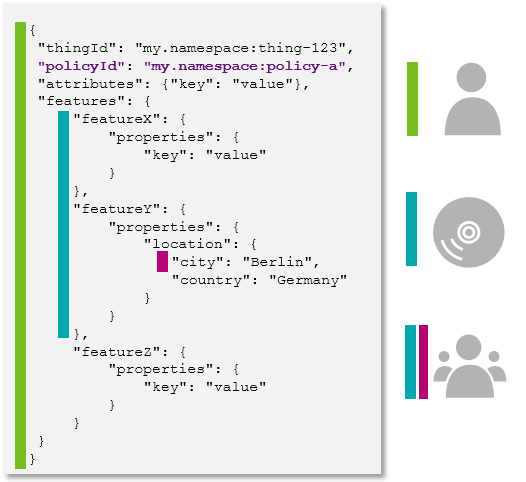
Your Policy then might look like the following:
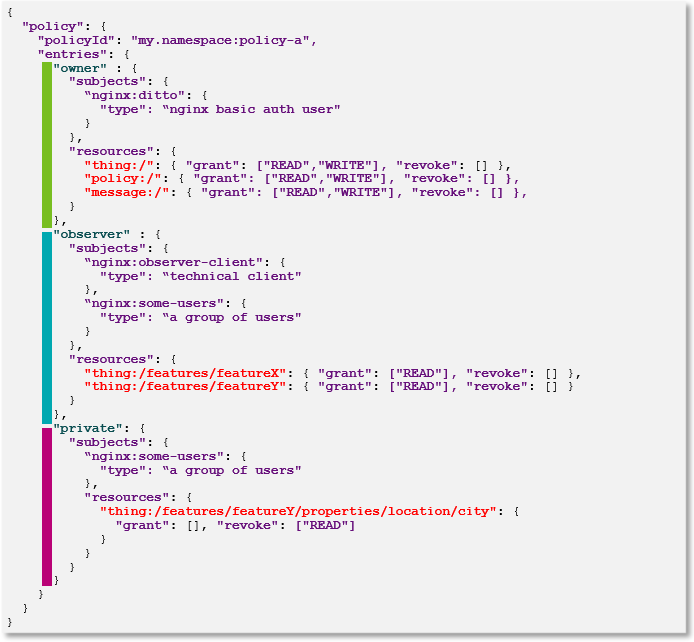
The correct Policy JSON object notation would be as shown in the following code block.
{
  "policyId": "my.namespace:policy-a",
  "entries": {
    "owner": {
      "subjects": {
        "nginx:ditto": {
          "type": "nginx basic auth user"
        }
      },
      "resources": {
        "thing:/": {
          "grant": ["READ", "WRITE"],
          "revoke": []
        },
        "policy:/": {
          "grant": ["READ", "WRITE"],
          "revoke": []
        },
        "message:/": {
          "grant": ["READ", "WRITE"],
          "revoke": []
        }
      }
    },
    "observer": {
      "subjects": {
        "nginx:observer-client": {
          "type": "technical client"
        },
        "nginx:some-users": {
          "type": "a group of users"
        }
      },
      "resources": {
        "thing:/features/featureX": {
          "grant": ["READ"],
          "revoke": []
        },
        "thing:/features/featureY": {
          "grant": ["READ"],
          "revoke": []
        }
      }
    },
    "private": {
      "subjects": {
        "nginx:some-users": {
          "type": "a group of users"
        },
        "resources": {
          "thing:/features/featureX/properties/location/city": {
            "grant": [],
            "revoke": ["READ"]
          }
        }
      }
    }
  }
}
The Policy can be found:
- Via GET request at
/api/2/policies/<policyId>, and - Via GET request at
/api/2/things/{thingId}/policyId - At any Thing itself in its JSON representation.
It is however not included by default, but can be retrieved by specifying the
/api/2/things/<thingId>?fields=_policyquery parameter.