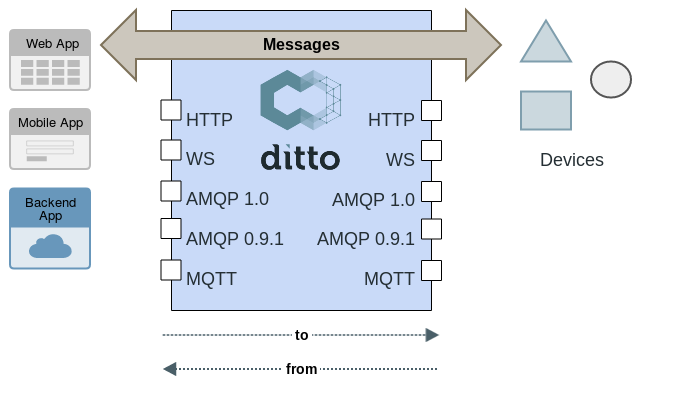
Messages let you send arbitrary payloads to or from a device through its digital twin. Unlike commands, messages do not change the twin’s state – Ditto routes them without inspecting their content.
How messages work
You send a message to a device to trigger an action (for example, turnOff). A device sends
a message from itself to report something (for example, smokeDetected). Ditto routes the
message to all currently connected and authorized recipients.
Important characteristics
Ditto is a message router, not a message broker:
Message elements
Every message requires these fields:
| Field | Description |
|---|---|
| Direction | to (toward the device) or from (from the device) |
| Thing ID | The ID of the Thing that should receive or is sending the message |
| Subject | A custom topic string (for example, turnOff, smokeDetected) |
Optional fields:
| Field | Description |
|---|---|
| Feature ID | Target a specific Feature instead of the whole Thing |
| content-type | MIME type of the payload (for example, application/json) |
| correlation-id | Required if you want Ditto to route a response back to the sender |
Payload
A message can carry any payload. Since Ditto does not interpret the content, you choose the serialization format and content-type that fits your solution.
Sending and receiving messages
Sending
You can send messages through:
- The HTTP API – fire-and-forget or blocking (waits for a response)
- The WebSocket API – as Ditto Protocol messages
- Connection sources – incoming Ditto Protocol messages via a managed connection
Sending requires WRITE permission on the Thing (see Permissions).
Receiving
You can receive messages through:
- The WebSocket API – as Ditto Protocol messages
- Server Sent Events (SSE)
- Connection targets – subscribing for “Thing messages”
Receiving requires READ permission on the Thing. Every connected client with the correct
permissions receives the message. If multiple consumers respond, only the first response is
routed back to the original sender.
Filtering messages
When subscribing for messages, you can filter to receive only the ones you care about.
By namespace: Provide a comma-separated list of namespaces:
namespaces=org.eclipse.ditto.one,org.eclipse.ditto.two
By RQL expression: Use an RQL expression with enriched Thing state or Ditto Protocol field placeholders:
topic:subject– filter by message subjectresource:path– filter by the affected resource path
By placeholder pipeline (connections only): Connection targets additionally accept fn-filter
parameters, which filter on any placeholder available for the message – see
Filtering with placeholder functions:
fn-filter=topic:subject|fn:filter('like','alarm.*')
Responding to messages
Messages are stateless, so there is no built-in request-response mechanism. To route a response
back to the sender, use the same correlation-id in the reply message.
Permissions
To control message access, configure the message:/ resource in the Thing’s
Policy:
READonmessage:/– receive all messages for the ThingWRITEonmessage:/– send messages to the Thing- Fine-grained control – grant access to specific subjects or features (for example,
message:/features/lamp/inbox/messages/turnOff)
Claim messages
Claim messages are a special case for gaining initial access to a Thing:
- The subject is always
claim - You do not need
WRITEpermission to send a claim message - Ditto forwards it to all subscribers registered for claim messages on that Thing
- The receiver decides whether to grant access (for example, by updating the Policy)
Further reading
- Policies – configure message permissions
- Change Notifications – subscribe to state change events
- Messages HTTP API – HTTP endpoint reference
- Ditto Protocol messages specification – wire format